Email deliverability: the operator-side guide for 2026
What email deliverability actually means, what controls it, and the operator playbook for getting cold and marketing email into the inbox. No fluff.
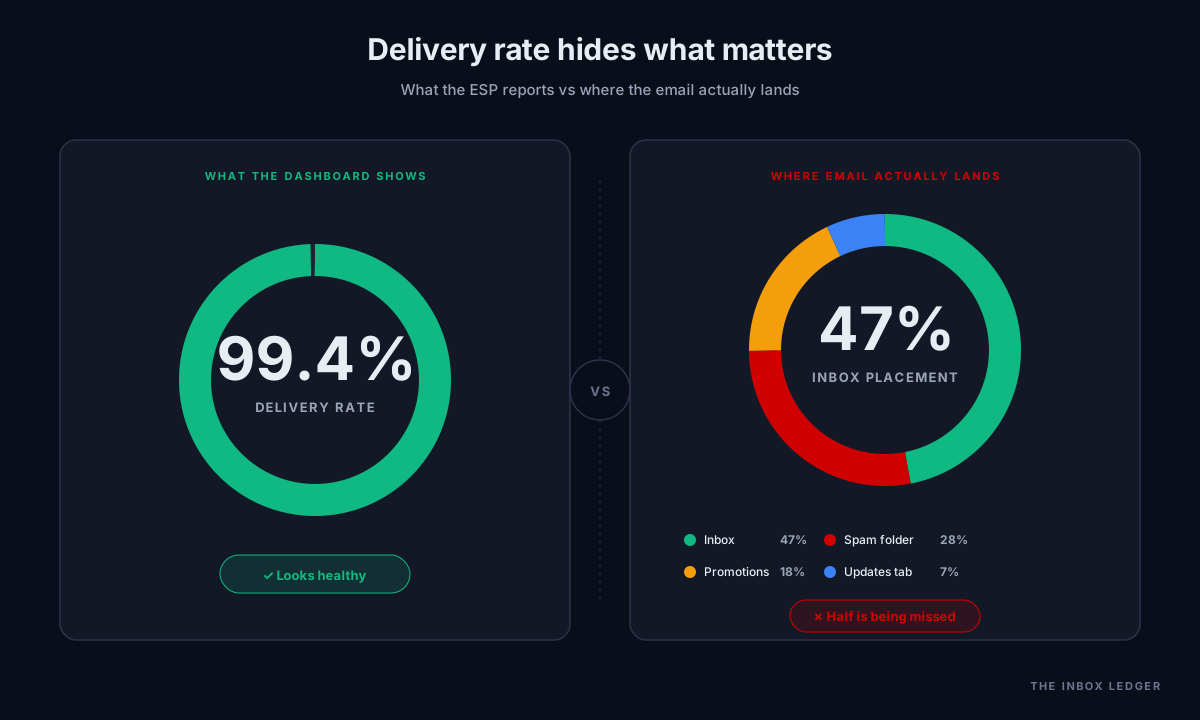
Email deliverability is the difference between a campaign that books meetings and a campaign that vanishes into the spam folder, and most teams cannot tell which one they ran until weeks afterward. A B2B SaaS company called us last quarter with exactly that problem. Their ESP dashboard showed 99.4 percent delivery on their nurture campaigns. Their reply rates had collapsed by two-thirds in six weeks. Nothing about the campaigns had changed. Every metric they tracked was green.
The metric they were not tracking was inbox placement. It had quietly fallen to 47 percent. Half their email was in Promotions, a quarter was in the spam folder, and the dashboard had no idea because the receiving servers had accepted every message. From the ESP’s perspective, everything was working perfectly. From their customers’ perspective, this company had gone silent.
This guide is the operator playbook we run when an email deliverability problem like that lands on our desk. The diagnostics, the fixes, the order to do them in, and the tools that earn their place in a real sender stack. If you are losing email to spam folders, or you are about to send your first cold campaign and want to do it right, read it front to back. If you already know what SPF is and just want the failure modes, skip to the diagnostics section.
What email deliverability actually means
Email deliverability is the probability that the message you sent reaches the inbox of the person you sent it to. That is not the same as whether the email was “delivered.”
A message is “delivered” the moment the receiving mail server accepts it. That tells you almost nothing. The receiving server can accept your email and then drop it into the spam folder, the Promotions tab, the Updates tab, or a quarantine zone the recipient will never check. The sender sees “delivered” in every report. The recipient never reads the message.
Inbox placement is the email deliverability metric that matters. It measures what fraction of your sent volume actually lands in the primary inbox where humans look. A campaign with 99 percent “delivery” and 40 percent inbox placement is, for practical purposes, a failed campaign. Most senders never measure the second number, which is exactly why their reply rates collapse and they cannot figure out why.
Industry data from early 2026 puts average cold email deliverability at 87.6 percent inbox placement across the major providers, with about 9.1 percent landing directly in spam. Outbound research from Sopro suggests as many as one in five cold emails get flagged. The senders we audit who track inbox placement separately from delivery are almost always the senders who are doing well. The ones who do not track it are the ones in crisis.
The five things that control whether your email is seen
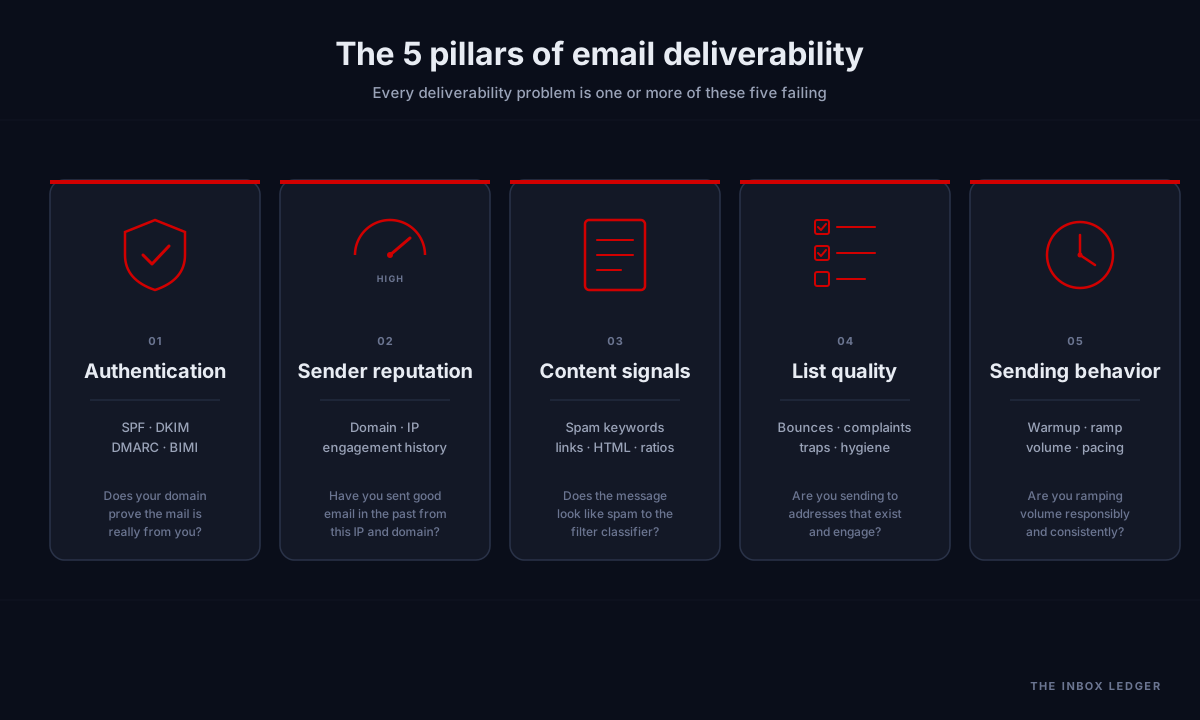
Email deliverability is decided by mailbox providers (Gmail, Microsoft, Yahoo, Apple, and the various corporate filters) based on signals they have built up about your sending behavior. Those signals collapse into five buckets:
- Sender authentication. Does your domain prove the mail is really from you? SPF, DKIM, DMARC, and BIMI handle this.
- Sender reputation. Have you sent good email in the past from this IP and this domain? Mailbox providers track engagement (opens, replies, deletions, complaints) and use it to predict whether the next message is worth showing.
- Content signals. Does the message look like spam? Specific words, link patterns, image-to-text ratios, suspicious shorteners, and broken HTML all feed into this.
- List quality. Are you sending to addresses that exist, engage, and have not previously marked you as spam? Hard bounces and spam complaints are sender reputation poison.
- Sending behavior. Are you ramping volume responsibly, sending at consistent rates, and respecting unsubscribes? Sudden volume spikes from a cold IP are a near-instant block.
Every email deliverability problem is, at its root, one or more of these five failing. The next sections cover each in the order you should fix them. If you want to skip the explanations and just work through a checklist, jump to the 47-point email deliverability checklist further down.
Sender authentication: the foundation everyone gets wrong
If your SPF, DKIM, and DMARC are not configured correctly, nothing else matters. Mailbox providers in 2026 treat unauthenticated mail as either spam or refuse to accept it at all. Google and Yahoo’s February 2024 sender requirements, expanded by Microsoft in May 2025, made this a hard floor: any domain sending 5,000 or more messages per day to Gmail or Outlook users now must have SPF, DKIM, and DMARC configured. Gmail tightened enforcement again in November 2025. Non-compliant senders see meaningful volume blocked outright across all three major providers simultaneously.
Here is what each one does and how to get it right. For deeper dives on each protocol, see our email authentication category.
SPF (Sender Policy Framework)
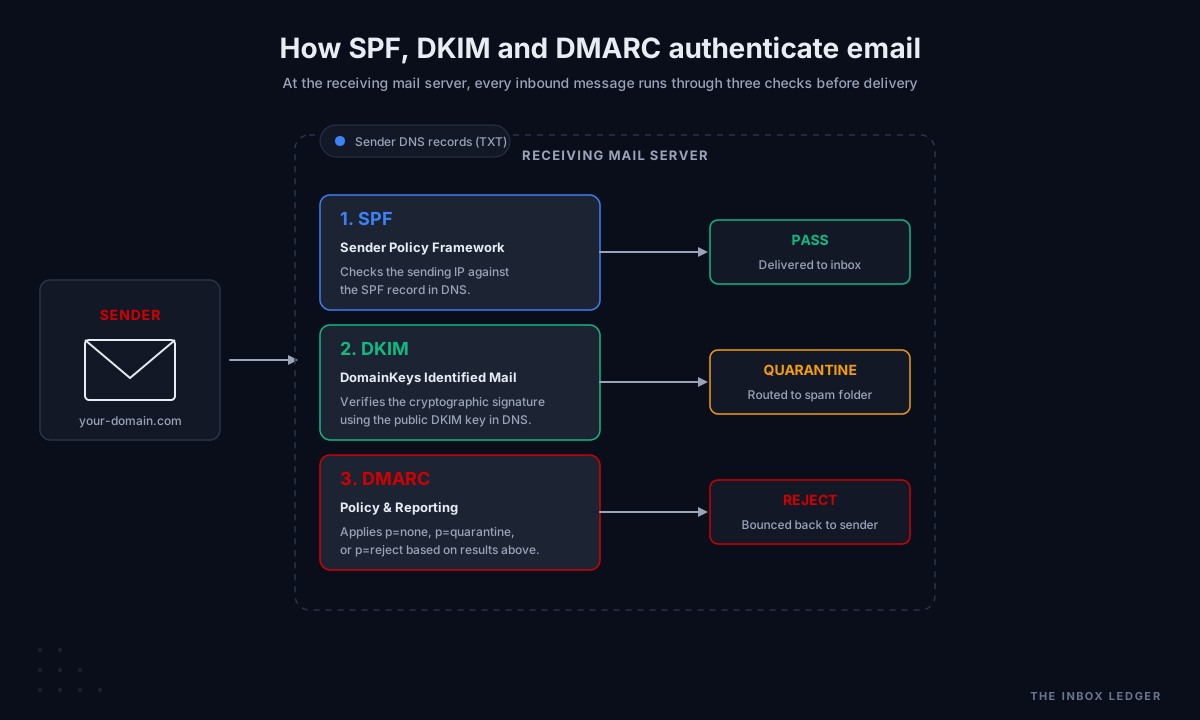
SPF is a DNS TXT record that lists the IP addresses and servers allowed to send mail “from” your domain. When a mail server receives a message claiming to be from you, it checks your SPF record. If the sending IP is on the list, SPF passes. If not, SPF fails.
The most common SPF mistake is the 10 DNS lookups limit. RFC 7208 caps SPF processing at 10 DNS queries per evaluation. Every include: statement counts as at least one lookup, and the included records can chain into more lookups. The a, mx, ptr, redirect, and exists mechanisms all count. Only ip4: and ip6: are free. Exceeding the limit triggers a PermError, and SPF fails for every message regardless of where it came from.
We had a SaaS client last year, mid-sized fintech, who came to us after their reply rates dropped by half in three weeks. They had no idea anything had changed. Their setup looked fine at first glance: SPF, DKIM, and DMARC all published, no obvious problems. The issue was that they had added three new marketing tools over the previous quarter (a webinar platform, a transactional service, and an enrichment vendor) and their SPF record now resolved to 14 nested includes. Every email they sent was hitting permerror because the receiving servers gave up before they reached the legitimate sending IP. Six weeks of campaigns went out essentially unauthenticated. The fix took an afternoon. The sender reputation recovery took two months.
The fix for an overflowing SPF is one of three approaches:
- Prune. Remove
include:statements for services you no longer use. The 14-include client we mentioned was actually only using seven of them. Three were for tools they had cancelled the year before but never cleaned up. - Subdomain delegation. Move different services onto different subdomains, each with its own SPF record. Marketing on
marketing.yourdomain.com, transactional onmail.yourdomain.com. Each subdomain stays under the 10-lookup limit and lets you separate sender reputation by stream. - SPF flattening. Replace
include:statements with the resolved IP ranges they point to. Tools like dmarcian’s SPF survey and EasyDMARC’s flattening service do this automatically and re-flatten when the underlying IPs change. The downside is dependency on a third-party tool; if it stops updating, your SPF goes stale and breaks silently.
Of the three, subdomain delegation is the most robust. Flattening is faster but introduces ongoing maintenance. Pruning is always the first step regardless of which path you take afterward.
DKIM (DomainKeys Identified Mail)
DKIM cryptographically signs each outgoing message with a private key. The receiving server fetches your public key from DNS and verifies the signature. A passing DKIM signature means the message was not altered in transit and was sent by someone who controls your domain’s DKIM key.
DKIM is per-domain, per-selector. You can have multiple selectors active at once (handy when rotating keys without downtime). Key length should be 2048-bit minimum in 2026. The old 1024-bit keys still work but are deprecated, and several enterprise filters now soft-fail them.
The single most common DKIM mistake we see is during platform migrations. A client moves from one ESP to another, configures DKIM on the new provider, and forgets to publish the new selector in DNS, or publishes it under the wrong name. Their old ESP gets disconnected. The new ESP signs every message with a selector that does not resolve. Every email now fails DKIM. Because their SPF is still passing through the new ESP, DMARC alignment fails on the DKIM side but not catastrophically. Open rates drift down. Nobody notices for a quarter.
We worked with an outbound agency last year who had migrated three of their client domains over a single weekend. Two of the three transitioned cleanly. The third had a typo in the selector name in their DNS record (a single character off from what the ESP was signing with), and every one of that client’s campaigns failed DKIM for six weeks. The agency caught it during a routine audit. By that point the sender reputation on that domain had taken visible damage in Google Postmaster Tools, and it took another seven weeks of careful sending to repair.
Always verify the DNS record exists at the exact selector your sending platform claims to be using. Most platforms display this in their configuration UI. If they do not, send a test message to a Gmail account and check the original headers, where the DKIM selector is visible in the Authentication-Results line.
DMARC (Domain-based Message Authentication, Reporting, and Conformance)
DMARC is the policy layer that ties SPF and DKIM together. Your DMARC record tells receiving servers what to do when SPF or DKIM fails: nothing (p=none), quarantine to spam (p=quarantine), or reject outright (p=reject).
It also turns on reporting. Aggregate (RUA) reports show you who is sending mail claiming to be from your domain (including legitimate sources you forgot about, and spoofers you did not know existed). Forensic (RUF) reports show individual failed messages, though most major providers no longer send these for privacy reasons.
The email deliverability mistake here is moving too fast to p=reject. Skipping straight from no DMARC to reject will block your own legitimate mail that you forgot to authenticate (the marketing tool, the support helpdesk, the HR system). According to the Global Cyber Alliance, organizations that use percentage-based ramp-ups experience 60 percent fewer delivery disruptions than those that jump directly to full enforcement. The correct path:
- Publish
p=nonewith RUA reporting to an aggregator. Stay here a minimum of one full quarter, longer if your organization has multiple sending services. The point of this phase is visibility, not protection. - Read the reports until you have identified every legitimate source. Authenticate each one through SPF and DKIM with proper domain alignment.
- Move to
p=quarantinewithpct=10and watch your aggregate reports for collateral damage. Hold for two to three weeks. - Increase to
pct=25for three weeks, thenpct=50for three weeks, thenpct=75for three weeks, thenpct=100for the remainder of the phase. Industry guidance puts the full quarantine ramp at 90 to 120 days when done carefully. - Move to
p=rejectonly afterpct=100quarantine has run clean for at least 30 days. Even here, ramp the percentage gradually rather than jumping straight to 100.
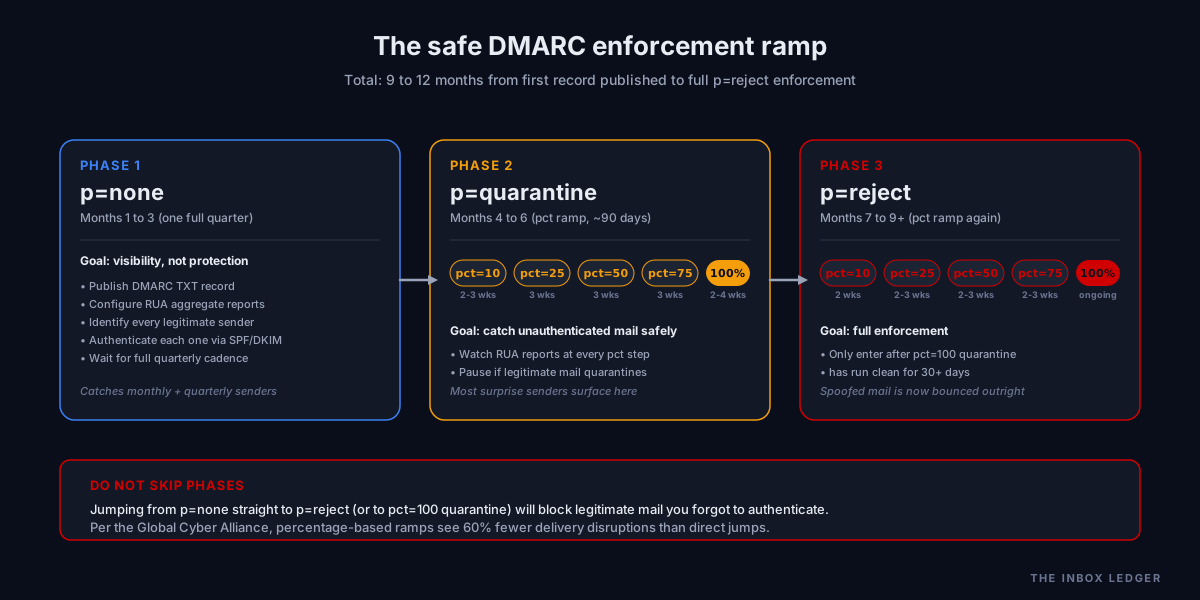
We worked with an agribusiness research organization on a DMARC migration that took just over four months end to end. They had 11 distinct sending services across their parent organization and three regional offices, including an old volunteer-managed mailing list nobody had documented in years. The mailing list surfaced in the second week of p=none monitoring. Every previous attempt at DMARC enforcement had failed because that mailing list (forwarding mail through a header-rewriting system that broke SPF and DKIM alignment) had silently torpedoed any policy stricter than none. Once we identified it and migrated it through an authenticated relay, the rest of the ramp went exactly to schedule. The total elapsed time was 18 weeks. We have done faster migrations and slower ones. The pattern that always works is patient: a quarter at p=none to find the surprises, then a careful pct ramp through quarantine, then a careful ramp through reject.
BIMI (Brand Indicators for Message Identification)
BIMI is the newest of the four. It lets you display your logo next to authenticated messages in supporting inboxes (Gmail, Yahoo, Apple Mail among them). It requires p=quarantine or p=reject DMARC and, for the verified checkmark, a Verified Mark Certificate (VMC) from Entrust or DigiCert. The VMC costs around 1,500 USD per year.
Is BIMI worth it? For senders with strong brand recognition, yes, because the logo lifts open rates 5 to 15 percent in our measurements. For a B2B sender most prospects have never heard of, probably not, at least until brand recognition is built.
Sender reputation: the metric Google will not show you
Every mailbox provider keeps a running sender reputation score on your sending IPs and your sending domain. They do not publish the scores. They use them.
You can infer your sender reputation in three ways:
Google Postmaster Tools shows you Gmail’s view of your domain and IP reputation, broken into Bad / Low / Medium / High. It is free, it is canonical for Gmail, and every serious sender uses it. Sign up at postmaster.google.com and add your sending domain.
Microsoft SNDS does the same thing for the Microsoft ecosystem (Outlook.com, Hotmail, plus corporate Exchange Online tenants that use Microsoft filtering). The interface is dated but the data is real.
Seed-list inbox placement testing tools like GlockApps, Mailtrap, and Folderly send your campaign to a panel of “seed” addresses across the major providers and measure where the mail lands. This is the only way to get a real-time placement read across providers that do not give you direct visibility.
Sender reputation is built slowly and lost quickly. A single bad campaign (a spam complaint rate above 0.3 percent, or a sudden 20x volume spike) can take six to 12 weeks to recover from. We have seen clients permanently retire IPs after a single catastrophic send.
For the senders we work with at the high end of volume (over 500,000 messages per month), we recommend running on dedicated infrastructure rather than shared ESP IPs. A properly configured PMTA setup with dedicated IPs, custom warmup pacing, and per-recipient throttling consistently outperforms shared ESPs by 10 to 18 percentage points in inbox placement in our seed-list tests. The trade-off is operational complexity: PMTA requires real expertise to configure correctly, ongoing IP warmup discipline, and active monitoring that most teams underestimate. For most senders, a reputable shared-IP ESP is the right answer. Dedicated infrastructure becomes worth it only when volume justifies the operational overhead.
Content signals: what the spam filter sees
Modern spam filters use machine learning models that are essentially black boxes. We cannot tell you exactly what triggers them. We can tell you what consistently moves the needle in production:
Avoid the obvious spam-trigger language. “Act now,” “limited time,” “free money,” excessive exclamation points, all caps subject lines, “urgent” without context. These signals are old but still weighted.
Watch your image-to-text ratio. Image-only emails, or emails with one big image and almost no text, get filtered hard. Aim for at least a 60/40 text-to-image ratio by visible area.
Be careful with link shorteners. bit.ly, tinyurl, and similar are heavily abused by spammers. Use your own tracking domain with a CNAME pointing to your ESP’s link tracker, or no shortener at all.
Mind the HTML. Inline CSS only (no <style> blocks for older clients), valid HTML structure, no hidden text, no broken tags. Test renders in Litmus or Email on Acid before sending at scale.
Match the sending domain to the from name. If you send from support@randomdomain.com but the from-name says “Acme Inc.”, filters get suspicious. Use a domain that matches the brand.
Personalization without breakage. Merge tags that fall back to empty strings, broken Liquid templates, or visible {{first_name}} artifacts will tank your engagement, which feeds back into sender reputation.
List quality: where most senders bleed reputation
Sending to bad addresses is the fastest way to destroy email deliverability. The 2026 thresholds that actually matter:
- Hard bounce rate. Total cold email bounces above 2 percent triggers exponential reputation damage, not linear. Above 5 percent, most ESPs flag the account for active review. Above 10 percent, many suspend immediately. Elite cold email teams target under 1 percent.
- Spam complaint rate. Google recommends staying below 0.1 percent. The hard threshold for active enforcement is 0.3 percent. Microsoft applies similar rules since May 2025. Gmail tightened enforcement again in November 2025, and a bounce rate above 2 percent now triggers permanent 5xx rejections from Gmail entirely.
- Spam trap hits. A single pristine spam trap (an address that has never been a real user) can damage IP reputation overnight. Recycled traps (addresses that were once real but have been dormant and reclaimed) catch senders who fail to remove dormant subscribers.
- Role accounts. info@, sales@, admin@. High complaint rates, frequently blocked outright by some providers.
A typical pattern we audit: a B2B outbound team scrapes 25,000 contacts from a tool like Apollo without verification, sends a full sequence, sees a 7 to 9 percent bounce rate, and is surprised when their next campaign mysteriously underperforms. The cold email deliverability damage from one campaign with that bounce rate takes months to undo. We worked with one outbound agency that had to retire two sending domains after their team made exactly this mistake on a high-value client launch. The cost of an upfront verification pass (typically four cents per address) would have been roughly 1,000 USD for that campaign. The cost of replacing the domains, warming the replacements, and missing the campaign window cost the client a quarter of pipeline.
Ongoing hygiene matters as much as initial verification. Suppress addresses that have not opened in 90 plus days; re-engage them with a separate sub-campaign on a separate sub-domain so any deliverability damage stays contained. Remove the ones that never re-engage.
Sending behavior: warmup, ramp, and pace
A brand-new sending IP, or a brand-new sending domain, has zero sender reputation. Send 10,000 messages from it on day one and the major providers will block you within minutes. They cannot tell you apart from a spammer.
The fix is warmup: starting with very low volume to engaged recipients, ramping gradually over weeks. The classic warmup curve doubles daily for the first week (10, 20, 40, 80, 160, 320, 640), then doubles every two to three days, with a target of full volume around week four to six.
Manual warmup is possible but tedious. Automated warmup services use networks of seed inboxes that send and reply to each other, generating the engagement signals that build reputation. Quality varies. The good ones (the ones we still run on our own infrastructure) use real-looking conversations, vary timing, and respect provider quotas. The bad ones generate obvious patterns that providers have started to detect and discount.
Once warmed, sending pace still matters. Sudden volume spikes get flagged. If you normally send 5,000 per day and want to push 25,000, ramp over a week. Sending on consistent schedules (rather than dumping a campaign all at once) also reads as “operator behavior” rather than “spammer behavior.”
The deliverability diagnostic order
When a sender comes to us with “my email is going to spam,” we work through diagnostics in this order. Do not skip steps. The earlier issues mask the later ones.
This is the protocol we ran when a Series B logistics platform came to us in March, two weeks after a sudden 70 percent drop in reply rates. Their dashboard showed no obvious problems. By the end of step two we had identified that someone on their team had added a new transactional sender to SPF without checking the lookup count, taking them to 11 includes. SPF was throwing permerror on every send. They had been silently unauthenticated for nine days. The fix took two hours. The sender reputation repair took six weeks.
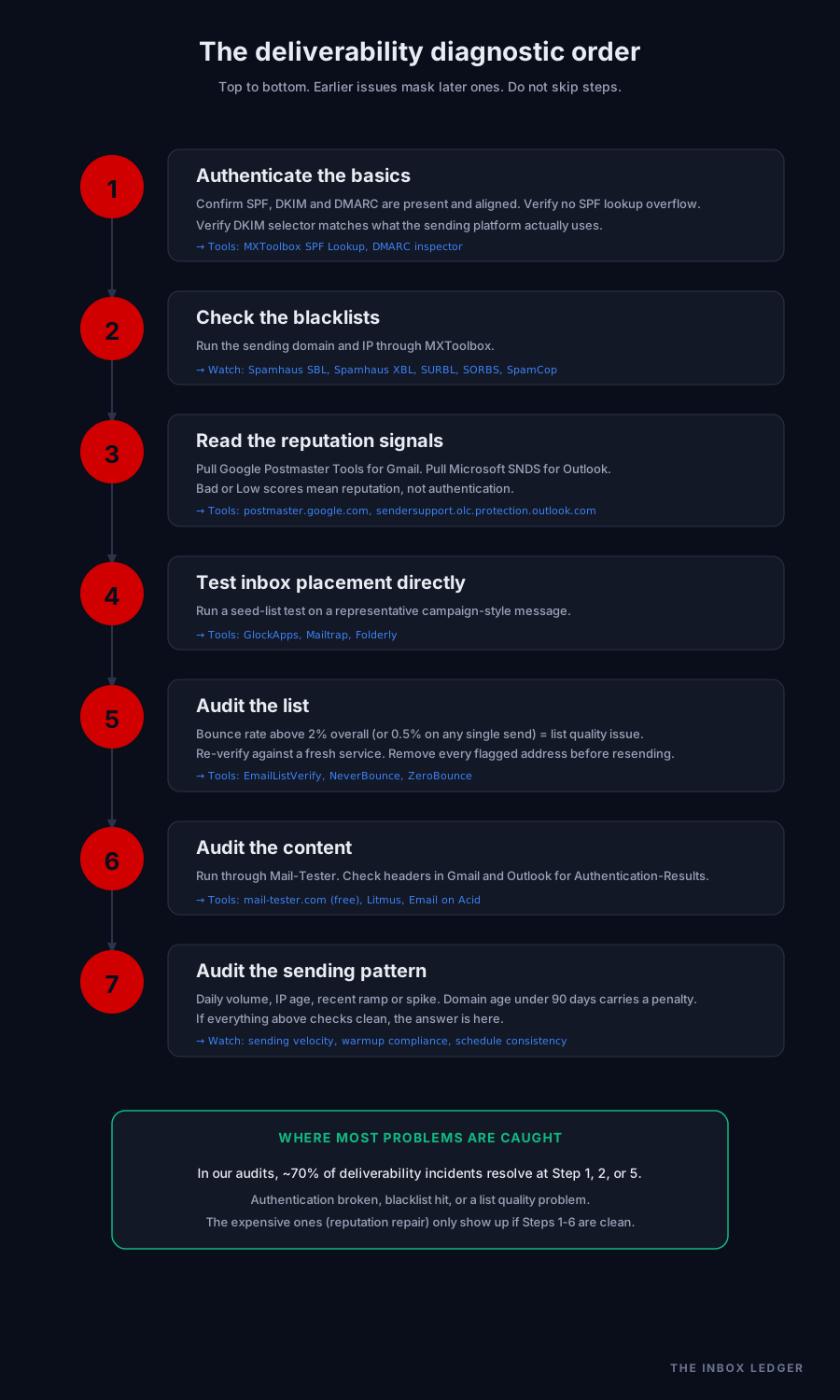
1. Authenticate the basics
- Pull the domain in a DMARC inspector. Confirm SPF, DKIM, and DMARC all present and aligned. If any fail, fix here first; nothing downstream matters.
- Verify there are no SPF lookup overflows. Use MXToolbox SPF Lookup; it counts total lookups including nested includes.
- Verify DKIM selector matches what the sending platform actually uses.
2. Check the blacklists
- Run the sending domain and IP through MXToolbox or similar. The blacklists that matter most: Spamhaus SBL, Spamhaus XBL, SURBL, SORBS, SpamCop. If listed, follow each blacklist’s specific delisting process. Other lists matter less.
3. Read the reputation signals
- Pull Google Postmaster Tools. Look at domain reputation, IP reputation, spam rate, encryption rate, authentication rate.
- Pull Microsoft SNDS for the IP reputation.
- If those show Bad or Low, you have a sender reputation problem, not an authentication problem. The fix is volume reduction and engagement repair, not technical tweaks.
4. Test inbox placement directly
- Run a seed-list test through GlockApps, Mailtrap, or Folderly. Send a real campaign-style message to the seed list. Read where it landed across Gmail, Outlook, Yahoo, and corporate filters.
5. Audit the list
- What is the bounce rate over the last 90 days? Anything above 2 percent overall, or 0.5 percent on any single send, is a list quality problem.
- Verify the list against a fresh service. Compare the verifier’s hard-bounce flag count to your historical bounce rate. The deltas usually tell you exactly where to clean.
6. Audit the content
- Send the message through Mail-Tester (free) and read its spam-score breakdown.
- Send to a personal Gmail and Outlook account. Check the full headers. Look for “Authentication-Results” and “X-Spam-Status.”
7. Audit the sending pattern
- What is the daily volume? How long has the IP been sending? Has there been a recent ramp or spike?
- Is the sending domain new (less than 90 days)? New domains carry a “new sender penalty” that does not lift until consistent engagement is established.
Run this diagnostic order top to bottom. Most senders find their problem in step 1, 2, or 5. The expensive ones (sender reputation repair) only come into play if everything above checks out.
A 47-point operator checklist
For when you want a list to work through, here is the condensed email deliverability checklist we use as the audit framework:
Authentication (8 points)
- SPF record present
- SPF aligns with From domain
- SPF lookups under 10
- DKIM record present
- DKIM selector matches sending platform
- DKIM key 2048-bit or stronger
- DMARC record present with at least p=none
- DMARC RUA reporting configured
Reputation (6 points)
- Google Postmaster Tools configured
- Microsoft SNDS configured
- Domain not on Spamhaus
- IP not on Spamhaus
- Domain not on SURBL
- IP not on SORBS
List quality (8 points)
- List verified within last 30 days
- Hard bounce rate under 0.5 percent on last 5 sends
- Spam complaint rate under 0.1 percent
- No role accounts in list (or segregated)
- No catch-all addresses without verification
- No purchased or scraped data
- Re-engagement campaign run on dormant subs
- Unsubscribes processed within 24 hours
Content (8 points)
- Plain-text version included alongside HTML
- Inline CSS only
- No
<style>blocks targeting older clients - Image-to-text ratio under 40 percent by area
- No URL shorteners
- Custom tracking domain configured (CNAME to ESP)
- No hidden text
- Mail-Tester score 9.5+ on a representative send
Infrastructure (8 points)
- Dedicated IP if sending volume justifies it (over 50K/month)
- Subdomain used for sending (not root domain)
- Sending subdomain has its own SPF, DKIM, DMARC
- Reverse DNS (PTR) configured for sending IP
- PTR matches forward DNS
- HELO/EHLO greeting matches sending hostname
- TLS enabled for outbound
- Bounce processing configured (catches and removes bounces)
Behavior (9 points)
- New IPs/domains warmed before full volume
- Volume ramp under 2x per week post-warmup
- Sending pace consistent (not batch-and-blast)
- Unsubscribe link visible and one-click compliant
- List-Unsubscribe header set (RFC 8058 one-click)
- Engagement-based segmentation in place
- Suppression list maintained across campaigns
- Bounce-back loop processed (no resending to hard bounces)
- Quarterly authentication audit scheduled
A score of 40 or above out of 47 puts a sender in healthy territory. Below 35 usually means active email deliverability problems.
What to fix first if your email is going to spam right now
If you are reading this with an active email deliverability crisis, here is the triage order:
- Stop sending. Whatever is happening will only get worse with more volume.
- Verify SPF, DKIM, DMARC are all configured and passing. Use a single test message to a personal Gmail and check the headers.
- Check Google Postmaster and Spamhaus. If you are on a blacklist, that is the entire problem and nothing else matters until it is cleared.
- Verify your list against a fresh verification service. Remove every hard bounce and high-risk address before sending again.
- Reduce sending volume by 80 percent for 7 days. Send only to your most engaged segment (opened in the last 30 days).
- Send a small re-engagement campaign with a strong personal subject line and high-quality body. Watch engagement rates.
- Resume normal volume gradually only after Google Postmaster shows Medium or better.
Most of these crises are recoverable in 4 to 8 weeks of disciplined sending. Some are not (heavily damaged IPs sometimes never come back). Knowing the difference is half the work.
Frequently asked questions
How long does it take to fix bad email deliverability?
What is a good email deliverability rate?
Is email warmup necessary for cold email deliverability?
Do I need a dedicated IP to improve email deliverability?
What is the difference between SPF, DKIM, and DMARC?
How often should I verify my email list?
What is the maximum spam complaint rate before Gmail penalises a sender?
What we recommend, by use case
For small senders (under 10,000 emails per month) just trying to improve email deliverability and not land in spam: focus on authentication, list verification, and content. Use a reputable shared-IP ESP. Skip the dedicated IP, the BIMI certificate, and the seed-list testing.
For cold email at scale (over 50,000 per month, multi-inbox setup): you need dedicated infrastructure, warmup that is continuous (not one-time), and inbox placement monitoring. Smartlead handles the first two natively; GlockApps handles the third.
For marketing email at scale (newsletters, transactional, mixed): the priorities are list segmentation, engagement-based suppression, and authentication on the marketing subdomain separate from your transactional domain. Mailbox providers have started weighing transactional and marketing sender reputation separately; do not let one drag down the other.
For B2B teams running their own infrastructure (covered in detail in our sending infrastructure category) (PMTA, custom MTAs): you already know the basics. The thing most teams underestimate is per-recipient pacing. Static rate limits across all providers leave performance on the table. Dynamic pacing that responds to provider-specific deferrals and 4xx codes is the difference between sending and being seen.
The thing nobody tells you about deliverability
Email deliverability is not a one-time setup. It is a continuous monitoring problem. The senders who maintain great deliverability are the ones who check their Google Postmaster dashboard weekly, who run seed-list tests on every meaningful campaign, who treat sending reputation like a credit score.
If you cannot do that yourself, that is what a deliverability consultant or managed service is for. Get in touch if you want us to take a look at your setup. The cost of getting email deliverability right is always less than the cost of campaigns that nobody sees.
Subscribe to the weekly briefing below to get the next deep-dive on cold email infrastructure, sender reputation repair, and the comparison reports we run on the tools in this article.
More on Deliverability
Email blacklist removal 2026: the operator playbook
Email blacklist removal in 2026: diagnose the root cause first, identify the tier, delist in the right order, prevent re-listing. The full playbook.
Email deliverability monitoring vs warmup: 2026 guide
Email deliverability monitoring vs warmup in 2026: what each does, when you need both, and why monitoring is non-negotiable post-enforcement.
Spam complaint rate 2026: the 0.3% operator playbook
Spam complaint rate in 2026: the 0.3% threshold explained, why ESP dashboards underreport, the five drivers of complaints, and the recovery playbook.