Email blacklist removal 2026: the operator playbook
Email blacklist removal in 2026: diagnose the root cause first, identify the tier, delist in the right order, prevent re-listing. The full playbook.
Email blacklist removal in 2026 follows a sequence that matters more than any individual step. Most guides walk through delisting forms and timelines as if the order was interchangeable, then leave you on the same blacklist within days because you skipped the part that actually keeps you off it. The teams we work with that recover quickly follow four phases in strict order: diagnose what listed you, identify which tier of blacklist matters, delist in priority order, and build the discipline that prevents re-listing. Skip phase one and submit a delisting request immediately and you usually burn your one clean shot at removal; Spamhaus and Barracuda both deny requests when the underlying issue is unresolved, and repeated failed submissions can disable self-service entirely.
This guide is the email blacklist removal playbook we use when teams find themselves listed and need to be sending again by end of week. It covers how to confirm and triage the listing, the root cause diagnosis that every credible blacklist requires before approval, the delisting procedures for each major blocklist with realistic timelines, and the prevention discipline that keeps you off the lists once you are clean. Written for SDRs, deliverability owners, and infrastructure engineers who got the Monday-morning Slack message asking why outbound stopped.
For the broader foundation, see the email deliverability pillar, the sender reputation guide, and the email deliverability monitoring vs warmup guide. For the infrastructure that gets compromised when listings happen, see the cold email infrastructure guide and the SPF DKIM DMARC setup guide.
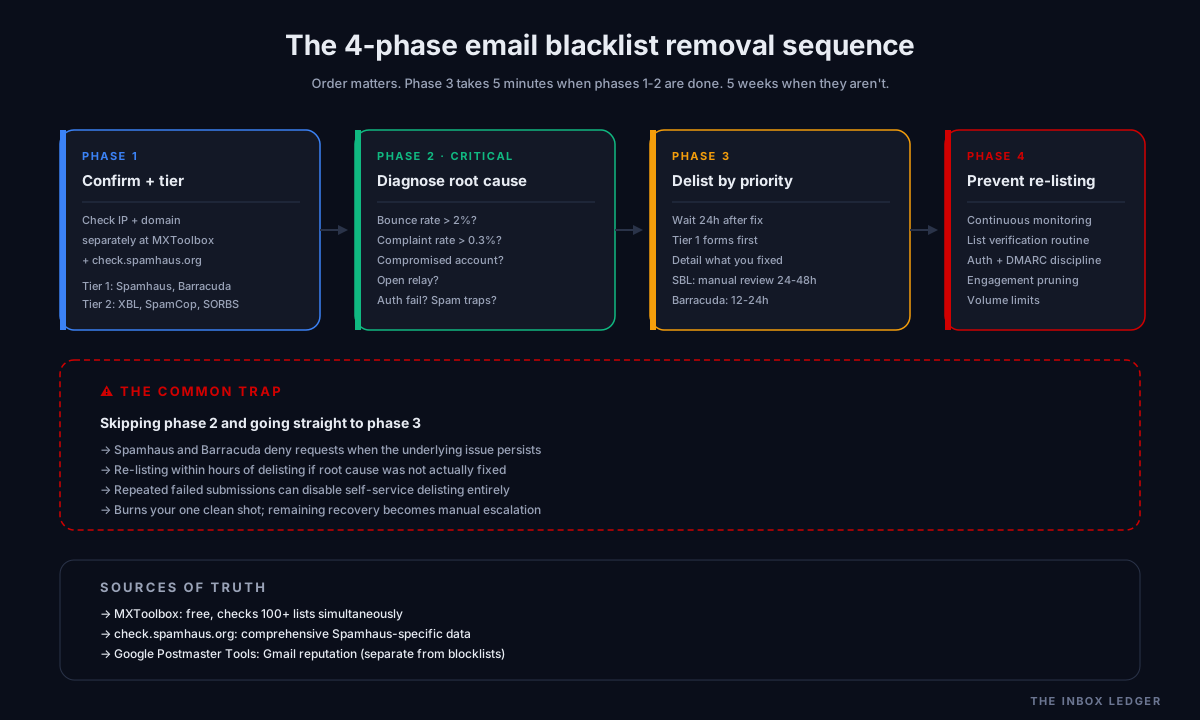
Phase 1: Confirm the listing and identify the tier
The first reaction to a deliverability problem is usually to assume the worst and start submitting delisting requests. That is the wrong order. Phase one is confirming you are actually on a meaningful blacklist before doing anything else, because a meaningful fraction of “we got blacklisted” panics turn out to be either misdiagnosis or listings on low-impact blocklists that no major mailbox provider consults.
Step 1: Run the lookup. Use MXToolbox (free) or the Spamhaus Reputation Checker at check.spamhaus.org to check your sending IP and your sending domain separately. These are different lists; an IP blacklist flags the mail server, a domain blacklist flags the brand. Listings on one do not automatically mean listings on the other.
Step 2: Identify the tier. Not all blacklists matter equally. The practical 2026 email blacklist removal tiering:
- Tier 1 (critical, fix immediately): Spamhaus SBL, Spamhaus DBL, Spamhaus CSS, Barracuda BRBL. These are consulted by Gmail, Outlook, and most enterprise mail systems. A listing here means your mail is being filtered at scale.
- Tier 2 (important, fix promptly): Spamhaus XBL, SpamCop, SORBS, Mailspike. Consulted by enough providers to materially affect deliverability but generally faster to clear.
- Tier 3 (often ignorable): UCEProtect L2 and L3, MicroBlock, smaller regional lists. These rarely affect mainstream deliverability and are sometimes safer to ignore than to engage. UCEProtect Level 1 is a different matter; treat it as Tier 2.
Step 3: Document what you find. Note exactly which IP or domain is listed, on which lists, and when each listing began. The delisting forms require this information, and time-on-list affects the conversation with providers.
The Spamhaus SBL alone maintains 30,000 to 40,000 active listings at any given time, and the list protects mail to over 3 billion mailboxes. A Tier 1 listing means real outbound damage; a Tier 3 listing might mean nothing observable. Triage matters.
Phase 2: Diagnose the root cause before delisting
This is the phase most guides skip and the one that determines whether delisting actually sticks. Blacklists do not list IPs or domains randomly; every listing has a specific, documented cause, and Spamhaus investigators verify that the issue is resolved before approving removals.
The common root causes we see on the audits we run:
Cause 1: High bounce rate from bad lists. Sending to unverified or scraped lists produces bounce rates above 2 percent, which triggers automated listings on multiple lists. This is the most common single cause for cold email programs. The fix is list verification before every send (see the email hygiene guide) and dropping unresponsive contacts after 90 days.
Cause 2: Spam complaint rate above 0.3 percent. Recipients marking your mail as spam is the fastest reputation killer and a common trigger for Barracuda and Spamhaus CSS listings. The fix is reviewing copy for relevance, tightening targeting, and adding a clear one-click unsubscribe (now an RFC 8058 requirement under Google’s bulk sender rules and Microsoft’s high-volume sender enforcement).
Cause 3: Compromised mailbox or account. A breached account sending unauthorized mail produces rapid Spamhaus SBL listings. Mail server logs showing unusually high outbound volume (500+ emails per hour from a business server) is a strong indicator. The fix is auditing access, rotating credentials, and reviewing API tokens before any delisting request.
Cause 4: Open relay or misconfigured infrastructure. A mail server accepting unauthenticated relays is detected by Spamhaus’s automated honeypots within hours. The fix is closing the relay, verifying with the Spamhaus test tools, then submitting delisting.
Cause 5: Authentication failures. SPF, DKIM, or DMARC misconfigured or drifted, producing failed authentication that lists like Spamhaus CSS use as a signal. The fix is the SPF DKIM DMARC setup guide walked through end to end with alignment verified, not just syntax.
Cause 6: Spam trap hits. Sending to dormant addresses that have been converted to spam traps produces immediate Spamhaus SBL or CSS listings. The fix is list verification (covered below) and never resurrecting old purchased lists for new campaigns.
The pattern we see is teams skipping diagnosis, submitting a delisting form, getting re-listed within hours, and burning the goodwill that would have made the second submission easier. The diagnosis step is not optional.
Phase 3: Submit delisting requests in priority order
Once the root cause is genuinely fixed (not just identified, actually fixed), phase three is submitting delisting requests in the order that produces the best outcomes. Tier 1 lists first, with each list’s own form and process.
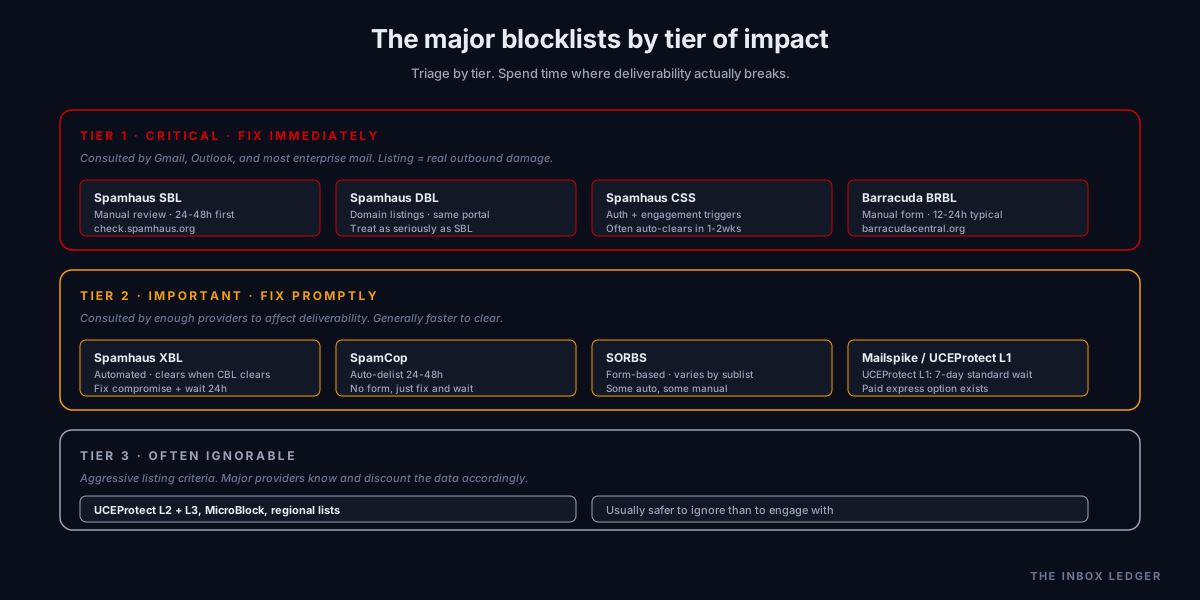
Spamhaus delisting
Spamhaus operates several distinct lists, each with a different removal path. Mixing them up wastes time:
- SBL (Spamhaus Block List): Manual human review required. Submit at check.spamhaus.org with a detailed explanation of the corrective measures taken. First offenses typically clear in 24 to 48 hours; repeat offenses take 1 to 2 weeks.
- XBL (Exploits Block List): Automated. Removes itself once the underlying CBL or compromised-host detection clears. Fix the compromise, wait 24 hours, re-check.
- PBL (Policy Block List): Self-service for legitimate static mail servers; for residential or dynamic IPs, use an ESP or SMTP relay instead. This is not an accusation of spam, just a policy listing for IPs that should not send mail directly.
- DBL (Domain Block List): Domain listings, not IP. Same submission portal as SBL with domain context. Treat with the same seriousness as SBL.
- CSS (Composite Sending Source): The newest list, triggered by authentication failures and engagement patterns. Often clears automatically when the underlying signals improve over 1 to 2 weeks.
Spamhaus delisting is always free. Anyone charging for “blacklist removal” is selling something you can do yourself in 10 minutes once the root cause is fixed.
Barracuda delisting
Submit at the Barracuda Central removal request form with three required fields: the IP being listed, contact email, and a detailed explanation of corrective measures. MXToolbox warns explicitly that requests submitted without addressing the core problem will likely result in relisting and extended listing periods. Typical timeline is 12 to 24 hours for first-offense legitimate requests, longer for repeat offenders.
SpamCop and other auto-delisting lists
SpamCop auto-delists in 24 to 48 hours once the underlying issue stops triggering reports. No form to submit; just fix the cause and wait. Many smaller lists (SORBS, Mailspike on some categories) work similarly.
UCEProtect Level 1 versus Level 2 and 3
UCEProtect Level 1 has a standard 7-day waiting period with a paid express option. Most teams should wait the 7 days unless deliverability is critically affected. Level 2 and Level 3 listings are usually safer to ignore than to engage with; their listing criteria are aggressive enough that legitimate senders end up listed routinely, and the major mailbox providers know this and discount the data accordingly.
Microsoft and Gmail sender reputation recovery
Listings on the major blocklists are separate from sender reputation at Gmail and Outlook. Even after delisting from Spamhaus, your reputation at Gmail (visible via Google Postmaster Tools) recovers slowly. Expect 2 to 6 weeks for full Gmail reputation recovery from a severe incident, and longer for Outlook. There is no Outlook equivalent of a delisting form; you escalate through the Sender Network Data Cooperative (SNDS) and the smart network data service for direct reputation visibility.
Phase 4: Prevent re-listing
Getting delisted is only valuable if you stay delisted. Re-listing can happen within hours if the underlying problem recurs, and Spamhaus and Barracuda both track repeat offenders aggressively. The discipline that keeps you off the lists long-term:
Continuous email blacklist removal monitoring. Configure email blocklist alerts so you catch new listings within hours rather than days. Free options: MXToolbox alert (basic), the Spamhaus Reputation Checker on a periodic schedule. Paid options: Folderly, Mailreach, Warmy. The free options are adequate for low-volume programs; paid monitoring pays for itself above ~1,000 cold sends per day where invisible listings cost more than the tool.
Authentication discipline. SPF, DKIM, and DMARC configured and aligned on every sending domain, monitored continuously for drift. See the SPF DKIM DMARC setup guide and the DMARC policy guide. Authentication failures are a leading cause of Spamhaus CSS listings; getting authentication right prevents the listing rather than recovering from it.
List hygiene as routine, not exception. Run lists through a verification service before every send to keep bounces under 2 percent. The email hygiene guide covers the verification discipline; the short version is that verified lists prevent the high-bounce listings that account for most of the email blacklist removal work we see.
Engagement-based pruning. Drop unresponsive addresses after 90 days. Continuing to send to a contact who has not engaged in three months mostly hits dormant or trap addresses, which are exactly what trigger blacklist listings.
Volume discipline. Stay under safe sending limits (30 to 50 emails per mailbox per day for cold outbound, ramped gradually during warmup). Scaling volume by adding mailboxes and domains, not by pushing individual mailboxes past safe limits. The cold email infrastructure guide covers the full sizing arithmetic.
One-click unsubscribe. Mandatory under 2024-2025 Gmail and Microsoft bulk sender rules and a primary defense against spam complaint listings. Implement RFC 8058 one-click unsubscribe headers correctly and honor the requests immediately.
The discipline that separates teams that get listed once from teams that get listed repeatedly is treating prevention as ongoing operational work rather than a one-time fix after an incident.
How IP blacklists and domain blacklists differ
A critical distinction most blacklist removal guides skip: IP blacklists and domain blacklists are different things, list different signals, and have different remediation paths.
IP blacklists flag the mail server that sent the mail. Spamhaus SBL, Barracuda BRBL, SpamCop, SORBS, and UCEProtect are primarily IP-focused. If you send through a shared ESP (SendGrid, Mailgun, Smartlead), the IP belongs to the ESP and ESP-level listings may not be your problem to fix directly. If you send from dedicated IPs or your own infrastructure, IP listings are entirely your responsibility.
Domain blacklists flag the sending brand independent of which IP it sent from. Spamhaus DBL, SURBL, URIBL, and a handful of smaller lists focus on domain reputation. A domain listing affects every IP you ever use to send from that domain, which makes domain listings significantly more serious than IP listings for serious senders. A Spamhaus DBL listing for yourcompany.com means even if you switch ESPs entirely, the new IPs are still sending from a flagged domain.
The practical implication for email blacklist removal:
- IP listing only: focus on infrastructure (compromised account, open relay, ESP-level issue) and the IP itself
- Domain listing only: focus on content and behavior (high complaints, spam traps, abusive practices attributed to the domain) and the domain
- Both listed: usually indicates a sustained issue rather than a one-time incident; address both, expecting longer recovery
The diagnosis in phase 2 should explicitly identify whether you have an IP issue, a domain issue, or both, because the remediation differs.
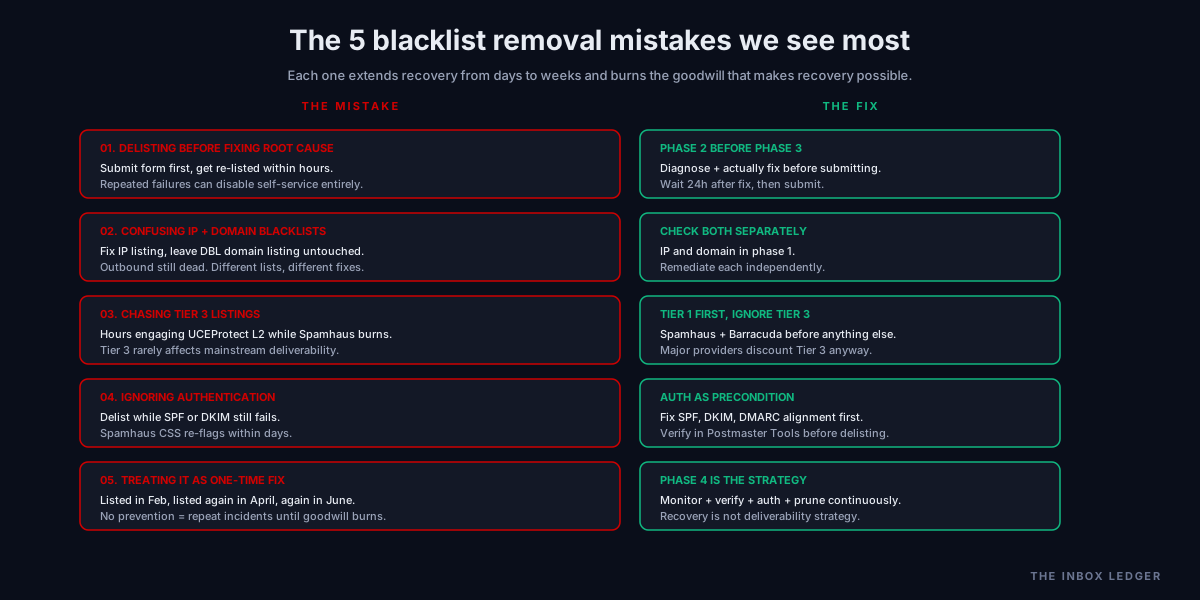
Common email blacklist removal mistakes in 2026
Five patterns we see most often when teams handle blacklist incidents:
1. Submitting delisting requests before fixing the root cause
The most expensive mistake. Spamhaus and Barracuda both deny requests when the underlying issue persists, and repeated failed submissions can disable self-service delisting on Spamhaus entirely. The fix is the four-phase sequence above: confirm, diagnose, fix, then submit.
2. Confusing IP blacklists with domain blacklists
A team gets a Spamhaus SBL listing on their IP, fixes the IP issue, gets delisted, then keeps sending and discovers their domain is still listed on DBL with no progress. The fix is checking both IP and domain separately in phase 1 and remediating each independently.
3. Chasing every Tier 3 listing
Spending hours engaging with UCEProtect L2 or smaller regional lists that have negligible deliverability impact, while ignoring the Spamhaus SBL listing that is actually killing outbound. The fix is the tiered triage above: Tier 1 first, Tier 2 promptly, Tier 3 usually ignored.
4. Ignoring authentication during recovery
Delisting from Spamhaus while SPF or DKIM still fails on the recovered domain. The CSS list will re-flag within days because authentication is one of its trigger signals. The fix is treating authentication as a precondition for delisting, not a post-recovery cleanup task.
5. Treating blacklist removal as a one-time fix
The team that got listed in February will get listed again in April unless the underlying discipline changes. The fix is the prevention phase: continuous email blacklist monitoring, list verification as routine, authentication as a system not a one-time setup, and ongoing engagement-based pruning.
When email blacklist removal is not the actual problem
Sometimes teams discover during phase 1 that they are not on a meaningful blacklist at all; the deliverability symptoms have a different cause. The audit pattern that frequently misdiagnoses:
Symptoms of poor reputation without a listing. Inbox placement drops, reply rates fall, but MXToolbox shows clean. The cause is usually a slow sender reputation degradation visible in Google Postmaster Tools but not on the blocklists. The fix is the reputation guide, not email blacklist removal.
Authentication failure mistaken for blocklisting. Mail is being rejected, MXToolbox shows clean, but logs show DMARC rejection. The fix is the SPF DKIM DMARC setup guide, not delisting.
Mailbox-provider-specific filtering. Mail lands in Gmail but not Outlook (or vice versa), no blocklist listings. The cause is provider-specific reputation. Recovery is through engagement signals, not delisting forms.
Content-triggered spam filtering. Mail lands in spam at multiple providers with no blocklist listings. The cause is content patterns triggering filters (excessive links, spam-trigger words, missing plain-text alternative). The fix is content review, not delisting.
Phase 1 of email blacklist removal includes ruling out these non-blacklist causes, because spending two days submitting Spamhaus forms when your actual problem is a DKIM key drift produces no recovery and wastes the cleanup window.
How email blacklist removal fits in the broader deliverability stack
The email blacklist removal procedure is one part of a broader deliverability operations discipline:
- Prevention through infrastructure (the cold email infrastructure guide covers the foundation that prevents most listings)
- Authentication (the SPF DKIM DMARC setup guide and DMARC policy guide cover the records that prevent CSS and DBL listings)
- List hygiene (the email hygiene guide covers the verification discipline that prevents bounce-driven listings)
- Warmup discipline (the email warmup tools guide covers reputation building that reduces listing risk)
- Sender reputation tracking (the sender reputation guide covers the reputation layer that listings damage)
- Continuous monitoring (the email deliverability monitoring vs warmup guide covers the visibility layer that catches listings early)
- Email blacklist removal (this article: the recovery procedure when prevention fails)
- Operational baseline (the cold email deliverability checklist covers the ongoing discipline)
The teams that get hit with repeated blacklist incidents usually have weakness in layers 1 through 6 that the email blacklist removal in layer 7 cannot fix permanently. Treating recovery as the deliverability strategy guarantees repeat incidents; treating it as one component of a complete stack produces programs that get listed once, recover quickly, and stay clean afterward.
The practical email blacklist removal decision framework in 2026
The decision process we use when teams face a blacklist incident:
- Confirm the listing. Check IP and domain separately at MXToolbox and check.spamhaus.org. Document exactly what is listed where
- Identify the tier. Tier 1 (Spamhaus SBL/DBL/CSS, Barracuda) needs immediate action. Tier 2 (XBL, SpamCop, SORBS) needs prompt action. Tier 3 (UCEProtect L2/L3) usually ignorable
- Diagnose root cause before doing anything else. High bounces, complaints, compromise, open relay, auth failure, or trap hits. Identify which one specifically caused this listing
- Fix the root cause genuinely. Not “we will fix it after delisting”; actually fix it. Spamhaus verifies fixes during review
- Wait at least 24 hours after the fix before requesting delisting, so signals propagate and you have something to point to in the request
- Submit Tier 1 delisting requests first, with detailed explanation of corrective measures. Spamhaus and Barracuda forms specifically ask what you fixed
- Monitor Postmaster Tools and your monitoring stack for the next 30 days to verify the fix held
- Implement prevention discipline to keep it from recurring: continuous monitoring, list verification, authentication, engagement-based pruning, volume discipline
The discipline that matters most: email blacklist removal is a recovery procedure, not a deliverability strategy. The teams that treat it as recovery and invest in prevention afterward stop getting listed; the teams that treat recovery as the strategy get listed repeatedly and eventually exhaust the goodwill that makes recovery possible at all.
For the broader deliverability operations picture, see the email deliverability pillar, the cold email deliverability checklist, and the how to improve email deliverability walkthrough. For the infrastructure that prevents most listings, see the cold email infrastructure guide.
Frequently asked questions
How long does email blacklist removal take?
Why was my email IP blacklisted?
Can I pay to get off a blacklist faster?
What is the difference between an IP blacklist and a domain blacklist?
How do I check if my domain is on a blacklist?
Can I be relisted after delisting?
Should I worry about UCEProtect listings?
The bottom line on email blacklist removal
Email blacklist removal in 2026 is a four-phase recovery procedure with strict ordering: confirm and tier the listing, diagnose root cause, delist in priority order, prevent re-listing. The teams that get this right treat phases 1 and 2 as the time-consuming work and phase 3 as a 5-minute form submission with the right inputs; the teams that get it wrong open with phase 3, get re-listed within hours, and burn the goodwill that would have made later submissions easier.
The discipline that matters most: blacklist removal is recovery, not strategy. The teams we work with that stop getting listed treat the incident as a signal that prevention discipline (continuous monitoring, list verification, authentication, engagement-based pruning) needs to improve; the teams that get listed repeatedly treat each incident as isolated and never close the underlying gap. Phase 4 is where long-term deliverability lives.
For the broader deliverability operations picture, see the email deliverability pillar, the sender reputation guide, and the email deliverability monitoring vs warmup guide. For the infrastructure that prevents most listings before they happen, see the cold email infrastructure guide.
Subscribe to the weekly briefing for operator-grade deliverability and sending notes, one short email every week.
More on Deliverability
Email deliverability monitoring vs warmup: 2026 guide
Email deliverability monitoring vs warmup in 2026: what each does, when you need both, and why monitoring is non-negotiable post-enforcement.
Spam complaint rate 2026: the 0.3% operator playbook
Spam complaint rate in 2026: the 0.3% threshold explained, why ESP dashboards underreport, the five drivers of complaints, and the recovery playbook.
DMARC policy: when to move from p=none to quarantine
DMARC policy in 2026: when to move from p=none to quarantine to reject, how to read dmarc reports, and what to avoid breaking on the way there.