Email deliverability monitoring vs warmup: 2026 guide
Email deliverability monitoring vs warmup in 2026: what each does, when you need both, and why monitoring is non-negotiable post-enforcement.
Email deliverability monitoring and email warmup are two separate disciplines that solve two different problems, but the SERP treats them as variants of the same thing. They are not. Warmup is the pre-send work of building a mailbox’s reputation through simulated engagement before you scale; email deliverability monitoring is the post-send work of seeing what is actually happening to your reputation, your inbox placement, and your bounce rates while live campaigns run. Confusing the two produces teams that bought a warmup tool, assumed deliverability was handled, then discovered three weeks into a campaign that they had been landing in spam the entire time with no visibility. Different jobs, different tools, often bundled in 2026 but never interchangeable.
This guide is the breakdown we use when teams ask whether they need warmup, email deliverability monitoring, or both. It covers what each discipline actually does, the five jobs each solves, the honest 2026 data on which one moves the needle (and which one is now non-negotiable after the 2024 to 2025 enforcement wave at Gmail, Yahoo, and Microsoft), the bundled tools that combine them, and the decision framework for picking the right combination for your sending volume and risk tolerance.
For the broader foundation, see the email deliverability pillar, the sender reputation guide, and the email warmup tools guide for the warmup tool landscape in depth. For the infrastructure these sit on top of, see the cold email infrastructure guide.
What email warmup actually is
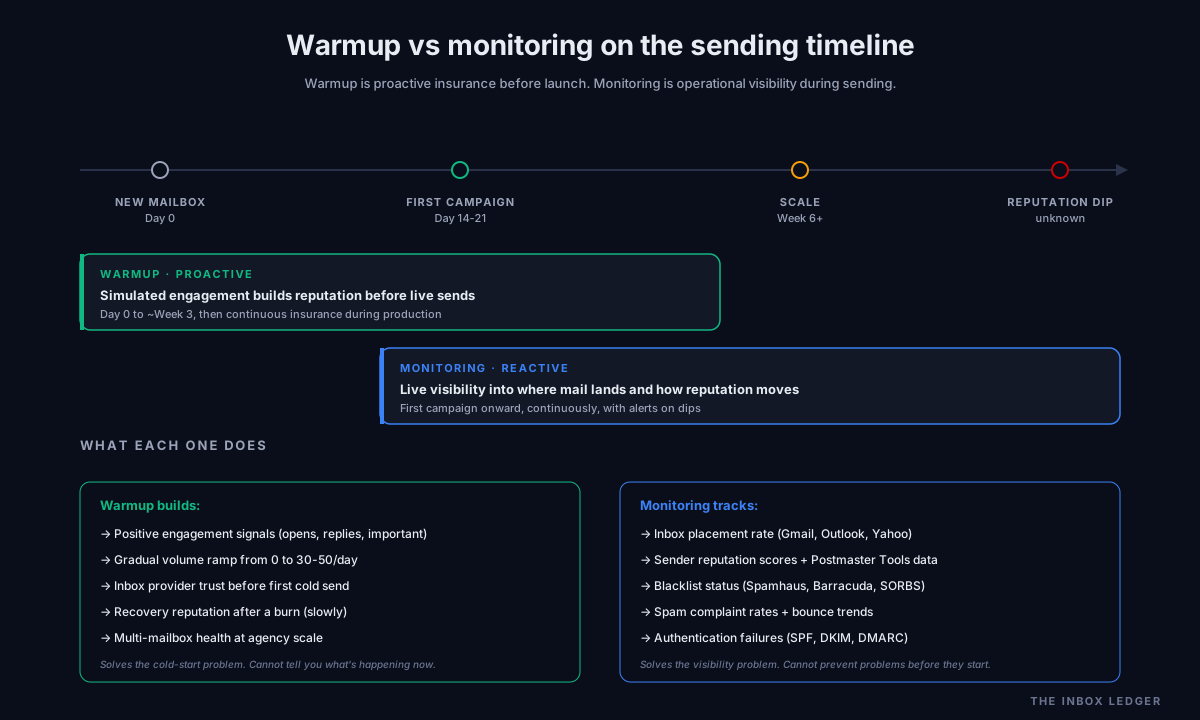
Email warmup is the practice of building a new mailbox’s sending reputation through gradual, controlled engagement before any production outreach. A warmup tool sends mail between a network of participating mailboxes, opens it, replies to it, marks it important, and pulls it out of spam if it lands there. Over 2 to 3 weeks the daily volume ramps from a handful of messages to the mailbox’s target sending rate, simulating the engagement pattern of an established, trusted sender.
The job warmup solves is the cold-start problem: brand-new mailboxes on new domains have no reputation, and inbox providers treat unknown senders skeptically. Warmup generates positive engagement signals that tell Gmail, Outlook, and Yahoo this is a trusted sender before you start cold outreach. Without it, the first production campaign on a new mailbox usually lands in spam regardless of how good the copy is.
The standard practice in 2026 is 2 to 3 weeks minimum before any production send, ramping gradually to a safe ceiling of 30 to 50 emails per mailbox per day. Most modern sending platforms (Smartlead, Instantly, Lemlist) include warmup natively; dedicated tools like Mailreach, Warmy, Warmup Inbox, InboxAlly, and Warmforge operate as standalone services.
What email deliverability monitoring actually is
Email deliverability monitoring is the post-send visibility layer: continuous tracking of where your mail is actually landing, what inbox providers are doing with it, and whether your reputation is rising or falling. Where warmup is proactive (build reputation before sending), monitoring is reactive (watch reputation while sending). The two are complements, not substitutes.
Email deliverability monitoring tools track several distinct signals:
- Inbox placement rate: where your mail lands across Gmail, Outlook, Yahoo, and other providers, typically via seed-list testing where the tool sends to a known panel of monitored inboxes and reports where each one delivered
- Sender reputation scores: Google Postmaster Tools domain reputation, IP reputation, spam rate, authentication pass rate, and DMARC alignment health
- Blacklist status: monitoring across major DNS-based blocklists (Spamhaus, Barracuda, SORBS, others) for both sending domains and IPs
- Spam complaint rates: the percentage of recipients marking your mail as spam, the single fastest reputation killer above 0.3 percent
- Bounce rate trends: hard and soft bounces broken out by provider, with alerts when rates exceed safe thresholds
- Authentication failures: SPF, DKIM, DMARC pass-and-alignment monitoring with alerts when records drift or break
The job monitoring solves is operational visibility: knowing within hours rather than weeks when something has gone wrong with your sending. A team without monitoring discovers a deliverability problem when reply rates collapse; a team with monitoring catches the same problem the day it starts and fixes it before a full campaign cycle burns through bad placement.
The honest 2026 data on what actually moves deliverability
Most articles on email warmup and email deliverability monitoring tools are written by warmup or monitoring vendors, which produces a predictable bias toward whichever tool the vendor sells. The honest data is messier:
Independent warmup tests. Multiple independent studies (EmailChaser’s 2024 panel, Postbox Services’ analysis, Sean B2B’s July 2024 split test) found that warmup tools either failed to improve reply rates measurably or, in some cases, actively hurt them by sending unnatural engagement patterns that inbox providers detected as artificial. The pro-warmup case rests heavily on vendor-published data that is rarely replicable on independent panels.
What does measurably move deliverability. Authentication (SPF, DKIM, DMARC correctly configured and aligned), list verification before every send to keep bounce rates under 2 percent, and infrastructure discipline like secondary domains and 3-to-4 mailboxes per domain. These produce measurable inbox placement lift in controlled tests. Warmup produces measurable lift in some tests and noise in others.
Why monitoring is now non-negotiable. After Google’s bulk sender requirements in February 2024 and Microsoft’s high-volume sender enforcement in 2025, the mailbox providers tightened filtering aggressively. Office365 inbox placement dropped from 77.4 to 50.7 percent year over year through 2025 for cold sending. The margin for error is now thin enough that flying blind without monitoring produces silent deliverability collapse that you only notice when revenue drops. The visibility layer is no longer optional for any serious sender.
The pattern we see is teams over-investing in warmup tools while under-investing in monitoring and authentication. The economics now run the other way: monitoring catches problems in days that warmup cannot prevent and authentication eliminates entirely.
The five jobs email deliverability monitoring solves
Most teams that pick monitoring tools by feature count end up paying for capabilities they never use. The job-to-be-done split:
Job 1: Inbox placement visibility (most common need). Where is your mail actually landing across the major providers? Seed-list testing services (GlockApps, Mailtrap, MXToolbox) send to a panel of monitored mailboxes and report inbox-vs-spam-vs-promotions-vs-missing for each.
Job 2: Sender reputation monitoring. What is your domain reputation at Gmail and your IP reputation across providers? Google Postmaster Tools is the canonical free source for Gmail; paid tools layer broader visibility on top.
Job 3: Blacklist monitoring. Are your sending domains or IPs listed on major blocklists like Spamhaus? Free tools like MXToolbox cover this; paid tools add continuous monitoring with alerts.
Job 4: Continuous reputation alerting. When something changes, are you alerted in hours rather than weeks? This is the operational discipline that separates teams that fight fires from teams that catch issues early. Folderly, Warmy, and Mailreach all cover this for paid users.
Job 5: Pre-send content scoring. Will this specific email trigger spam filters before you hit send? Content scorers (parts of GlockApps, Mailtrap, Litmus) check subject lines, body copy, and HTML against known spam signals.
For most B2B outbound teams, jobs 1, 2, and 3 cover 80 percent of monitoring value. Job 4 is the upgrade for serious senders; job 5 is mostly marketing-focused and less relevant for plain-text cold email.
The five jobs email warmup solves
The warmup side has its own job split, often missed because most warmup articles assume all teams need the same warmup setup:
Job 1: New mailbox cold-start. Brand new mailbox on a new domain, zero reputation. This is the canonical warmup use case and the one where warmup unambiguously helps: anything beats sending production volume from a cold mailbox.
Job 2: Domain recovery after a burn. A mailbox or domain that hit deliverability problems and needs to rebuild reputation. Warmup helps here, though aggressive ramp-up after a burn often makes things worse; slow continuous warmup combined with monitoring is the safer pattern.
Job 3: Continuous warmup during production. Warmup keeps running while live campaigns send, acting as insurance against reputation dips. This is bundled into Smartlead, Instantly, and Lemlist by default and is the most common 2026 warmup pattern.
Job 4: Multi-mailbox warmup at scale. Agencies and teams running 20+ mailboxes need centralized warmup with per-mailbox health visibility. Mailreach, Warmforge, and the enterprise tiers of Warmy specialize here.
Job 5: Adaptive warmup based on signals. Newer tools (Lemwarm, Warmforge AI) adjust warmup volume in real time based on monitored reputation signals: pull back when reputation dips, push forward when it recovers. This is the most operationally sophisticated warmup pattern and effectively bundles monitoring into the warmup loop.
The teams we work with that get warmup right match the tool to the job. Solo founders need job 1 only; agencies need jobs 3 and 4; sophisticated operators benefit from job 5.
When you need warmup, monitoring, or both
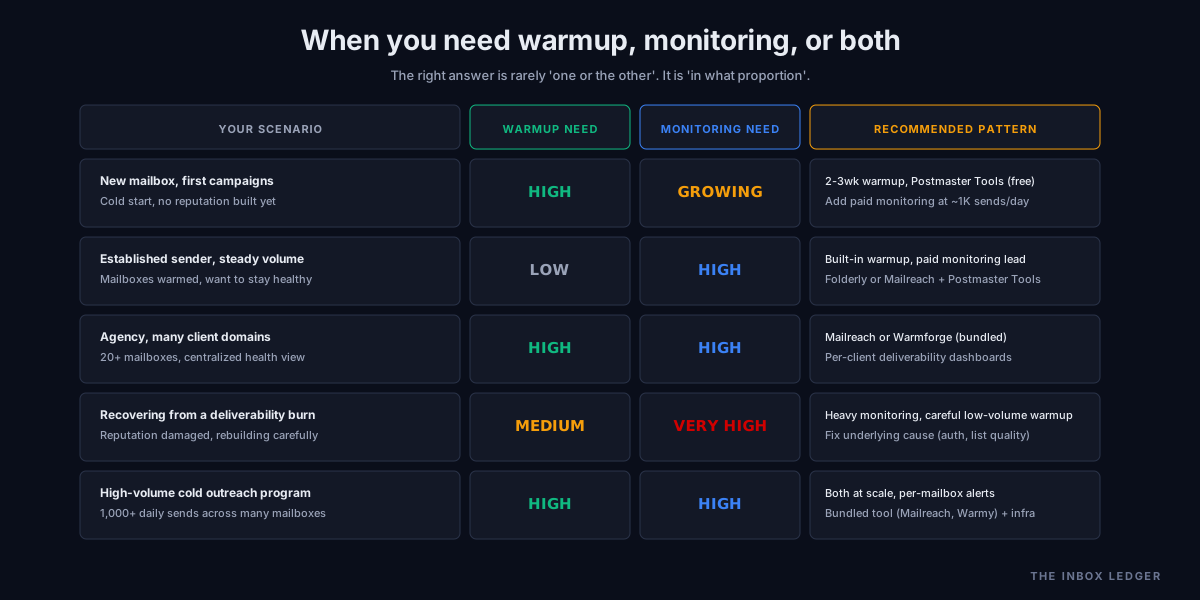
The decision is rarely “one or the other”; it is “in what proportion, and which first.” The pattern we see across team types:
New mailbox launching first campaigns (high warmup need, growing monitoring need). Warmup is essential before the first send. Monitoring starts as basic Google Postmaster Tools (free) and escalates as volume grows. Pattern: warmup for 2-3 weeks, monitor with Postmaster Tools from day one of sending, add paid monitoring when volume passes ~1,000 sends per day.
Established sender running steady volume (low warmup need, high monitoring need). Mailboxes are warmed; the question is whether reputation stays healthy. Monitoring becomes the primary deliverability discipline. Continuous warmup runs as insurance via the sending platform’s built-in warmup; dedicated warmup tools are rarely worth the cost.
Agency managing many clients (high need for both). Warmup runs continuously across 20+ mailboxes; monitoring is the operational dashboard that makes the agency model possible at all. Centralized tools like Mailreach and Warmforge that combine both are usually the right pick.
Recovering from a deliverability burn (medium warmup, very high monitoring). Monitoring is now the priority because you need to see whether recovery is working day by day. Warmup helps slowly rebuild, but aggressive warmup after a burn often digs the hole deeper. Pattern: heavy monitoring, careful low-volume warmup, fix the underlying authentication or list-quality issue that caused the burn.
High-volume cold outreach program (high need for both, plus infrastructure discipline). At scale, neither warmup nor monitoring is optional. Warmup runs continuously across all sending mailboxes; monitoring runs in real-time with per-mailbox alerts. This is the pattern covered in the cold email infrastructure guide.
The bundled email deliverability monitoring tools that do both
Several 2026 email deliverability tools combine warmup and email deliverability monitoring in one platform, which is increasingly the default for serious senders.
Mailreach runs warmup across a network of Google Workspace and Office 365 mailboxes (giving more realistic engagement signals than tools using random inboxes), assigns daily “spam score” and “inbox score” per connected account, and alerts when scores drop. Best fit for agencies managing 10+ client domains and operators who want centralized visibility.
Warmy focuses on AI-driven warmup with continuous monitoring of blacklists, complaint rates, and inbox placement. Proactive alerts when something changes. Higher-end pricing; targeted at senders for whom deliverability problems would cost real revenue.
InboxAlly takes a different warmup approach (browser-level engagement rather than network simulation) plus inbox placement testing, list verification, and authentication checks bundled in. Best fit for teams that want active reputation repair, not just passive warmup.
Folderly is monitoring-first with warmup as a supporting feature. Strong fit for teams where the primary need is reputation visibility and the warmup layer is “nice to have.” Per-mailbox monitoring with detailed deliverability diagnostics.
Smartlead and Instantly bundle warmup and basic monitoring into the sending platform itself. Adequate for most teams under 5,000 sends per day; specialist tools above that volume.
Warmforge is the newer entrant specializing in warmup that integrates natively with Instantly and Smartlead, plus AI-driven ramp adjustment. Best fit for operators already on those platforms who want better warmup automation.
The picking criteria: if monitoring is the primary need, lead with Folderly or Mailreach; if warmup is the primary need, lead with Mailreach, Warmy, or your sending platform’s built-in option; if both matter equally, the all-in-one tools (Mailreach, Warmy, InboxAlly) usually beat stitching two specialist tools together.
Pricing reality
The cost spread across warmup and email deliverability monitoring tools is genuinely wide, and the headline pricing obscures the real cost at common team sizes.
Warmup pricing 2026. Independent comparisons find a 160x cost spread across warmup tools, from around $0.60 per inbox per month at the budget end to $96 per inbox at the premium end. The outcome difference across that range is much smaller than the price difference suggests. Tools that bundle warmup with the sending platform (Smartlead, Instantly) are effectively free for the warmup layer if you are already paying for the sending tool.
Monitoring pricing 2026. Google Postmaster Tools is free and covers Gmail. Mailtrap and MXToolbox offer free tiers with paid upgrades. Folderly starts around $150 per month for the entry tier; Warmy and Mailreach are usage-based at $25-$50 per monitored inbox monthly. Enterprise-grade monitoring (250ok, Validity Everest) runs $1,000+ per month.
The right spend pattern for most teams. Free monitoring via Google Postmaster Tools from day one, paid warmup via the sending platform’s built-in option, and paid monitoring layered on when volume passes the threshold where invisible deliverability problems would cost more than the monitoring tool. For most B2B outbound teams, that crossover sits at 1,000-2,000 cold sends per day.
Common email deliverability monitoring and warmup mistakes
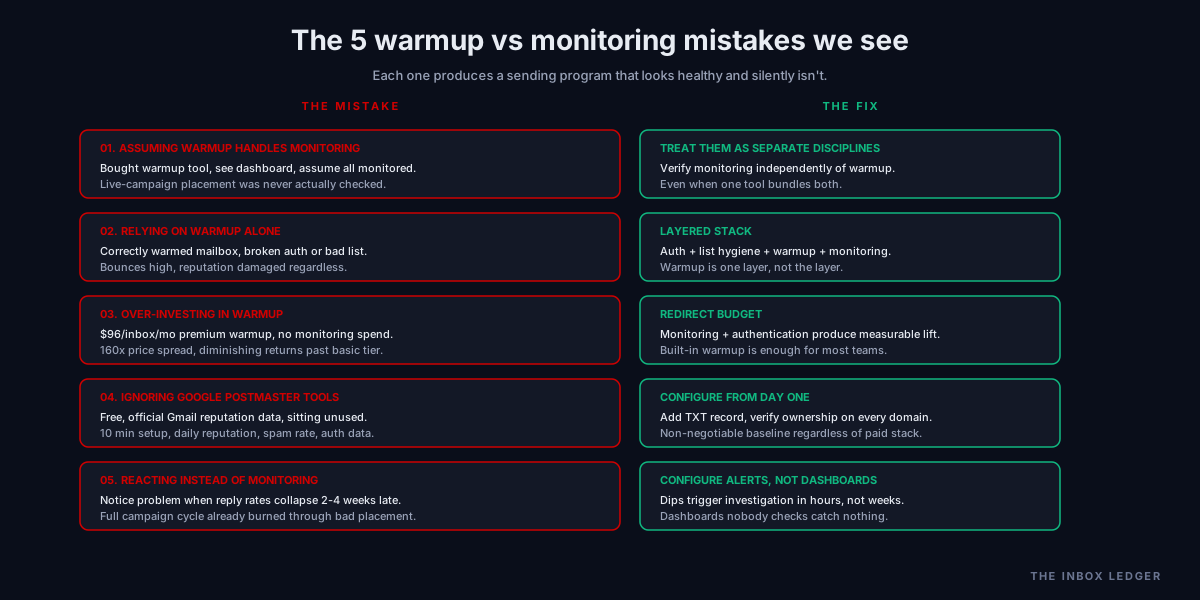
Five patterns we see most often when teams pick between warmup and email deliverability monitoring:
1. Assuming warmup handles monitoring
The most common mistake. Team buys a warmup tool, sees the dashboard, assumes everything is being monitored, then discovers weeks into a campaign that warmup was running but live-campaign placement was never checked. The fix is treating warmup and monitoring as two separate disciplines that need separate verification, even when the tool bundles them.
2. Relying on warmup alone
Warmup builds reputation before sending; it does not catch problems during sending. A correctly warmed mailbox with broken authentication or a bad list still produces high bounces and damages reputation. The fix is the layered stack: authentication first (see the SPF DKIM DMARC setup guide), list verification before every send (see the email hygiene guide), warmup before scaling, and monitoring continuously.
3. Over-investing in warmup
Teams paying $96 per inbox per month for premium warmup when their actual bottleneck is no monitoring, missing DMARC, or unverified lists. Independent tests show diminishing returns on warmup spend past the basic tier. The fix is redirecting budget to monitoring and authentication, which produce measurable lift where premium warmup often produces noise.
4. Ignoring Google Postmaster Tools
The free, official, canonical reputation data source for Gmail (the largest single inbox provider for B2B) sits unused on most sending domains. Configuring it takes 10 minutes and gives daily reputation, spam rate, authentication, and feedback loop data. The fix is configuring Postmaster Tools on every sending domain from day one, regardless of which paid monitoring tool you eventually add.
5. Reacting instead of proactively monitoring
Teams notice a deliverability problem when reply rates collapse, which is typically 2-4 weeks after the problem actually started. By then a full campaign cycle has burned. The fix is configuring alerts (in Postmaster Tools and in your paid monitoring tool) so reputation dips trigger investigation within hours rather than weeks.
The decision framework
The decision process we use when teams ask whether they need warmup, email deliverability monitoring, or both:
- Set up Google Postmaster Tools on every sending domain from day one. Free, official, takes 10 minutes. Non-negotiable baseline regardless of paid stack
- Identify the primary risk. New mailbox launching = warmup risk is higher. Established sender at volume = monitoring risk is higher. Both new and at scale = both risks
- Use the sending platform’s built-in warmup unless you have a specific reason not to. Smartlead, Instantly, and Lemlist warmup is adequate for most teams. Dedicated warmup tools matter for agencies, multi-domain operations, or recovery scenarios
- Layer paid monitoring at the volume threshold. Below ~1,000 cold sends per day, free monitoring (Postmaster Tools + MXToolbox) is usually enough. Above that, the cost of invisible deliverability problems justifies paid monitoring (Folderly, Mailreach, Warmy)
- Run authentication and list verification first. Both produce more measurable deliverability lift than either warmup or monitoring. Get SPF, DKIM, and DMARC correct and run lists through verification before any send
- Treat the two disciplines as a sequence, not alternatives. Warmup before launch, monitoring continuously after, both running together at scale
- Configure alerts, not dashboards. A dashboard nobody checks does not catch problems; an alert that fires within hours of a reputation dip does
- Budget proportionally to risk. Teams sending 50 emails per day need different infrastructure than teams sending 5,000. Right-size the stack to volume
The discipline that matters most: neither warmup nor email deliverability monitoring is a silver bullet. Both sit inside a larger sending stack that includes authentication, infrastructure, list hygiene, and sender reputation discipline. The teams that treat warmup or monitoring as the deliverability solution rather than as components of a larger system get the same poor outcomes regardless of how much they spend on either.
How warmup and monitoring fit the broader stack
Both disciplines sit inside the broader cold email and deliverability stack:
- Infrastructure (the cold email infrastructure guide covers secondary domains, mailboxes, and the foundation underneath everything)
- Authentication (the SPF DKIM DMARC setup guide and DMARC policy guide cover the records that determine whether mail authenticates)
- Warmup (this article and the email warmup tools guide cover pre-send reputation building)
- List hygiene (the email hygiene guide covers verification before every send)
- Sender reputation (the sender reputation guide covers the reputation layer warmup builds and monitoring tracks)
- Deliverability monitoring (this article covers post-send visibility and the tools that provide it)
- Sending platform and sequencing (the best cold email software guide and the instantly vs smartlead comparison cover the platforms)
- Operational discipline (the cold email deliverability checklist and the how to improve email deliverability guide cover the ongoing work)
The teams that get deliverability right run all eight layers; the teams that struggle pick one or two and assume the rest will handle themselves. Warmup and email deliverability monitoring matter, but they matter as components of a system, not as substitutes for the full stack.
For the broader operational baseline, see the email deliverability pillar, the cold email deliverability checklist, and the sender reputation guide. For the prospecting context that feeds into these disciplines, see the email finder tools guide and the email enrichment guide.
Frequently asked questions
What is the difference between email warmup and email deliverability monitoring?
Do I need both warmup and email deliverability monitoring?
Is email warmup necessary in 2026?
What is the best email deliverability monitoring tool?
How much does email deliverability monitoring cost?
Can warmup tools cause deliverability problems?
Should I use Google Postmaster Tools?
The bottom line on email deliverability monitoring vs warmup
Email warmup and email deliverability monitoring are two separate disciplines that solve different problems and belong in different parts of a sending program. Warmup is the pre-send work of building reputation before you scale; email deliverability monitoring is the post-send visibility that tells you whether reputation is staying healthy under live load. Treating them as alternatives produces teams that run warmup, assume deliverability is handled, and discover too late that they were landing in spam the whole time.
The teams we work with that get deliverability right run both, in proportions matched to their stage. New mailboxes need heavy warmup and basic monitoring (Google Postmaster Tools as the free baseline). Established senders at volume need light warmup and heavy monitoring. Agencies need both at scale, usually through bundled tools. And critically, none of this matters without the layers underneath: authentication, infrastructure, and list hygiene produce more measurable deliverability lift than either warmup or monitoring alone. The discipline that separates programs that consistently land in inboxes from programs that constantly fight fires is treating warmup and monitoring as components of a complete stack rather than as the stack itself.
For the broader operational picture, see the email deliverability pillar, the cold email deliverability checklist, and the sender reputation guide. For the infrastructure that sits beneath all of it, see the cold email infrastructure guide.
Subscribe to the weekly briefing for operator-grade deliverability and sending notes, one short email every week.
More on Deliverability
Email blacklist removal 2026: the operator playbook
Email blacklist removal in 2026: diagnose the root cause first, identify the tier, delist in the right order, prevent re-listing. The full playbook.
Spam complaint rate 2026: the 0.3% operator playbook
Spam complaint rate in 2026: the 0.3% threshold explained, why ESP dashboards underreport, the five drivers of complaints, and the recovery playbook.
DMARC policy: when to move from p=none to quarantine
DMARC policy in 2026: when to move from p=none to quarantine to reject, how to read dmarc reports, and what to avoid breaking on the way there.