Cold email deliverability: the 47-point checklist we audit
The 47-point cold email deliverability checklist we use on every audit in 2026. Authentication, reputation, list quality, content, and behavior.
Cold email deliverability is decided by a small set of measurable signals, and almost every campaign that lands in spam is failing at least three of them. The list below is the same one we work through on every audit. It is built around how mailbox providers actually decide what to deliver in 2026, not what looked correct three years ago. Run it top to bottom on your setup once a quarter, and the kinds of “why are we suddenly in spam” surprises that derail campaigns largely stop happening. If your goal is to improve cold email deliverability and lift cold email inbox placement above the industry average, this is the framework.
This is the long version of the 47-point cold email deliverability checklist we reference inside our email deliverability pillar guide. Each item below has the specific threshold, the tool to check it with, and the failure mode it catches.
How to use this cold email deliverability checklist
Run all 47 checks in order. Earlier items mask later ones, so do not skip ahead. Score one point per check that passes. A proper cold email deliverability audit takes 60 to 90 minutes the first time you run it; subsequent quarterly re-audits go faster. The thresholds we use:
- 40 to 47 of 47: Healthy sending program. Quarterly re-audit is enough. Strong cold email deliverability foundation.
- 35 to 39 of 47: Marginal. Active risks exist. Fix the failing items inside a month.
- 30 to 34 of 47: Likely seeing inbox placement issues already. Stop sending at scale until the gap is fixed.
- Below 30: Active reputation damage. Treat as a crisis. See the triage section at the bottom.
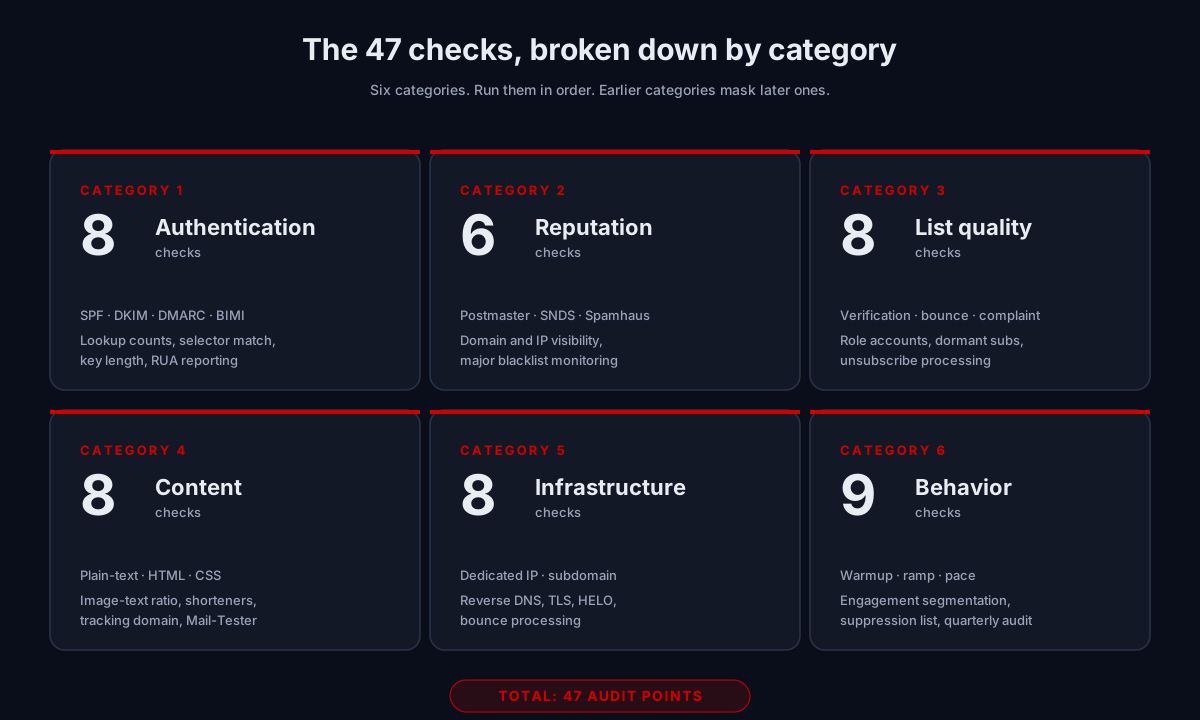
The categories below mirror the five pillars covered in the deliverability guide: authentication, sender reputation, list quality, content signals, infrastructure, and sending behavior. We split sender reputation and infrastructure into their own sections here because the operator checks for each are different even though they map to one pillar conceptually.
Authentication (8 checks)
If your authentication is wrong, nothing downstream matters. Mailbox providers in 2026 treat unauthenticated bulk mail as either spam or refuse to accept it. Google and Yahoo’s February 2024 sender requirements and Microsoft’s May 2025 expansion now apply to any domain sending 5,000+ messages per day. Authentication is the non-negotiable foundation of cold email deliverability.
1. SPF record present
Run a dig TXT yourdomain.com or use a DNS inspector. Exactly one SPF TXT record should exist. Multiple SPF records on the same domain cause permerror. None means SPF fails by default.
2. SPF aligns with the From domain
The MAIL FROM (envelope sender) domain must match or be a subdomain of the visible From header for SPF alignment to pass DMARC. Misalignment here is a frequent post-migration bug.
3. SPF lookup count under 10
RFC 7208 caps SPF processing at 10 DNS lookups per evaluation. Every include: counts, and nested includes count further. Check the total with MXToolbox SPF Lookup. Above 10 = permerror = every message effectively unauthenticated.
4. DKIM record present and resolving
Look up the DKIM selector your sending platform claims to use. Confirm a TXT record exists at selector._domainkey.yourdomain.com. The most common DKIM failure mode is the platform signing with a selector that does not resolve in DNS, usually after a migration.
5. DKIM selector matches sending platform
Send a test message to a personal Gmail account and inspect the original headers. The Authentication-Results line will show the DKIM selector your mail actually used. Confirm it matches the DNS record published.
6. DKIM key length is 2048-bit or stronger
1024-bit keys still work technically but are deprecated. Several enterprise filters now soft-fail them. Rotate to 2048-bit minimum. Some senders run 4096-bit; 2048 is the practical standard.
7. DMARC record present with at least p=none
Without a DMARC record, none of the SPF and DKIM work gets reported back to you, and full enforcement at the receiving end is weakened. Start at p=none with RUA reporting enabled.
8. DMARC aggregate (RUA) reporting configured
Add a rua= tag to the DMARC record pointing to an aggregator. This is the only way to see who is sending mail “from” your domain, including legitimate sources you forgot about. Without RUA reporting, the DMARC migration ramp is impossible to run safely.
Sender reputation (6 checks)
Reputation is the slowest-moving signal in cold email deliverability. It is built across weeks of disciplined sending and damaged in a single bad campaign. These six checks confirm you can actually see your reputation signals rather than guessing. If you cannot see them, you cannot manage them.
9. Google Postmaster Tools configured
Verify your sending domain at postmaster.google.com. Check the Domain Reputation, IP Reputation, Spam Rate, Authentication, and Encryption panels daily during active sending, weekly otherwise.
10. Microsoft SNDS configured
Sign up at sendersupport.olc.protection.outlook.com/snds for the Microsoft ecosystem (Outlook.com, Hotmail, Exchange Online tenants with Microsoft filtering). The interface is dated; the data is real.
11. Domain not on Spamhaus
Check both Spamhaus SBL and XBL. If listed, follow the specific delisting process. Spamhaus is the single most consequential blacklist; being listed kills inbox placement at most major providers simultaneously.
12. Sending IP not on Spamhaus
For dedicated IPs only. Shared IPs from reputable ESPs are usually clean but worth checking quarterly anyway. Same delisting process if listed.
13. Domain not on SURBL
SURBL catches URLs and domains used in spam content. Check via MXToolbox blacklist lookup.
14. Sending IP not on SORBS or SpamCop
Less critical than Spamhaus but still tracked by many corporate filters. Re-check quarterly. Newer IPs that have been used by spammers in their past life sometimes carry historical listings.
List quality (8 checks)
This is where most senders bleed cold email deliverability. List quality fails are usually invisible from the sending platform’s dashboard, which is why senders keep being surprised by them. The 2026 thresholds that actually matter:
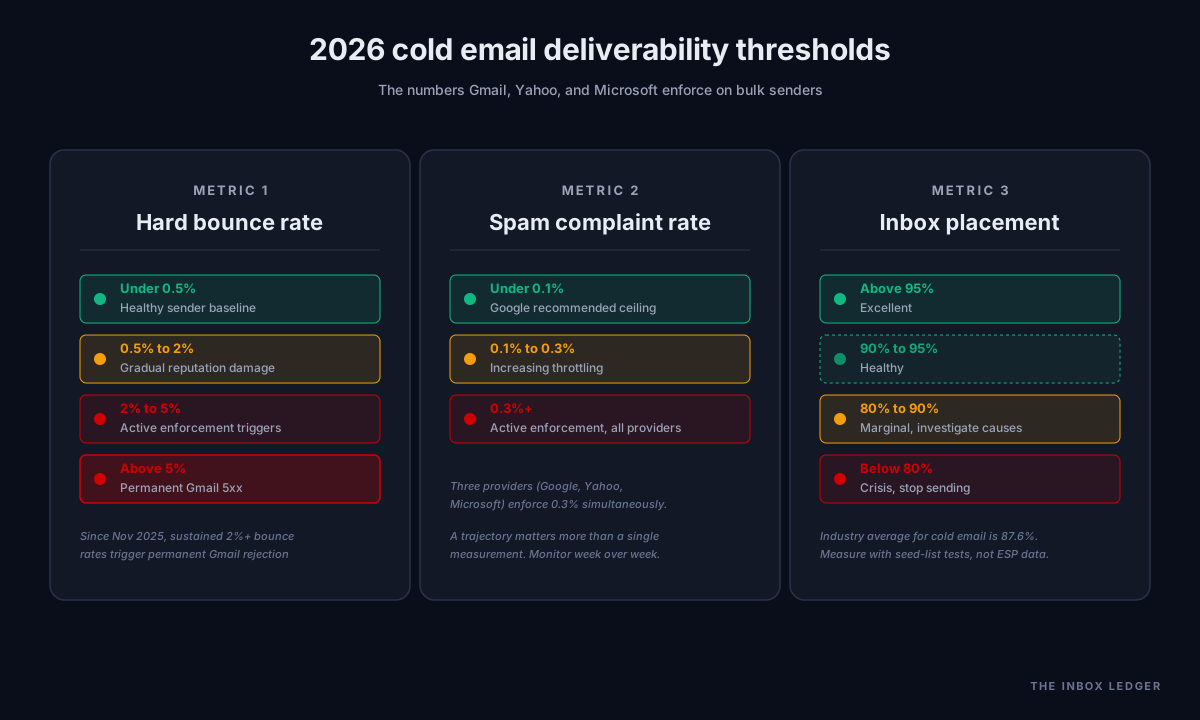
- Bounce rate: any single send above 2% triggers reputation damage. Sustained bounce rates above 2% can trigger permanent 5xx rejections from Gmail entirely (since November 2025).
- Spam complaint rate: Google recommends staying below 0.1 percent. The hard enforcement threshold is 0.3 percent. Microsoft applies similar rules since May 2025.
15. List verified within the last 30 days
B2B email lists decay at roughly 25 to 28 percent per year. A list verified six months ago is meaningfully degraded. Re-verify before every major send. Verification before a campaign is much cheaper than reputation repair after one.
16. Hard bounce rate under 0.5 percent on the last 5 sends
The 2 percent threshold is the “stop everything” line. The 0.5 percent threshold is the “looks healthy” line. Senders consistently above 0.5 percent are accumulating gradual reputation damage even if no single send crosses the danger threshold.
17. Spam complaint rate under 0.1 percent
Google recommends keeping the cold email spam rate below 0.1 percent. Above 0.3 percent and Gmail, Yahoo, and Microsoft all start punishing the sender simultaneously. Trend matters more than the single number; a program at 0.08 percent climbing 10 percent month over month is heading for enforcement.
18. No role accounts in list (or fully segregated)
info@, sales@, admin@, support@. High complaint rates, frequently blocked outright by some corporate filters. If you must email them, segregate to a separate sending subdomain so any damage is isolated.
19. No catch-all addresses without verification
Catch-all domains accept mail to any address. Sending to unverified catch-alls produces invisible bounces that some providers count anyway. Verify or exclude.
20. No purchased or scraped data without verification
Bought lists are reputation poison. Scraped data is slightly better but still high-risk. If you must use scraped contacts (Apollo, ZoomInfo, scraped Sales Navigator exports), every address must pass a fresh verification pass before sending. Skip the verification and you will see 7 to 9 percent bounce rates on the first campaign.
21. Re-engagement campaign run on dormant subscribers
Sending to subscribers who have not opened in 90+ days erodes domain reputation steadily. Run a separate re-engagement campaign on a separate sub-domain so any damage stays contained. Remove the ones who never re-engage.
22. Unsubscribes processed within 24 hours
RFC 8058 one-click unsubscribe is now required for bulk senders. Removal must happen inside two days, ideally inside 24 hours. Delayed unsubscribe processing is the single most common reason for sudden spam complaint spikes.
Content (8 checks)
Modern spam filters use machine learning that is essentially a black box. We cannot tell you exactly what triggers them. We can tell you which content signals consistently move cold email deliverability in production, audit after audit.
23. Plain-text version included alongside HTML
Multipart MIME with both text/plain and text/html is expected by all major filters. HTML-only mail is a weak signal toward spam. Most ESPs add the plain-text version automatically; verify yours does.
24. Inline CSS only
External stylesheets do not work in email clients. Use inline CSS exclusively. Test renders in Mail-Tester or equivalent before sending at scale.
25. No <style> blocks targeting older clients
<style> blocks in the document head are stripped by Gmail and Outlook web. Inline everything. Keep the <head> minimal: title only.
26. Image-to-text ratio under 40 percent by area
Image-only emails and emails dominated by one big image get filtered hard. Aim for 60/40 text-to-image minimum by visible surface area. The visible body should read as prose even with images disabled.
27. No URL shorteners
bit.ly, tinyurl, and similar are heavily abused by spammers and weighted negatively by most filters. Use your own tracking domain with a CNAME pointing to your ESP’s link tracker, or no shortener at all.
28. Custom tracking domain configured (CNAME to ESP)
A custom tracking domain like track.yourdomain.com looks legitimate. The default ESP tracking domain (often tools.yourcoldemailtool.com) does not. Custom tracking domains protect open and click tracking from being flagged as suspicious links.
29. No hidden text or invisible content
Hidden divs, white-on-white text, font sizes below 4 pixels. Filters scan for these and weight them as spam signals. Modern templates rarely include them; legacy templates sometimes do.
30. Mail-Tester score above 9.5 on a representative send
Mail-Tester gives a 0 to 10 score based on authentication, content signals, and content quality. Anything below 9.5 has fixable issues. Run before every major campaign launch.
Infrastructure (8 checks)
These are the foundational sending-stack decisions that shape cold email deliverability long-term. Most are set-and-forget; some require quarterly review.
31. Dedicated IP if sending volume justifies it
The threshold where dedicated IPs help (rather than hurt) is roughly 50,000 messages per month sustained. Below that volume, a shared IP from a reputable ESP usually outperforms a dedicated IP because the shared IP already has established reputation. Above that volume, dedicated IPs let you control reputation directly.
32. Subdomain used for sending (not root domain)
Send marketing and cold email from a dedicated subdomain like mail.yourdomain.com or outreach.yourdomain.com. Sending from the root protects nothing; sending from a subdomain isolates any reputation damage from your transactional and root domain mail.
33. Sending subdomain has its own SPF, DKIM, DMARC
Subdomains do not inherit parent-domain authentication automatically. Each sending subdomain needs its own complete authentication setup. Confirm with a test message from the subdomain.
34. Reverse DNS (PTR) configured for sending IP
The PTR record maps your sending IP back to a hostname. Most corporate filters check this and treat missing PTR as a spam signal. Required for dedicated IPs; usually handled automatically by reputable shared-IP ESPs.
35. PTR matches forward DNS
PTR alone is not enough. The hostname the PTR returns must itself resolve forward to the same IP. Mismatches between forward and reverse DNS are treated as suspicious by enterprise filters.
36. HELO/EHLO greeting matches sending hostname
The hostname your sending server announces during SMTP handshake should match the PTR hostname and the actual sending domain. Mismatches here are an old but still-active spam signal.
37. TLS enabled for outbound
Opportunistic TLS (STARTTLS) on outbound mail is now standard. Plain-text SMTP is treated as a weak signal toward spam by most major filters. Confirm your ESP has STARTTLS enabled by default.
38. Bounce processing configured
Hard bounces must be captured and added to a suppression list automatically. Sending to known-bouncing addresses on subsequent campaigns is a fast way to accumulate the kind of programmatic bouncing that damages reputation.
Sending behavior (9 checks)
The behavioral signals mailbox providers use to distinguish legitimate senders from spammers. These nine items have the biggest day-to-day impact on cold email deliverability, and they are the easiest to neglect because they require ongoing discipline rather than a one-time setup.
39. New IPs and domains warmed before full volume
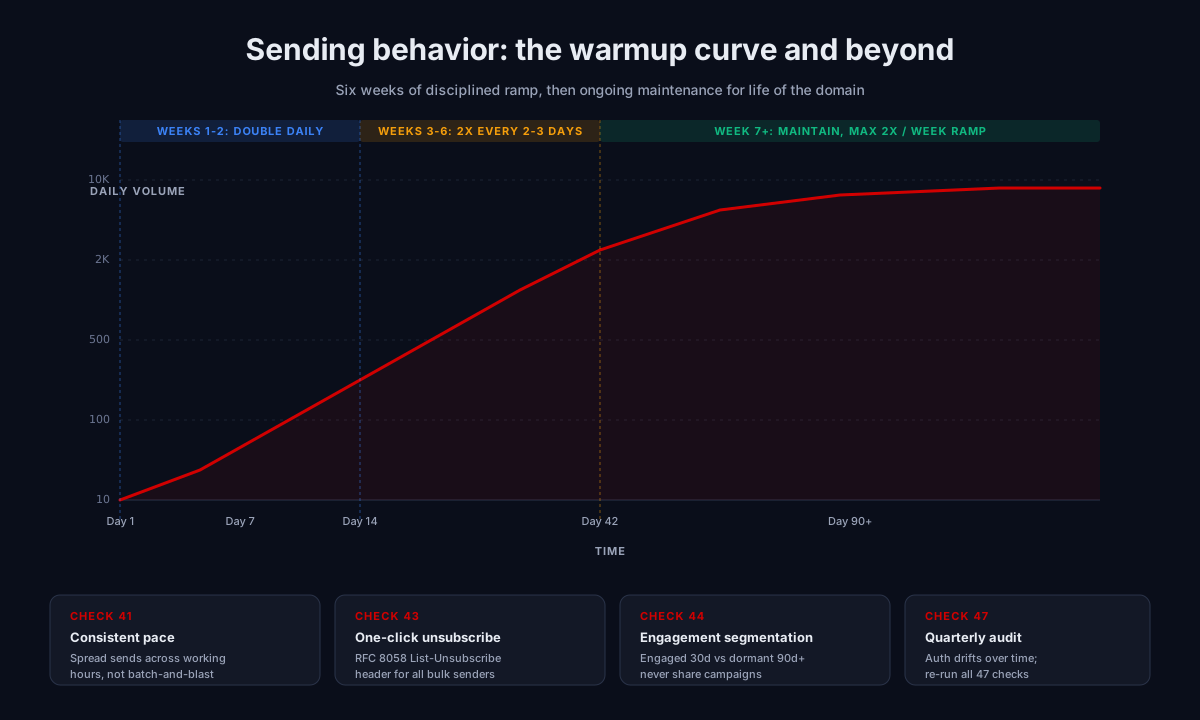
The classic warmup curve doubles daily in week 1 (10, 20, 40, 80, 160, 320, 640), then doubles every 2 to 3 days, with target full volume around week 4 to 6. New domains carry a “new sender penalty” that does not lift until consistent engagement is established for at least 90 days.
40. Volume ramp under 2x per week post-warmup
Once warmed, sudden volume increases still trigger flags. If you normally send 5,000 per day and want to push 25,000, ramp over a week. Doubling is the safe maximum; 5x in a single day reliably trips spam filters.
41. Sending pace consistent (not batch-and-blast)
A campaign dumped 100,000 messages at 9 a.m. reads as “spammer behavior” to most filters. The same 100,000 spread across the working hours of relevant time zones reads as “operator behavior.” Most modern ESPs do this automatically; cold email tools sometimes do not.
42. Unsubscribe link visible and one-click compliant
The unsubscribe link must be visibly present in every marketing message, not hidden in light gray at the bottom. One-click compliance per RFC 8058 is required for bulk senders. Both the visible link and the header-based one-click should work.
43. List-Unsubscribe header set (RFC 8058 one-click)
The List-Unsubscribe-Post: List-Unsubscribe=One-Click header plus a List-Unsubscribe URL header. Gmail and Yahoo now require this for bulk senders. Without it, the visible unsubscribe is not enough.
44. Engagement-based segmentation in place
Your most engaged segment (opened in last 30 days) and your dormant segment (no engagement in 90+ days) should not receive the same campaigns. Send to engaged contacts at full volume; either suppress dormant ones or run them through a quarantined re-engagement track on a separate subdomain.
45. Suppression list maintained across campaigns
A single global suppression list that catches unsubscribes, hard bounces, and spam complaints across all campaigns. Without this, you re-introduce the same problem addresses on every new campaign launch.
46. Bounce-back loop processed
When an address bounces, it must be added to suppression before the next send. Some legacy ESPs only process bounces at campaign close, allowing the same bad address to bounce repeatedly inside one campaign and amplify the damage.
47. Quarterly authentication audit scheduled
Authentication drifts. New tools get added (your SPF lookup count grows). Old tools get removed (orphan includes pile up). DKIM keys expire if rotation is not automated. A quarterly audit catches drift before it turns into a deliverability problem.
What to do if you scored under 30
If you ran through this cold email deliverability checklist and scored under 30, you have an active cold email deliverability problem and continued sending will only make it worse. The triage order:
- Stop sending at full volume immediately. Whatever is happening will compound.
- Fix authentication first. Items 1 through 8. Most of these are configuration; fixing takes hours, not weeks.
- Check blacklists (items 11 to 14). If you are listed, delisting takes priority over everything else.
- Pull Google Postmaster Tools. If reputation shows Bad or Low for the domain, you have a behavioral problem (list quality, sending pace, content) that needs the slow fix.
- Verify your list. Items 15 to 22. A fresh verification pass usually removes 5 to 15 percent of an old list and stops the bleeding.
- Reduce volume by 80 percent for 7 days. Send only to engaged segments. Watch open and complaint rates.
- Resume normal volume only after Postmaster shows Medium or better.
The full version of this triage protocol is in the deliverability pillar guide. If you would rather not run it yourself, the deliverability consultant guide covers when bringing in outside help is the right move.
Frequently asked questions
What is a good cold email deliverability rate?
How often should I run this cold email deliverability checklist?
What is the maximum cold email spam rate before Gmail penalizes a sender?
What is the most common item that fails on this checklist?
How do I improve cold email deliverability fast?
Do I need a dedicated IP for cold email?
What is the difference between cold email deliverability and inbox placement?
Where to go next
Once you have run the checklist and identified your failing items, three options for fixing them:
- Fix it yourself. Each of the 47 items above has a specific tool and threshold. Work through the failing ones in order. Most authentication fixes take hours; list quality fixes take days; reputation repair takes weeks of disciplined sending.
- Read the deeper material. The email deliverability pillar guide covers each pillar in operator-grade depth. The email authentication category covers SPF, DKIM, DMARC, and BIMI individually.
- Get help. If your score is under 35 and continued sending matters more than the cost of expertise, the deliverability consultant guide explains when bringing in outside help is the right move and what fair pricing looks like.
Subscribe to the weekly briefing for cold email deliverability deep-dives, sender reputation case studies, and tool comparison reports.
More on Deliverability
Email blacklist removal 2026: the operator playbook
Email blacklist removal in 2026: diagnose the root cause first, identify the tier, delist in the right order, prevent re-listing. The full playbook.
Email deliverability monitoring vs warmup: 2026 guide
Email deliverability monitoring vs warmup in 2026: what each does, when you need both, and why monitoring is non-negotiable post-enforcement.
Spam complaint rate 2026: the 0.3% operator playbook
Spam complaint rate in 2026: the 0.3% threshold explained, why ESP dashboards underreport, the five drivers of complaints, and the recovery playbook.