Cold email follow up: the 2026 sequence that gets replies
How to structure a cold email follow up sequence in 2026: number of touches, timing, what each message should say, and the deliverability rules.
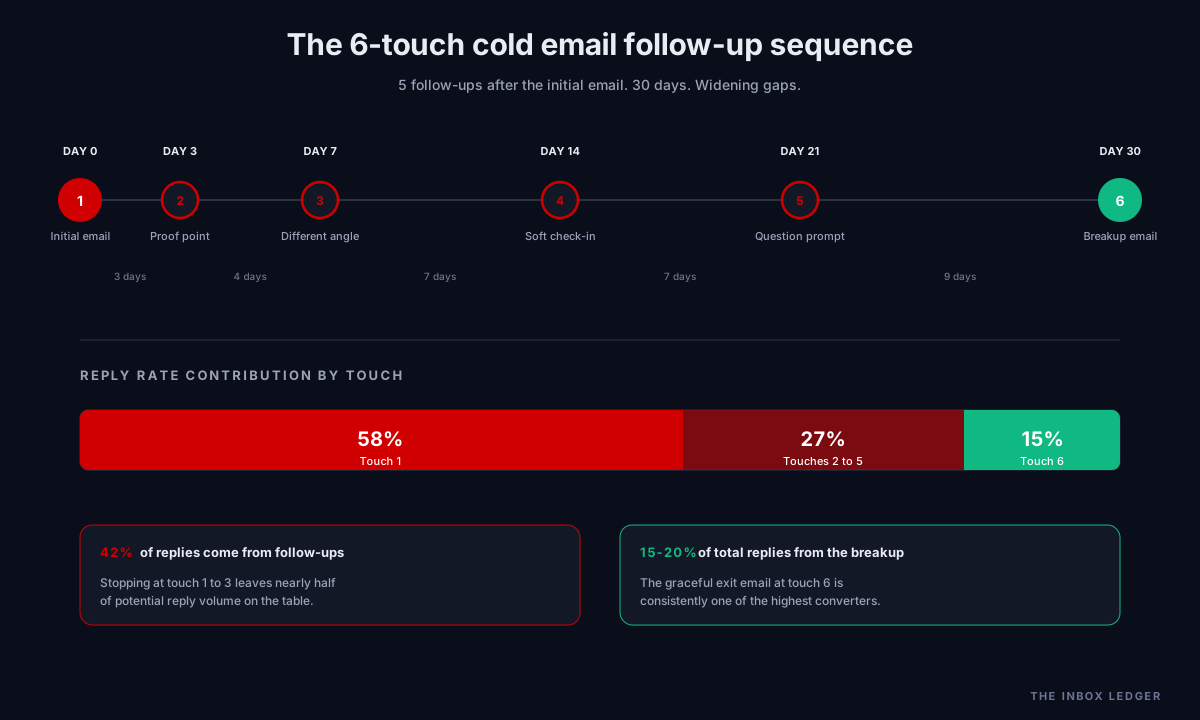
The cold email follow up is where most of the reply volume actually comes from. Industry data from the Instantly 2026 benchmark report shows 58 percent of replies come from the first email and the remaining 42 percent comes from follow-ups, which means campaigns that stop after one or two touches are giving up almost half their potential pipeline. The pattern is consistent across every benchmark report from 2026: campaigns with 4 to 7 touches achieve roughly 3x the reply rate of single-touch campaigns.
But this is not a “send more follow-ups” article. Volume without structure is what creates spam complaints, damages sender reputation, and gets you blocked. The cold email follow up sequence that actually works in 2026 is built around three things working together: the right number of touches, the right spacing between them, and a value angle in every single message that earns the reply rather than asking for it.
How many cold email follow ups should you actually send
The right answer for B2B in 2026 is 5 to 7 touches over 25 to 35 days. Stop earlier and you miss replies that would have come on touches 3 through 6. Push past 8 touches and you start generating spam complaints and unsubscribes faster than incremental replies.
Some context for how many cold email follow ups specifically:
- 1 to 3 touches: ~9 percent total reply rate. Most teams stop here, and most teams are leaving meetings on the table.
- 4 to 7 touches: ~27 percent total reply rate. Triple the response of shorter sequences.
- 8+ touches: diminishing returns. Risk of spam complaints climbs faster than incremental reply rate.
The exact count depends on segment. SMB targets respond to tighter sequences (4 to 5 touches over 14 to 21 days). Enterprise targets justify longer cadences (7 to 10 touches over 45 to 60 days) because the decision involves more stakeholders and longer purchasing cycles.
The cold email follow up timing pattern
The cold email follow up timing rule that consistently works in 2026 is the widening gap pattern: start with shorter intervals when interest is still warm, then widen as the sequence progresses. The exact spacing we recommend:
- Day 0: Initial email
- Day 3: Follow-up #1
- Day 7: Follow-up #2
- Day 14: Follow-up #3
- Day 21: Follow-up #4
- Day 30: Follow-up #5 (the breakup email)
This pattern works because of how attention decays. The prospect who saw your first email and almost replied is still in your sequence window at day 3. The prospect who needs to forward you to a colleague has enough breathing room. And the prospect who has not engaged after 30 days is statistically very unlikely to engage at day 45.
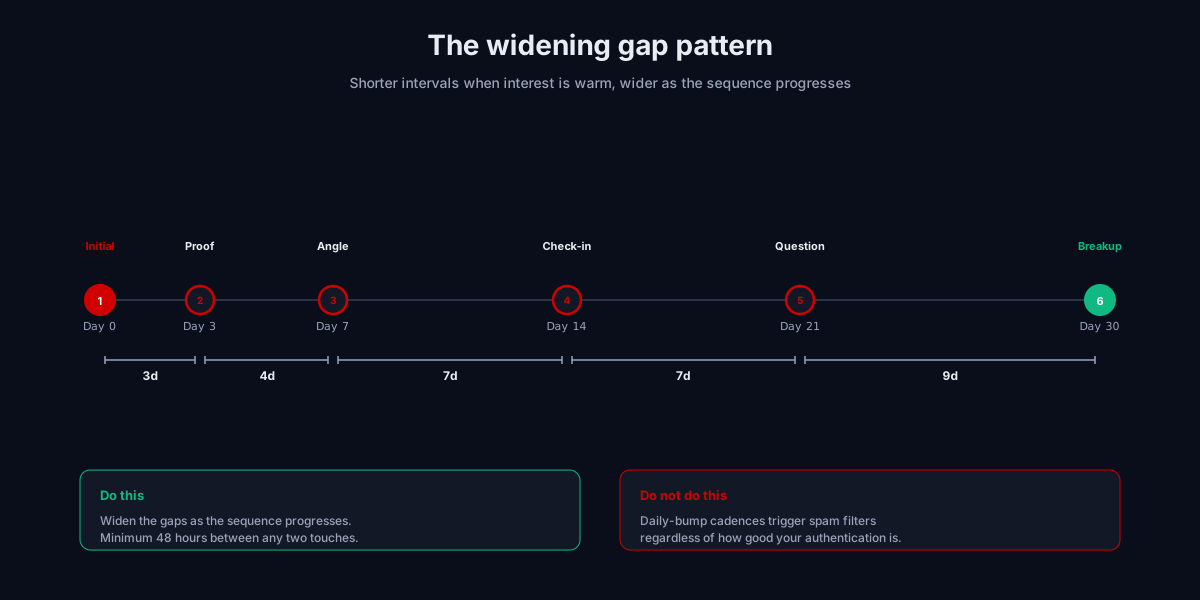
What absolutely does not work in 2026 is the daily-bump pattern that was common in 2020 to 2022. Sending follow-ups every 24 hours reads as robotic to modern mailbox provider filters and triggers spam treatment regardless of how good your authentication is. The minimum gap between touches is 48 hours; 72 hours is safer.
The angle for each cold email follow up
Repeating the same message with “just bumping this” is the fastest way to train prospects to ignore you and to train spam filters to suppress your domain. Every follow-up needs to add something new. The framework we use across audits is one distinct angle per touch.
Touch 1 (Day 0): the value-first opener
Short. Under 75 words. References a specific signal (funding round, leadership change, technology adoption, hiring trigger) that explains why you are reaching out to this person specifically. Ends with a low-friction CTA: “worth a 15-minute conversation?” not “let me know what time works best for a demo.”
Touch 2 (Day 3): the proof point
This is your shortest email in the sequence. Three to four sentences max. The angle: a concrete result from a comparable company. Not “we drove 40 percent more pipeline” (generic), but “[similar-stage company] in your space saw [specific outcome] after fixing [specific problem].” If you cannot name a comparable company specifically, this touch should be a different angle.
Touch 3 (Day 7): the different angle
Switch the framing entirely. If touch 1 led with the problem, touch 3 leads with a tactical insight. Reference industry data, a benchmark, or a piece of original research. The point is to position yourself as a useful thinker, not a vendor.
Touch 4 (Day 14): the soft check-in with new value
This is the touch where most senders get lazy and send “just checking in.” Resist it. Instead: “Quick note - just published [content piece] on [topic], thought it might be useful given [context]. No need to reply.” Linkable, value-driven, easy to ignore without guilt. The reply rate on these is typically higher than on aggressive asks.
Touch 5 (Day 21): the question-as-prompt
Reframe as a question that demonstrates you understand their situation. “Curious whether [specific decision] is something your team is evaluating in [timeframe].” Even prospects who do not want to talk often respond to a relevant question. The cold email follow up template here works best at 2 to 3 sentences total.
Touch 6 (Day 30): the breakup email
The breakup email is consistently one of the highest-converting touches in the sequence, often producing 15 to 20 percent of total replies despite being the last touch. The angle: graceful exit. “Looks like the timing is not right for [topic] - happy to circle back in [3 to 6 months]. If something changes before then, here is my direct line.” No guilt, no pressure, no “I have sent you three emails and never heard back.” Just an honest acknowledgment that the conversation may not be relevant right now.
The deliverability rules that constrain follow-up volume
This is where most cold email follow up advice falls apart. The follow-up cadence you can run is constrained by what your sending infrastructure can absorb without triggering spam treatment. Three numbers from Google’s bulk sender requirements, expanded by Microsoft’s May 2025 enforcement update, that hard-constrain follow-up strategy:
-
Spam complaint rate above 0.3 percent: Gmail, Yahoo, and Microsoft all start filtering or rejecting your mail. The practical operating ceiling is 0.1 percent. Aggressive follow-up cadences with weak personalization blow through this fast.
-
Hard bounce rate above 2 percent: triggers reputation damage immediately. Since November 2025, sustained bounces above 2 percent can trigger permanent 5xx rejections from Gmail. Following up on a list that has not been verified in 90+ days is the most common way to hit this.
-
One-click unsubscribe: required by RFC 8058. The
List-Unsubscribe-Postheader plus visible link. Without this, prospects who want out hit “Report Spam” instead.
If you are running cold email at any meaningful volume, the cold email follow up sequence is part of your deliverability strategy, not separate from it. The teams we audit who run clean follow-up sequences also have clean deliverability. The ones who don’t, don’t.
For the complete deliverability framework, see our 47-point cold email deliverability checklist. The 9 fastest interventions are in our guide on how to improve email deliverability.
The per-mailbox volume math behind your cold email follow up sequence
This is the section most cold email follow up guides skip entirely, and it is the calculation that determines whether your sequence is even physically possible to send safely. Sequence length and list size together create a sending-volume requirement that your infrastructure has to absorb without triggering spam filters. Most senders get the math wrong and end up either burning mailboxes or quietly missing touches because the platform throttled them.
The base equation
For any cold email follow up sequence, the total send volume is:
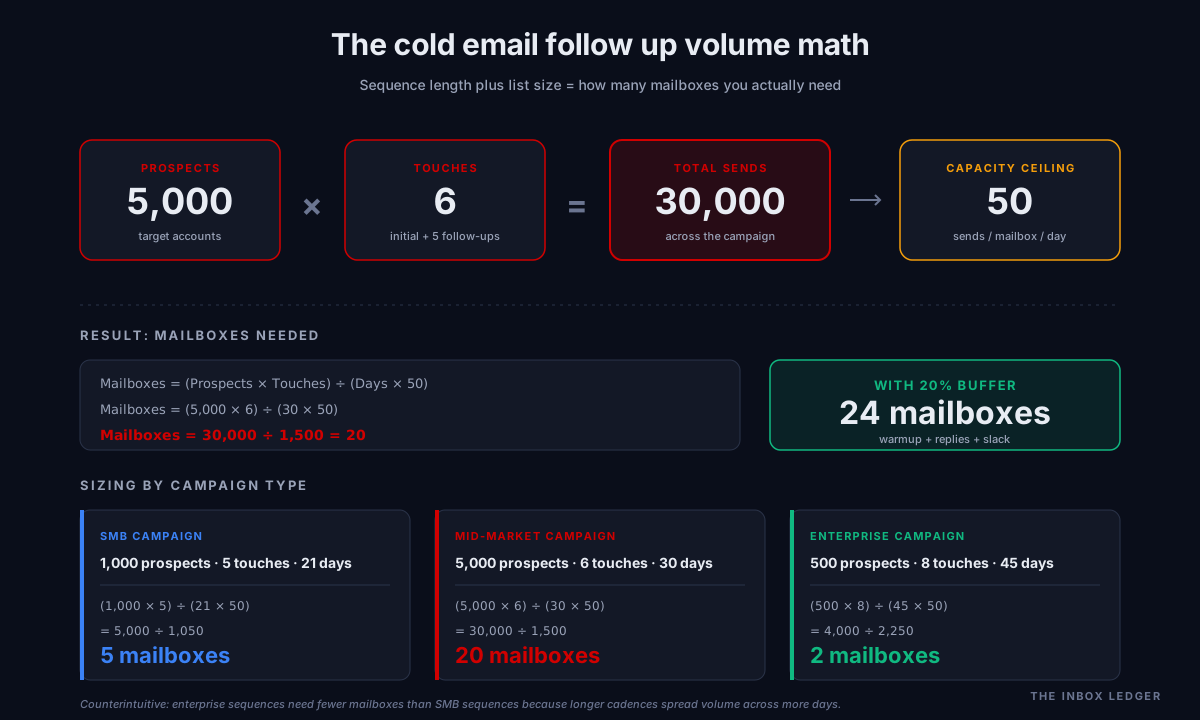
Total sends = Number of prospects × Number of touches
A 6-touch sequence to 5,000 prospects is 30,000 sends. That part is obvious. What is less obvious is how that volume needs to distribute across mailboxes and days to land each touch on the right day without exceeding per-mailbox limits.
The 50-per-mailbox-per-day rule
The safe sending ceiling in 2026 for a Google Workspace or Microsoft 365 mailbox doing cold outreach is 50 messages per mailbox per day. Some senders push to 75 or 100 with established reputation; some platforms recommend lower. The 50 number is the operating ceiling that consistently avoids triggering provider throttles, complaint thresholds, or pattern detection on cold outreach. It is not a hard technical limit; it is the line where reputation stays safe.
The math from there:
- 30,000 sends ÷ 50 per mailbox per day = 600 mailbox-days of sending capacity required
- Over a 30-day sequence window, that means 20 mailboxes running every day for 30 days
- Add 20 percent buffer for warmup volume, replies, and operational slack = 24 mailboxes
If you only have 5 mailboxes available, the same 5,000-prospect campaign would take 120 days to complete instead of 30. That stretches the sequence past the point where touches are still relevant, and replies decline accordingly.
What happens when senders ignore the math
The three failure modes we see most often on audits:
Failure 1: Stuffing more sends per mailbox. The team has 5 mailboxes available, ignores the 50-per-day ceiling, and pushes 200 per mailbox per day to keep the sequence on schedule. Within 2 to 3 weeks, those mailboxes hit Gmail’s bulk sender thresholds and start landing in spam. The campaign appears to work for the first 10 days, then collapses.
Failure 2: Skipping touches when capacity runs out. The platform queues messages because the per-mailbox limit is reached, and instead of failing loudly, it silently drops touches that fall outside the window. The sequence completes but with 3 of the 6 touches actually delivered to most prospects. This is the most common cause of campaigns that “should have worked” producing thin reply rates.
Failure 3: Compressing the cadence. The team realizes the math does not work, so they shorten the sequence to fit available capacity. Day 0, Day 1, Day 2, Day 3, Day 4. Five touches in a week. The compressed timing triggers spam filtering on top of the inadequate gaps. Both deliverability and reply rate suffer.
How to size mailbox capacity correctly
Three numbers you need before launching any cold email follow up sequence:
- Target prospect count for the campaign
- Total touches in the sequence (initial + follow-ups)
- Calendar days the sequence spans
The formula:
Mailboxes needed = (Prospects × Touches) ÷ (Days × 50)
For the example above: (5,000 × 6) ÷ (30 × 50) = 20 mailboxes minimum.
For a typical SMB sequence (1,000 prospects, 5 touches, 21 days): (1,000 × 5) ÷ (21 × 50) = 5 mailboxes.
For an enterprise sequence (500 prospects, 8 touches, 45 days): (500 × 8) ÷ (45 × 50) = 2 mailboxes (or even 1 with headroom).
Counterintuitive insight: enterprise sequences with their longer cadences often need fewer mailboxes than SMB sequences, because the volume is distributed across more days. SMB sequences with their tighter cadences need more infrastructure to support them safely.
Sequencing across multiple domains
If your campaign needs more than 5-6 mailboxes, distribute them across multiple sending subdomains rather than piling them onto one. A single subdomain sending from 20 mailboxes is a strong pattern signal to mailbox providers. Three subdomains with 6-7 mailboxes each look like normal multi-team sending.
The standard structure we recommend:
outreach.yourdomain.comfor the first 6-7 mailboxesteam.yourdomain.comfor the next 6-7connect.yourdomain.comfor the next 6-7
Each subdomain has its own SPF, DKIM, and DMARC. Each carries its own reputation. If one subdomain has a problem, the others keep delivering. This is the structural pattern behind every cold email follow up sequence we audit that scales past 5,000 prospects per month.
For the full infrastructure setup, see our guide on how to improve email deliverability under the subdomain section.
Cold email follow up template structure
A complete follow up email after no response from the prospect should hit these structural elements:
- Subject line: continues the existing thread (reply to your own email) for touches 1-3, then varies for touches 4-6 to avoid filter pattern detection
- Opening: references the specific context of why you are reaching out again. Never “just checking in”
- Body: 2 to 4 sentences max. New value, new angle, or new question
- CTA: low-friction in early touches, clear ask in middle touches, graceful exit in final touch
- Signature: short, professional, includes the one-click unsubscribe link
The structural mistake we see most often on audits is the third or fourth touch ballooning to 200+ words because the sender is trying to make the case all over again. Short messages convert better at every touch position. Brevity is a function of confidence; senders who write five-paragraph follow-ups read as desperate even when they are not.
What a complete cold email follow up sequence looks like
Putting it together, here is a 6-touch sequence with the angle and approximate length for each touch:
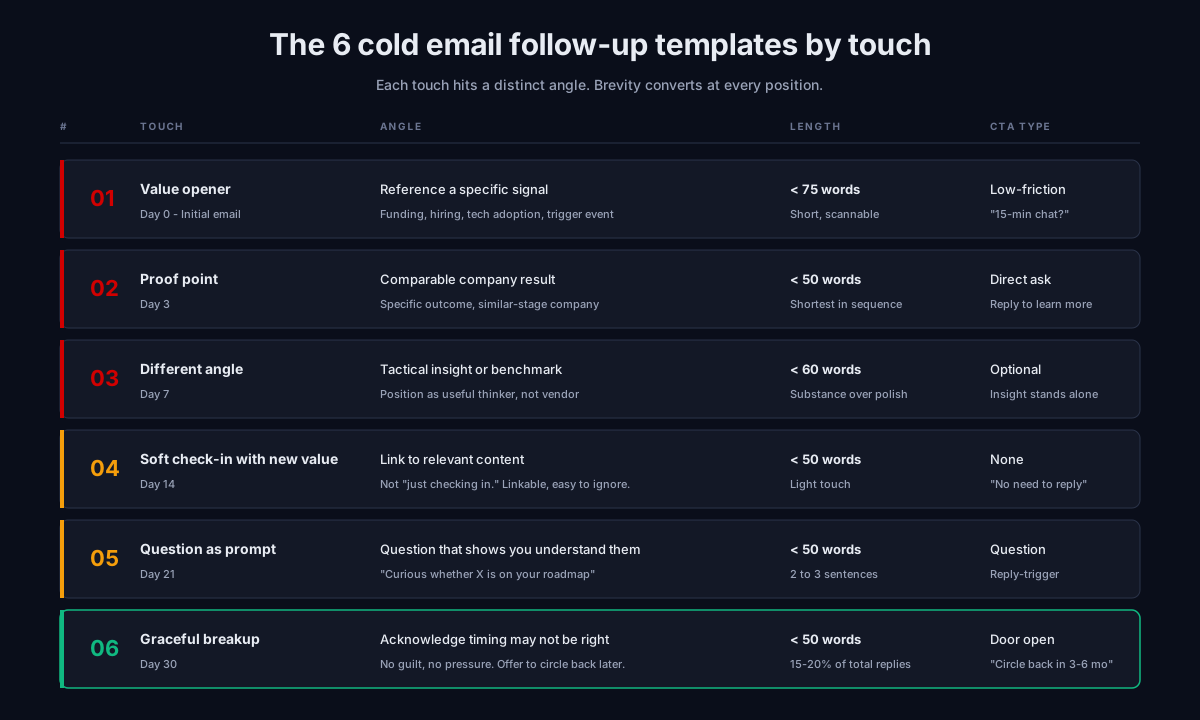
This is intentionally a framework, not pre-written copy. Pre-written cold email templates are now visible to mailbox providers across millions of sends; using a template verbatim (even a good one) gets pattern-detected and routed to spam. Use the framework, write the copy fresh for your specific ICP.
The 5 mistakes we see kill follow-up reply rates
Across the cold email programs we audit, the same 5 mistakes account for most of the underperformance:
1. Stopping after 2 or 3 touches
Roughly 60 percent of replies arrive after touch 2. Teams that stop at touch 3 capture maybe half of the available reply volume. The fix: commit to a 5 to 7 touch sequence as the default, not the exception.
2. Using the same message reworded
“Just bumping this”, “circling back”, “wanted to make sure this didn’t get buried.” Every prospect has seen these phrases hundreds of times. They train the prospect to delete on sight. The fix: a distinct angle for every touch, with a hard rule that no follow-up goes out unless it has something new to add.
3. Daily-bump cadences
Sending touch 2 the day after touch 1 reads as robotic and triggers spam filtering regardless of your authentication. The minimum gap is 48 hours, 72 is safer.
4. Identical subject lines on every touch
Either keep the thread (reply to your own previous email, same Re: subject) for the first 2 to 3 touches, or vary subjects entirely. The “FOLLOWING UP:” prefix added to every touch is now actively pattern-detected and lowers placement.
5. The guilt-trip breakup
“I have sent you 4 emails and have not heard back. I will assume you are not interested.” This makes the prospect feel bad, and guilt does not generate meetings. It generates unsubscribes. The breakup email should be graceful. Most of the time it actually books the meeting.
When to stop a sequence
The simple rule: if a prospect opens but never engages after 5 touches, they have seen you and chosen not to respond. Continuing past 7 touches in that scenario produces spam complaints at a rate that damages every other prospect in the sequence too.
Stop a sequence immediately when:
- The prospect replies with a clear negative or “unsubscribe”
- The prospect’s company has a relevant business change (acquisition, layoff, role change)
- Your bounce rate on the campaign crosses 2 percent
- Your spam complaint rate on the campaign crosses 0.1 percent
After completing a 5 to 7 touch sequence with no engagement, move the prospect to a quarterly “dormant” track. Many cold prospects re-engage 6 to 12 months later when their situation changes. A single thoughtful re-engagement email per quarter keeps you top of mind without damaging reputation.
Frequently asked questions
How many cold email follow ups should I send?
What is the best timing for cold email follow up sequences?
What should I write in a cold email follow up after no response?
Should I keep the same subject line or change it in cold email follow ups?
Does the breakup email actually work?
How long should each cold email follow up be?
When should I stop a cold email follow up sequence?
What to do this week
If you are running cold email and have not audited your follow-up sequence in the last 3 months:
- Count your touches. If you are at 1 to 3, extend to 5 to 7. If you are at 8+, cut back to 7.
- Check the angle of each touch. If two or more touches are basically the same message reworded, rewrite them with distinct angles.
- Check your timing. Anything tighter than 48 hours between touches should be widened. Anything wider than 10 days at the end of the sequence is likely losing momentum.
- Verify your sending list before the next campaign. A 90-day-old list will bounce at 4 to 8 percent, which kills the sequence before touch 2 lands.
For the full diagnostic framework on whether your cold email setup will actually deliver these follow-ups to the inbox, see our 47-point cold email deliverability checklist. If you have run the checklist and still see issues, the email deliverability consultant guide covers when outside help makes sense.
Subscribe to the weekly briefing for cold email deliverability deep-dives, sequence teardowns, and tool comparison reports.
More on Cold Email
Best cold email software 2026: 8 platforms by use case
Best cold email software 2026: the 8 platforms that actually work, categorized by operator profile, with pricing, deliverability, and use case fit.
Cold email agency: how to choose one that books meetings
Cold email agency hiring guide for 2026: what they actually do, how to evaluate them, the red flags, the questions to ask, and when to hire vs DIY.
Cold email outreach in 2026: what actually works now
Cold email outreach in 2026: the strategy, infrastructure, copy, and cadence that book meetings. What changed, what still works, what to stop doing.