How to improve email deliverability: the operator playbook
How to improve email deliverability in 2026: the 9 actions that move the needle, ranked by impact. Authentication, list quality, warmup, sending behavior.
If you came here looking for how to improve email deliverability, you are probably already in one of three situations: open rates have dropped, replies have dried up, or someone has noticed test emails landing in spam folders. The work to fix this is rarely glamorous, but it is predictable. The actions below are the same 9 we run through on every audit, ranked roughly by the impact-per-hour they tend to produce. They cover the email deliverability best practices that consistently move inbox placement in production, not the generic email deliverability tips that fill most articles on this topic.
Read top to bottom on the first pass. The earlier items often resolve issues that the later ones would have masked, so doing them in order matters. If you only have time for two hours of work this week, the first three actions are the ones to prioritize.
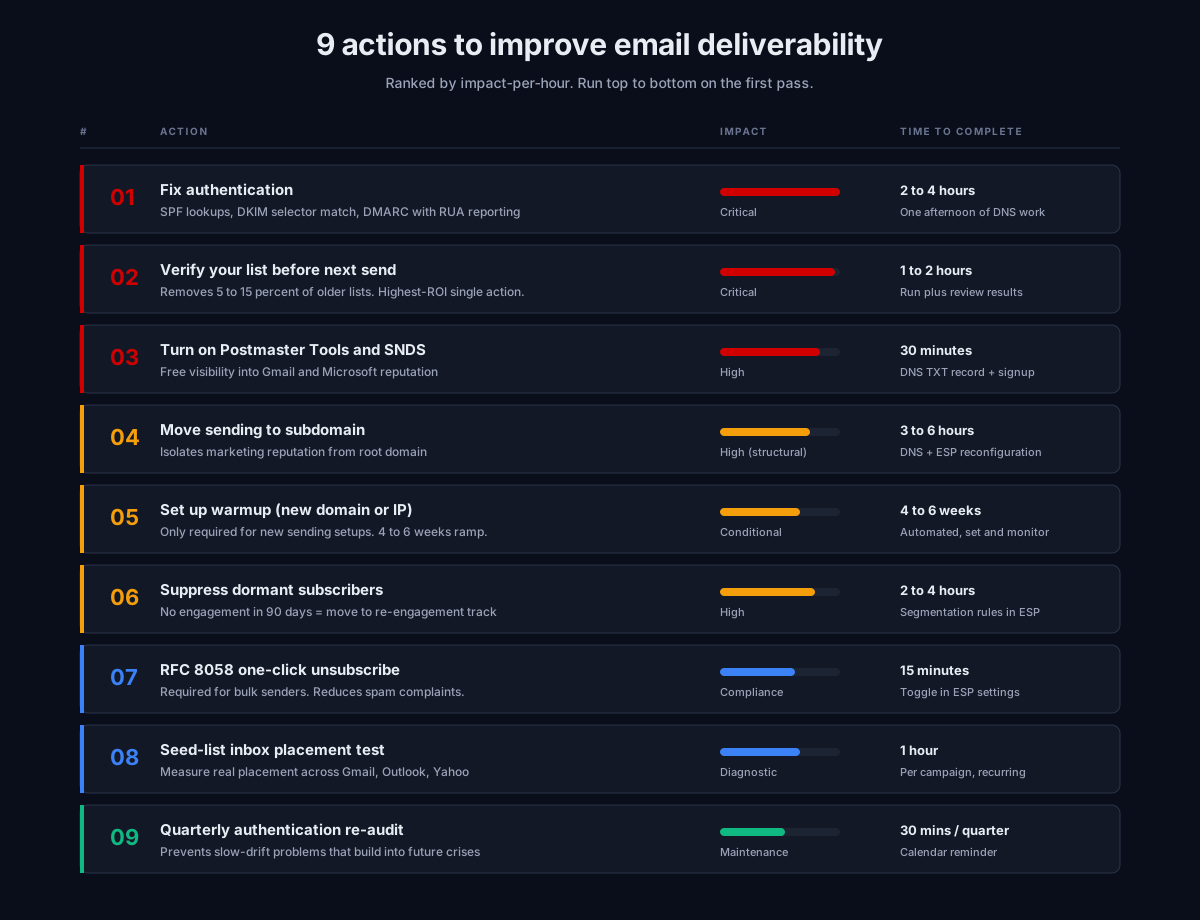
Action 1: Fix authentication first
If you only learn one thing about how to improve email deliverability, it should be this: authentication is non-negotiable. Google and Yahoo’s February 2024 sender requirements, expanded by Microsoft in May 2025, mean any domain sending 5,000+ messages per day needs SPF, DKIM, and DMARC configured. Mail without proper authentication gets filtered to spam or rejected outright in 2026.
The three checks that catch most authentication failures:
-
SPF lookup count under 10. RFC 7208 caps SPF processing at 10 DNS lookups. Every
include:statement counts. Exceed the limit and SPF throws permerror silently for every message. Use MXToolbox SPF Lookup to count. We see this break after almost every new tool addition. -
DKIM selector matches what the platform actually signs with. Send a test message to a personal Gmail, view original, check the
Authentication-Resultsline. Confirm the selector exists in your DNS atselector._domainkey.yourdomain.com. Post-migration mismatches here are the second-most-common authentication failure we audit. -
DMARC published with at least
p=noneand RUA reporting enabled. Without DMARC, you have no visibility into who is sending mail “from” your domain. Without RUA reports going to an aggregator, you cannot run the migration ramp safely.
Authentication problems are usually fixable in an afternoon. Reputation damage from sending unauthenticated mail for weeks is fixable in months. The asymmetry is why this action ranks first.
For full operator-grade depth on each protocol, see the email deliverability pillar guide.
Action 2: Verify your list before the next send
If you ask any deliverability practitioner how to improve email deliverability fast, list verification will be in their top three answers. List quality drives email deliverability more than any other input we measure on audits. B2B email lists decay at roughly 25 to 28 percent per year. A list that was clean six months ago is meaningfully degraded today.
Running a verification pass against a fresh service before any major send is the single highest-ROI item on this list. Verification typically removes 5 to 15 percent of older lists. Those addresses were going to bounce or hit spam traps either way. Removing them before sending saves the reputation damage entirely.
What verification catches:
- Hard bounces (addresses that no longer exist)
- Spam traps (pristine and recycled)
- Role accounts (
info@,sales@,admin@) - Disposable domains
- Catch-all addresses requiring extra handling
Above 2 percent bounce rate on a single send and you trigger immediate reputation damage. Above 5 percent and many ESPs flag the account for review. Since November 2025, sustained bounce rates above 2 percent can trigger permanent 5xx rejections from Gmail entirely. A fresh verification pass is cheap insurance against landing in any of those scenarios.
Action 3: Turn on Google Postmaster and Microsoft SNDS
You cannot figure out how to improve email deliverability if you cannot see your sender reputation. Both of these tools are free and take less than 30 minutes to set up between them.
Google Postmaster Tools shows Gmail’s view of your domain and IP reputation across Bad, Low, Medium, and High tiers. It also shows spam rate, authentication rate, and encryption rate over time. Set up the domain verification once and check the dashboard daily during active sending, weekly when sending is steady.
Microsoft SNDS does the same job for Outlook.com, Hotmail, and the Microsoft Exchange Online tenants that use Microsoft filtering. The interface is dated; the data is real.
Setting up these tools does not fix anything by itself. What it does is convert “we think our deliverability is OK” into actual data, which is the prerequisite for every other diagnosis.
Action 4: Move sending to a dedicated subdomain
Among the structural changes available to anyone working out how to improve email deliverability long-term, moving sending off the root domain is one of the highest-leverage. If you are sending cold email, marketing email, or transactional email from your root domain, move it to a subdomain. This is one of those changes that pays back across years.
The reason: sending reputation accumulates per domain. If you send marketing mail and transactional mail from the same domain, any reputation damage on the marketing side drags down delivery of your transactional mail too. If you send cold email from your root domain and it triggers spam complaints, your account team’s email to existing customers gets filtered alongside.
The fix is dedicated subdomains:
mail.yourdomain.comfor marketingoutreach.yourdomain.comfor cold email- Transactional stays on root (or its own subdomain)
Each subdomain needs its own SPF, DKIM, and DMARC. Subdomains do not inherit authentication from the parent. After setting up, send a test through each subdomain and confirm authentication passes in the message headers.
The cost of doing this is a few hours of configuration. The benefit compounds across every campaign you send forever.
Action 5: Set up warmup if you have a new domain or IP
If you are looking at how to improve email deliverability for a brand-new sending setup, warmup is the action that matters most in the first 90 days. A new sending domain has zero reputation. Send 10,000 messages from it on day one and major providers will block you within minutes. They cannot tell you apart from a spammer.
The fix is warmup: starting with very low volume to engaged recipients, ramping gradually over weeks.
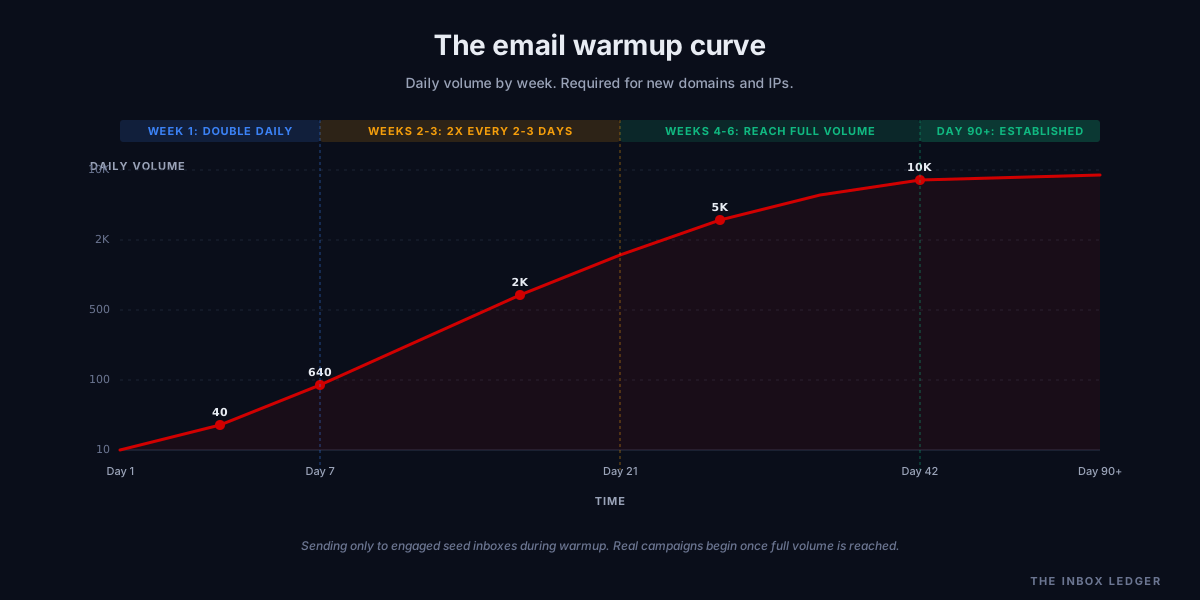
The classic warmup curve:
- Week 1: 10, 20, 40, 80, 160, 320, 640 daily
- Weeks 2-3: double every 2 to 3 days
- Weeks 4-6: reach full target volume (typically 5,000-10,000 daily per inbox)
- 90+ days: full reputation established, “new sender penalty” lifts
Automated warmup services run continuously in the background, using networks of seed inboxes that send and reply to each other to generate the engagement signals that build reputation. Quality varies between providers. The good ones use real-looking conversations, vary timing, and respect provider quotas.
Action 6: Suppress the dormant 50 percent of your list
Suppressing dormant subscribers is one of the fastest ways to boost email deliverability without any technical changes. Sending to subscribers who have not opened or clicked in 90+ days erodes domain reputation steadily. The non-opens look like low engagement signals to mailbox providers, which they interpret as “users do not value this sender.” That interpretation then suppresses placement for engaged users too.
The suppression rule we use:
- Engaged segment: opened or clicked in last 30 days. Send at full volume.
- Active segment: opened or clicked in last 90 days. Send normal campaigns.
- Dormant segment: 90+ days no engagement. Move to re-engagement track on a separate subdomain. If they do not re-engage in two campaigns, suppress permanently.
The senders who do this consistently see inbox placement recover within two to three weeks. It is one of the highest-leverage items on this list because the work is mostly suppression-list management, not technical changes.
Action 7: Implement RFC 8058 one-click unsubscribe
If you want to know how to improve email deliverability through one specific compliance fix, this is the highest-leverage one. RFC 8058 one-click unsubscribe is now required for bulk senders by Google, Yahoo, and Microsoft. The List-Unsubscribe-Post: List-Unsubscribe=One-Click header plus a List-Unsubscribe URL header.
Without this, recipients who want out click “Report Spam” instead of finding your unsubscribe link. Spam complaints damage sender reputation faster than any other single signal. Google’s enforcement threshold is 0.3 percent; the recommended ceiling is 0.1 percent.
The fix takes most ESPs and cold email platforms about five minutes to enable. Some require a paid tier; pay for it. The cost of any complaint rate increase from a missing one-click unsubscribe header dwarfs the platform fee.
Also visible unsubscribe link in the body. Visible link plus one-click header is the floor; ESP-only one-click without a visible link in the body is a weak setup that still draws complaints.
Action 8: Run a seed-list test on your next campaign
The fastest way to learn how to improve email deliverability for your specific setup is to actually measure where your mail is landing. Your ESP shows you delivery rate. Delivery rate is not inbox placement. A campaign with 99 percent delivery can have 47 percent inbox placement (we audit setups like this routinely). The receiving server accepted the message; it then routed half of it to spam or Promotions where humans never see it.
Seed-list inbox placement testing tools send your campaign to a panel of seed addresses across Gmail, Outlook, Yahoo, and corporate filters, then measure where the mail landed. This is the only way to see your real placement across providers in real time.
Run a seed-list test before every major campaign and at least monthly otherwise. The output catches placement decay weeks before it shows up in your engagement metrics, which gives you time to react instead of recover.
Action 9: Schedule a quarterly authentication re-audit
Authentication drifts. New tools get added (your SPF lookup count grows). Old tools get removed (orphan includes pile up). DKIM keys expire if rotation is not automated. DMARC RUA email destinations stop receiving mail when the inbox fills up.
Put a recurring quarterly calendar entry to re-run authentication checks:
- SPF lookup count under 10
- All
include:statements still in use - DKIM keys still resolving at the published selectors
- DMARC RUA reports still arriving
- No new sending services added without authentication
This is 30 minutes of work per quarter that prevents the kind of slow-drift problems that create deliverability crises six months from now.
How to sequence the work
How to improve email deliverability in practice usually comes down to ordering the work correctly. For most senders looking to increase email deliverability across all their sending streams, the right order is:
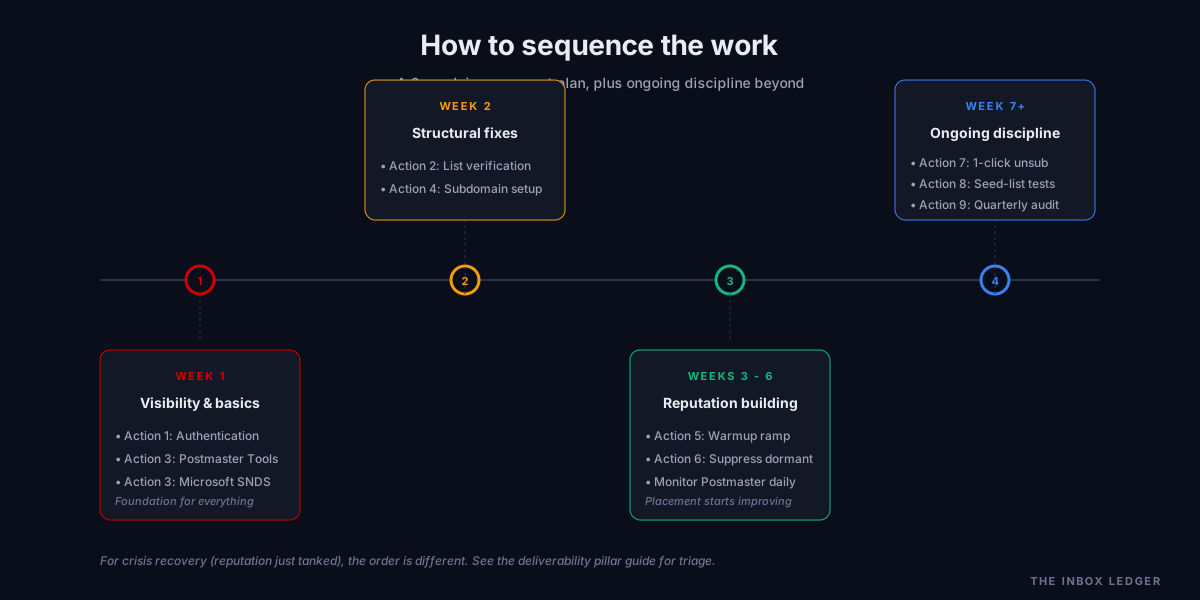
Week 1: Actions 1 and 3. Fix authentication, turn on Postmaster Tools and SNDS. Visibility is the prerequisite for everything else.
Week 2: Actions 2 and 4. Verify the list, move sending to subdomains. These are structural changes that pay back across every future campaign.
Weeks 3-6: Actions 5 and 6. Warmup if needed, suppress the dormant segment. This is where measurable inbox placement improvement starts showing up in seed-list tests.
Week 7 and ongoing: Actions 7, 8, 9. One-click unsubscribe, seed-list testing, quarterly authentication audit. Maintenance discipline that prevents the next crisis.
If your situation is “we sent a bad campaign, our reputation just tanked, and we need to recover fast,” the order changes. That triage protocol is covered in the email deliverability pillar guide under “What to fix first if your email is going to spam right now.”
Frequently asked questions
How long does it take to improve email deliverability?
What is the single most impactful action to improve email deliverability?
Can I improve email deliverability without changing my ESP?
How do I know if my email deliverability is actually bad?
Does warmup actually improve email deliverability?
How often should I run a list verification?
Do I need to hire a consultant to improve email deliverability?
What to do this week
If your team only has time for one push to figure out how to improve email deliverability quickly:
- Audit SPF, DKIM, and DMARC. Confirm they all pass.
- Sign up for Google Postmaster Tools and add your sending domain.
- Run a verification pass on the list you are about to send to.
Three actions. Two hours of focused work. Catches the majority of common email deliverability problems we audit. The rest of the actions on this list build on top of that foundation.
For the full diagnostic order we run on audits, see the email deliverability pillar guide. For the complete checklist version, see the 47-point cold email deliverability checklist. If you have run the checklist and need outside expertise, the email deliverability consultant guide covers when hiring help makes sense.
Subscribe to the weekly briefing for cold email deliverability deep-dives, sender reputation case studies, and tool comparison reports.
More on Deliverability
Email blacklist removal 2026: the operator playbook
Email blacklist removal in 2026: diagnose the root cause first, identify the tier, delist in the right order, prevent re-listing. The full playbook.
Email deliverability monitoring vs warmup: 2026 guide
Email deliverability monitoring vs warmup in 2026: what each does, when you need both, and why monitoring is non-negotiable post-enforcement.
Spam complaint rate 2026: the 0.3% operator playbook
Spam complaint rate in 2026: the 0.3% threshold explained, why ESP dashboards underreport, the five drivers of complaints, and the recovery playbook.