Email warmup tools in 2026: how to choose the right service
Email warmup tools in 2026: what they do, when you need one, how to choose, and the providers that work for cold email programs at any scale.
Email warmup tools are the gap between a fresh sending domain that gets immediately filtered to spam and a domain with the reputation to actually land in the inbox. In 2026, with Google and Yahoo’s tightened sender requirements and Microsoft’s May 2025 enforcement expansion, skipping warmup is no longer a survivable shortcut. A new inbox sending real volume on day one will be throttled within hours and reputation-damaged within a week.
This guide is the email warmup tools decision framework we use on every cold email infrastructure build. It covers what these services actually do under the hood, when you genuinely need one, the 7 criteria that separate effective providers from theatrical ones, and the common configuration mistakes that account for most of the warmup programs that fail to produce results. The market is full of tools that claim to improve deliverability; many just simulate activity. This guide is about telling those apart.
What email warmup tools actually do
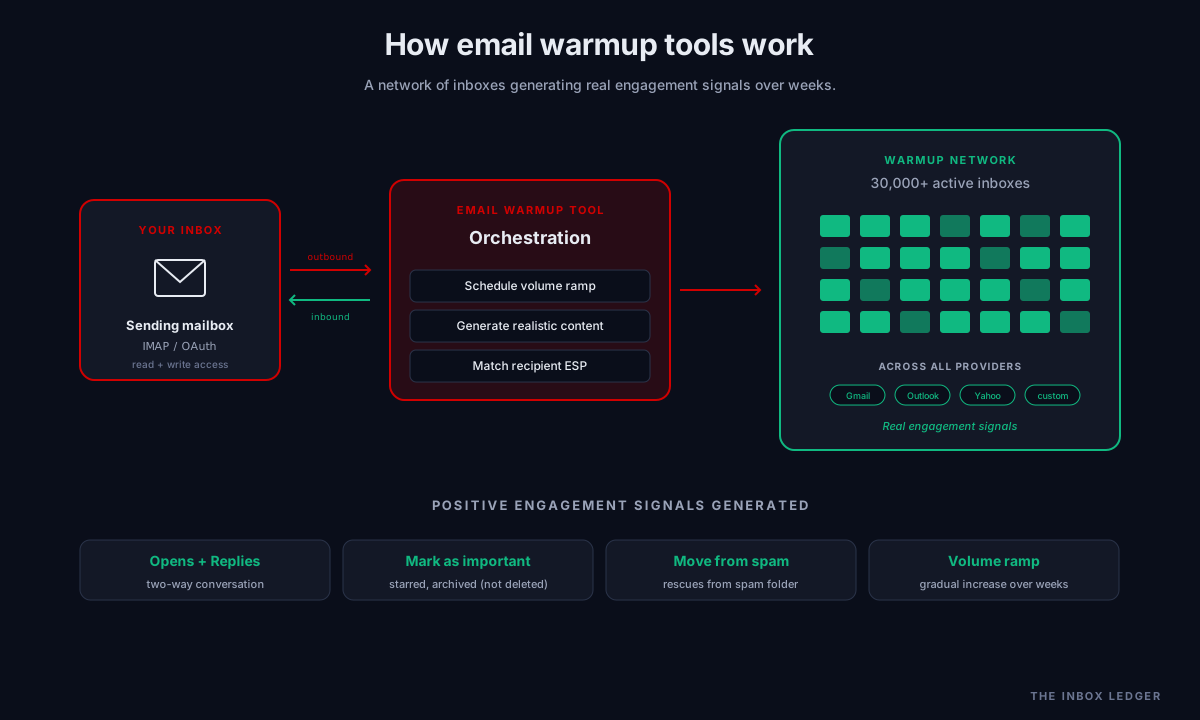
An email warmup tool connects your sending inbox to a network of other inboxes operated by the warmup provider and other customers, then orchestrates outbound and inbound messages between them that simulate legitimate email behavior. The mailbox providers (Gmail, Outlook, Yahoo) see this activity as normal sender-recipient correspondence and gradually build trust in the sending domain’s reputation.
The mechanics that matter:
- Outbound sends from your inbox to other inboxes in the warmup network, starting at a few messages per day and ramping over weeks
- Inbound replies from network inboxes back to your sending address, simulating real two-way conversation
- Positive engagement signals like opens, archives (not delete), marks as important, and moves from spam to inbox when messages occasionally land there
- Volume ramping over time so the sending pattern looks like a real human gradually using a new mailbox
The aggregate signal that mailbox providers learn over the warmup period: this domain sends mail that recipients actually engage with positively. That signal is the basis of sender reputation, and sender reputation is what determines whether your real campaigns land in the inbox or in spam.
The catch is that not all email warmup tools do this equally well. Some email warmup tools route activity through low-quality networks where mailbox providers can detect the artificial pattern. Some only send and never receive, missing half the signal. Some claim “AI-powered” engagement that is closer to script-based opens than real human-pattern behavior. The provider quality differences are the difference between warming up successfully and warming up while damaging your reputation in a more sophisticated way.
When you need an email warmup tool
Three scenarios where automated email warmup is genuinely required:
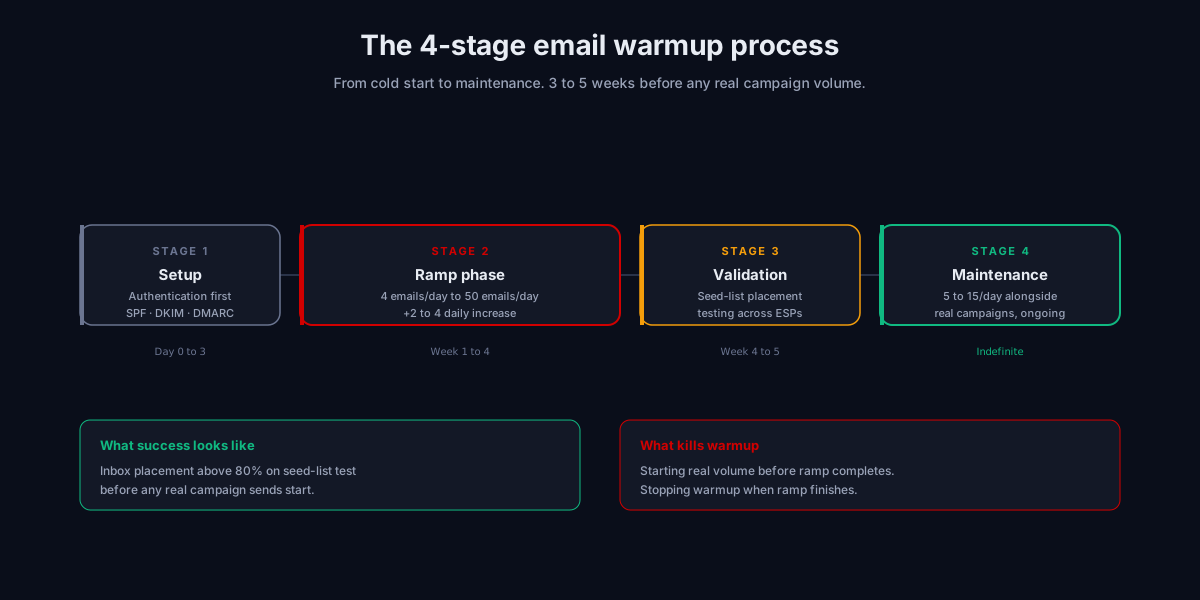
A brand new sending domain or subdomain. Any domain that has never sent meaningful volume starts at zero reputation. Sending real campaign traffic before warmup is the most common cause of cold email programs failing in their first month. The fix is 3 to 5 weeks of structured warmup before any real send.
A new mailbox on an existing domain. Even on a domain with established reputation, a new mailbox needs its own ramp. Mailbox providers track reputation per-mailbox and per-domain. A fresh address sending 50 messages on day one looks anomalous regardless of how warm the domain itself is.
Recovery after a reputation incident. If your domain landed on a major blocklist, suffered a complaint spike, or saw inbox placement collapse, structured warmup is part of the recovery path. The cadence is different from new-domain warmup (slower, more conservative) but the mechanics are the same.
Scenarios where you do not need a dedicated email warmup tool:
- Personal mailboxes used for normal email that already have organic engagement
- Transactional email from a domain that already has years of established reputation, where the volume is staying flat
- Internal team mail routed through Google Workspace or Microsoft 365 to known recipients
For everything else above trivial volumes, an email warmup tool is the difference between landing in the inbox and not.
How warmup actually works under the hood
The protocol-level reality of what an automated email warmup service does, simplified to what matters:
-
Connect your inbox to the warmup service via IMAP credentials, OAuth (for Google and Microsoft), or API integration. The service needs read and write access to your mailbox to send outbound and process inbound replies.
-
The service builds a warmup schedule based on your inbox provider (Gmail, Outlook, custom SMTP), domain age, and target final sending volume. Typical schedule: 4 emails on day one, ramping by 2 to 4 per day, reaching 40 to 50 daily emails by week 3 to 4.
-
Outbound warmup messages get sent from your inbox to a curated set of recipient inboxes in the provider’s network. Subjects and bodies are written to look like normal business correspondence, not templated marketing.
-
Recipients in the network reply, open, and engage with your warmup messages, generating positive engagement signals visible to mailbox providers. The best providers also have their networks mark warmup messages as “not spam” when they incorrectly land in the spam folder.
-
Your inbox receives and processes inbound warmup messages from the network, generating reciprocal activity that completes the two-way conversation signal.
-
The service tracks inbox placement over time, ideally by sending occasional seed-list test messages to a separate set of mailboxes used purely for placement measurement. This is how you know whether warmup is actually working, not just whether the dashboard says it is.
-
Volume reaches the target ceiling (typically 40 to 50 emails per day for a single Google Workspace or Microsoft 365 mailbox) after 3 to 5 weeks of consistent warmup activity.
-
Maintenance warmup continues at a lower volume even after the inbox reaches sending capacity, keeping reputation steady while you run real campaigns alongside. Most experienced operators run perpetual maintenance warmup at 5 to 15 messages per day for the life of the sending account.
The whole flow runs automatically once configured. The differences between providers come down to network quality, engagement realism, inbox placement measurement accuracy, and how cleanly the warmup activity blends with your real sending.
The 7 criteria for choosing the best email warmup tool
Across the audits we run, seven decision factors separate effective email warmup providers from theatrical ones. Ranked by impact:
1. Network size and quality
The warmup network is the pool of mailboxes that exchange messages with your inbox during warmup. Larger and more diverse networks produce better signals to mailbox providers. The best email warmup tool networks have tens of thousands of active inboxes across all major providers (Gmail, Outlook, Yahoo, custom domains). Tiny networks (under 1,000 inboxes) produce repetitive patterns that mailbox providers detect.
2. ESP-specific targeting
If your cold email program targets Gmail recipients primarily, your warmup network engagement should be Gmail-weighted. Some email warmup tools let you specify which ESPs to focus warmup activity on (Gmail-heavy, Outlook-heavy, balanced). This matters because Gmail’s reputation is built on engagement with other Gmail accounts; Outlook’s is built on Outlook engagement. Cross-ESP warmup is less effective per signal than ESP-matched warmup.
3. Engagement realism
Better email warmup tools generate “engagement” that looks like real human behavior: variable reply timing, threaded conversations, occasional non-responses, varied subject lines and content patterns. Worse email warmup tools send and reply on rigid schedules with templated content that mailbox providers can pattern-detect over time. The realism difference is invisible from your dashboard but very visible to filtering systems.
4. Inbox placement measurement (not just spam scores)
The metric that matters is where your real campaign messages actually land, not what a content score predicts. Quality email warmup tools include real inbox placement testing as part of the service, sending seed messages to known accounts across providers and measuring inbox vs spam vs promotions placement. Email warmup tools that only show you a “deliverability score” without actual placement data are measuring the wrong thing.
5. Integration with your sending stack
Most cold email operators run warmup alongside their primary sending platform. Either the warmup tool integrates cleanly with your sending tool (most do for major platforms), or the warmup tool is the same tool as your sending platform (Smartlead, Instantly). Standalone email warmup tools that require running parallel infrastructure add operational complexity without proportional benefit.
6. Volume scaling for multiple inboxes
If you run more than 5 sending mailboxes, the email warmup tools need to handle them at scale. Per-inbox pricing matters; some services charge per warmup-enabled mailbox while others bundle unlimited warmup with sending platform subscriptions. For programs running 20+ inboxes, the cost structure can differ by an order of magnitude between providers.
7. Reporting and diagnostic visibility
When something goes wrong (warmup not improving placement, unexpected reputation decline, complaint spike), you need diagnostic data to understand why. The best email warmup software surfaces per-day engagement metrics, network activity logs, and reputation indicators from Google Postmaster and Microsoft SNDS when available. Email warmup tools that show only summary dashboards leave you blind during incidents.
The major email warmup providers, categorized
Rather than rank email warmup tools (rankings shift quarterly as networks and features change), the framework we use is to categorize by use case and let the requirements decide:
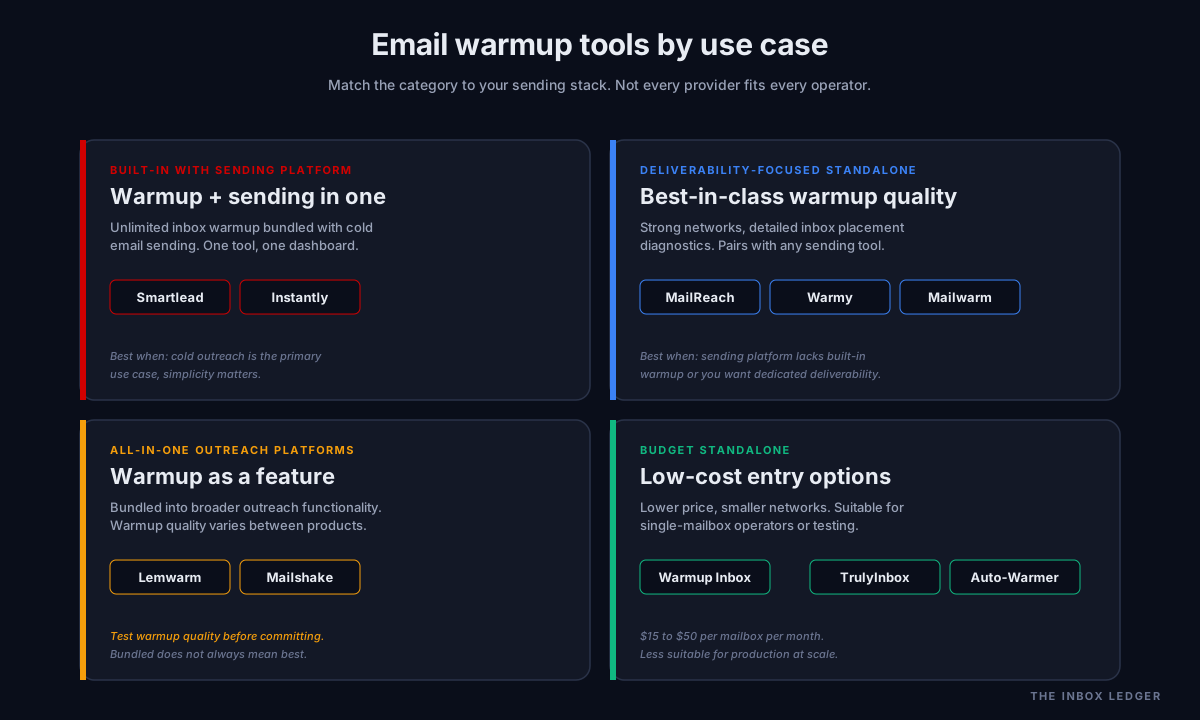
Built-in warmup with sending platform. Smartlead, Instantly. Unlimited inbox warmup bundled with cold email sending. Best for operators running cold outreach as the primary use case who want one tool instead of two integrated tools.
Deliverability-focused standalone tools. MailReach, Warmy, Mailwarm. Standalone warmup services with strong network quality and detailed inbox placement diagnostics. Best for teams running cold email through a separate sending platform that does not have built-in warmup, or who want a dedicated deliverability layer.
All-in-one outreach platforms with warmup. Lemwarm (part of Lemlist), Mailshake. Warmup bundled with broader cold outreach functionality. The warmup quality varies; some are competitive with dedicated tools, some are afterthoughts. Worth testing the warmup specifically before committing.
Budget standalone services. Warmup Inbox, TrulyInbox, Auto-Warmer (QuickMail). Lower price points and smaller networks. Suitable for single-mailbox operators or testing scenarios. Less suitable for production cold email programs at scale.
Common email warmup mistakes
The five mistakes we see most often on cold email infrastructure audits:
1. Skipping warmup entirely on a new domain
The most common and most damaging. Fresh domain plus immediate cold campaign equals near-guaranteed spam folder for the first 60 days. By the time the team realizes warmup was needed, the domain reputation needs months to repair. The fix is 3 to 5 weeks of structured warmup before any real send. No exceptions.
2. Mixing warmup activity with real campaign volume too early
The warmup ramp reaches 40 to 50 messages per day around week 3. Starting real campaigns at 100 per day in week 2 spikes volume in a way that triggers spam treatment. The fix is staying below the warmup-established ceiling until placement testing confirms the inbox is genuinely warm, then ramping real volume gradually on top.
3. Stopping warmup after the ramp completes
Many operators treat warmup as a one-time setup phase. In reality, sender reputation degrades without ongoing positive engagement. The fix is perpetual maintenance warmup at 5 to 15 messages per day for the life of the sending account, running alongside real campaigns indefinitely.
4. Choosing a cheap warmup tool with a tiny network
Below 5,000 active inboxes in the email warmup tools network, the activity patterns become detectable. Mailbox providers see the same set of “engaged recipients” across every customer of the tool. The fix is choosing a provider with at least 30,000 active inboxes (Instantly, Smartlead, Mailreach, Warmup Inbox all qualify) so the engagement signal blends with normal mail traffic.
5. Trusting the dashboard over inbox placement testing
Email email warmup tools show metrics about themselves (messages sent, replies received, “deliverability score”). They do not always show whether your real campaigns are landing in the primary inbox. The fix is running seed-list placement tests with a separate tool every 2 weeks during warmup and monthly thereafter; see our 47-point cold email deliverability checklist for the diagnostic framework.
For the broader operational discipline that warmup fits inside, see the cold email outreach playbook and the email deliverability pillar guide.
Built-in warmup vs standalone email warmup tool
The most common decision point: should warmup live inside your sending platform, or should it be a separate service?
Built-in warmup advantages. One tool to configure, one dashboard to monitor, one subscription. Warmup volume coordinates automatically with sending volume on the same inboxes. No integration to maintain.
Built-in warmup limitations. Network is shared with all other customers of the platform; lower network diversity than dedicated warmup tools. Warmup quality varies between platforms (Smartlead’s network is large and active; some smaller platforms have weaker networks). Bundled warmup is rarely best-in-class; it is good-enough warmup integrated with sending.
Standalone warmup advantages. Best-in-class warmup networks (MailReach, Warmy have networks built specifically for warmup quality). More detailed diagnostic data. Provider competes on warmup specifically rather than bundling it as a feature.
Standalone warmup limitations. Separate subscription. Separate dashboard. Integration coordination needed (your sending tool needs to know your inbox is being warmed by another service so it can avoid sending overlap).
The decision in practice: if you are running cold email through Smartlead or Instantly at scale, the built-in warmup is good enough and the operational simplicity is worth the trade-off. If you are running cold email through a platform without strong built-in warmup, dedicated email warmup tools (Mailshake older versions, custom infrastructure), a dedicated standalone email warmup service is the better choice.
Email warmup tools and the 2026 bulk sender requirements
The 2024-2025 tightening of bulk sender requirements changed what warmup needs to accomplish. Three things that matter:
-
Authentication must be fully configured before warmup starts. SPF under 10 DNS lookups per RFC 7208, DKIM with 2048-bit keys, DMARC at minimum
p=nonewith RUA reporting. Warmup on an unauthenticated domain just teaches mailbox providers to filter you faster. -
The complaint rate ceiling has tightened. Above 0.3 percent complaints, Gmail and Yahoo apply filtering enforcement. Above 0.1 percent operating rate is the practical ceiling. Warmup activity should never push complaint rates near these thresholds; if your warmup tool’s network produces complaints, change providers.
-
Bounce rate enforcement is now strict. Since Gmail’s November 2025 sustained-bounce enforcement, bounce rates above 2 percent on a single send trigger immediate reputation damage. Warmup tools need to verify their network inbox addresses regularly so warmup messages do not bounce; ask any prospective provider about their network inbox verification policy.
For depth on the authentication setup that warmup sits on top of, see our SMTP relay guide and the cold email deliverability checklist.
A practical email warmup setup workflow
When configuring email warmup tools for the first time, the order of operations that produces results:
- Configure authentication completely first. SPF, DKIM, DMARC with RUA reporting. Verify each test message lands authenticated in a Gmail inbox.
- Choose an email warmup tool that matches your operating pattern (built-in if running Smartlead or Instantly, standalone otherwise).
- Connect the inbox via IMAP or OAuth. Verify the tool can both send and receive on the mailbox.
- Set the target sending volume (typically 40 to 50 per day for Google Workspace or Microsoft 365).
- Start warmup with a 4-week minimum ramp before any real campaign volume. Resist the temptation to start sending earlier.
- Run a seed-list placement test at week 2 and week 4 to verify warmup is actually improving placement, not just running.
- Begin real campaigns at low volume (5 to 10 per day initially) on top of warmup, ramping over the next 2 weeks.
- Keep maintenance warmup running indefinitely at 5 to 15 messages per day alongside real sending.
The whole setup takes 30 minutes of configuration; the warmup period itself takes 3 to 5 weeks. Skipping any step costs more time and reputation than the time saved.
Frequently asked questions
What do email warmup tools actually do?
How long does email warmup take?
Which is the best email warmup tool for cold email?
Do I need email warmup if I am using a dedicated SMTP relay?
What is the difference between automated email warmup and manual warmup?
Can email warmup tools fix a damaged sender reputation?
How much do email warmup tools cost?
The bottom line on email warmup tools
Email warmup is no longer optional for cold email in 2026. The post-2024 tightening of bulk sender requirements made it structurally impossible to start a new sending domain at meaningful volume and survive. The question is no longer whether to warm up; it is how to warm up effectively and which provider produces measurable inbox placement improvement rather than dashboard theater.
For the broader deliverability framework that warmup fits inside, see the email deliverability pillar guide. For the cold outreach use case, see our cold email outreach playbook. For the sending infrastructure that warmed-up mailboxes sit on top of, see the SMTP relay guide.
Subscribe to the weekly briefing for warmup tool teardowns, deliverability diagnostics, and infrastructure deep-dives.