Email warmup: what it actually does (and what it does not)
Email warmup in 2026: what the email warmup process actually fixes, what it cannot fix, when to use it, and which warmup myths waste your budget.
Email warmup is the most misunderstood line item in the cold email stack. Half the teams we audit treat email warmup as a magic shield that fixes any sending problem, and the other half treat it as snake oil that does nothing. Both are wrong, and the gap between those beliefs is where most 2026 deliverability failures live. The truth is narrower and more useful: email warmup does a specific, limited set of things, and pretending it does more than that is what gets sending domains tanked in week three of a campaign.
This guide is for operators who want a clear picture of what the email warmup process actually changes inside a mailbox provider’s filtering decision, what it cannot change no matter how long you run it, and how to decide whether email warmup is the right intervention for the problem you’re seeing. We will cover the mechanics, the myths, the 2026 enforcement reality, and the specific configurations that work versus the ones that quietly burn reputation.
If you have not yet read the foundational pieces, the email deliverability pillar covers the broader system that email warmup sits inside, and our cold email deliverability checklist is the 47-point audit we run before recommending any warmup configuration at all.
What email warmup actually is
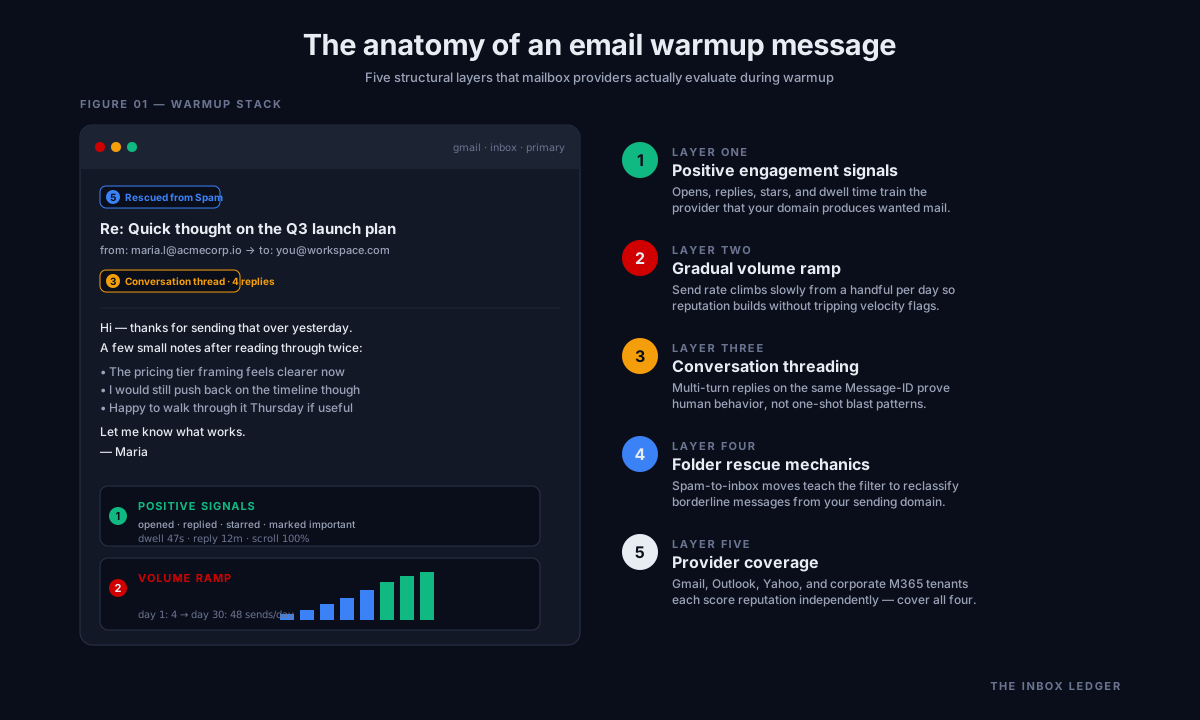
Email warmup is an automated process where your sending mailbox sends low-volume messages to a network of other mailboxes that automatically reply, mark messages as important, move them out of spam folders, and remove them from promotions tabs. The goal is to generate positive engagement signals (opens, replies, folder moves, star/important markings) that mailbox providers use as inputs into their reputation scoring algorithms.
The inbox warmup process is not a single thing. It is four mechanical operations running in parallel:
- Outbound sends from your domain to network participants, at a gradually increasing volume that mimics organic ramp.
- Automated replies from those participants back to your domain, generating two-way conversation threads that Gmail and Outlook both weight heavily.
- Folder rescues, where participant inboxes detect messages that landed in spam or promotions and move them to the primary tab.
- Positive interaction signals, such as opens, link clicks (on safe internal links), and “mark as important” actions.
When the warmup network is working, your sending domain accumulates a history of “this sender produces conversations that recipients value.” That history is what Gmail’s reputation system, Microsoft’s SmartScreen, and other providers reference when deciding whether your next message goes to inbox, promotions, or spam.
What email warmup actually fixes
Be precise about this, because vendors are not:
- New domain reputation gap. A domain registered six weeks ago has no sending history. Email warmup creates the appearance of one. This is the single legitimate use case where the email warmup process clearly works.
- Dormant domain re-activation. A domain that sent for two years, went quiet for six months, then started sending again will look anomalous to filters. A short warmup ramp restores the activity pattern.
- Recovery from a soft reputation dip. If a campaign caused a spike in spam complaints but the domain was not blacklisted, sustained positive signals from email warmup can pull reputation back toward neutral.
- Volume ramp discipline. Even when you do not need reputation help, the gradual send pattern that warmup enforces is operationally useful because it stops teams from blasting 800 messages on day one from a cold mailbox.
What email warmup cannot fix
This is the more important list, and it’s the one most articles skip:
- A domain on Spamhaus, SpamCop, or Microsoft’s internal blocklists. Email warmup does not delist you. Only the listing authority can.
- Authentication failures. If your SPF, DKIM, or DMARC records are broken, warmup messages will fail authentication just like your real cold email, and the network will compound the damage. Fix authentication first.
- A bad list with high bounce rates. Gmail’s November 2025 bounce enforcement (covered in Google’s bulk sender requirements) treats sustained bounce rates above 0.3 percent as a strong negative signal. Email warmup cannot offset that.
- Spam complaint rates above 0.3 percent. This is the Gmail-published threshold that triggers reputation damage, and no amount of warmup engagement compensates for genuine recipient complaints.
- Content that pattern-matches to spam. If your message body contains phrases that filters classify as spam, email warmup will get those exact phrases past the filter inside the network but not past the filter when you send to real prospects. The two filtering paths are not identical.
The cold email warmup process is a reputation supplement, not a reputation fix. On the audits we run, understanding that boundary is what separates teams that use warmup successfully from teams that burn through ten domains a year wondering why nothing works.
The 2026 enforcement reality that changes warmup math
Three regulatory shifts have changed how warmup tools work and what they can deliver:
Google and Yahoo’s February 2024 bulk sender requirements raised the floor for what counts as a legitimate sender. SPF, DKIM, DMARC alignment, one-click unsubscribe (RFC 8058), and complaint rates under 0.3 percent are now hard prerequisites. Warmup tools that ignore these prerequisites (and many still do) cannot help. You need the authentication stack right before email warmup has any chance of moving the needle.
Microsoft’s May 2025 enforcement expansion extended similar rules to Outlook.com, Hotmail, and Live.com mailboxes. Microsoft’s Exchange team announcement confirmed that high-volume senders to consumer Microsoft addresses must meet the same authentication and complaint thresholds. This matters for warmup because Microsoft consumer mailbox engagement (which represents a meaningful share of any warmup network) now counts as cleanly only if the underlying domain passes those checks.
Gmail’s November 2025 bounce enforcement is the one most teams missed. Sustained bounce rates above 0.3 percent now produce throttling and reputation damage that warmup cannot undo. The implication for warmup configuration: your warmup network must not be sending to dead inboxes within the network, and your real campaign list must be validated separately with a tool like EmailListVerify or ZeroBounce before any cold send.
How the email warmup process should actually be configured
Most teams use warmup tool defaults, and most defaults are wrong for cold outbound. On the audits we run, here is how the teams we work with configure it.
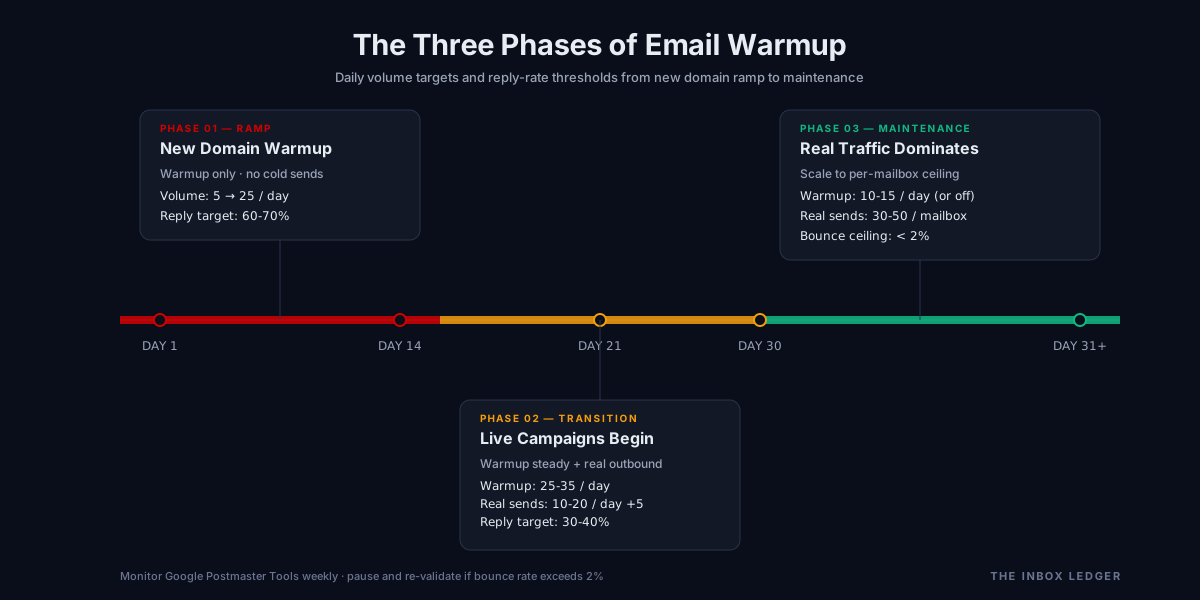
Phase 1: Days 1 to 14 (the new domain phase)
This is the only phase where email warmup is doing its primary job. Configuration:
- Volume: Start at 5 to 10 sends per day per mailbox, increment by 2 to 4 per day.
- Reply rate target: 40 to 60 percent of warmup sends should generate a reply within the network.
- Folder rescue rate: 100 percent. Any warmup message that lands outside the primary inbox must be moved there.
- No real campaign sending during this phase. Mixing warmup with cold outbound in the first two weeks dilutes the engagement signal. We see this mistake constantly on client audits.
- Authentication must be live and passing. Verify SPF, DKIM, and DMARC at MXToolbox before turning warmup on. If any check fails, fix it first.
Phase 2: Days 15 to 30 (the transition phase)
Now you begin overlaying real cold email sends on top of the warmup baseline. The shift looks like this:
- Warmup volume holds steady at roughly 25 to 35 sends per day per mailbox.
- Real campaign volume starts low, around 10 to 20 sends per day per mailbox, ramping by 5 per day if reply and bounce metrics stay clean.
- Reply rate target on warmup drops to 30 to 40 percent. This is intentional. A 60 percent reply rate on a mailbox that’s also doing cold outbound looks unrealistic to filters.
- List hygiene becomes critical. Bounce rate on real sends must stay below 2 percent. Above that, pause and re-validate.
Phase 3: Days 31 onward (the maintenance phase)
By day 31, email warmup is doing less of the heavy lifting. Real conversations from real prospects are now the dominant positive signal. Configuration:
- Warmup volume drops to roughly 10 to 15 sends per day, or off entirely if reply rates from real campaigns are strong.
- Real campaign volume can scale to the per-mailbox ceiling (we recommend 30 to 50 cold sends per mailbox per day on Google Workspace, lower on Microsoft 365).
- Monitor Google Postmaster Tools weekly for reputation, spam rate, and authentication results.
For platforms like Instantly and Smartlead, the built-in warmup networks handle the volume and reply mechanics automatically, but you still control the phase logic by deciding when to enable real campaigns on top.
The five email warmup myths that waste budget
On the audits we run, these five misconceptions are responsible for most warmup-related deliverability damage. If you believe any of them, fix that first.
Myth 1: “More email warmup is always better”
It is not. Warmup networks generate a measurable pattern (perfectly timed replies, predictable folder moves, network-internal IP ranges). Mailbox providers can detect that pattern. Running warmup at high volume permanently produces a sender reputation warmup signature that looks like a network, not like a real outbound sender. The teams we work with treat warmup as a 30 to 60 day intervention, not a permanent feature.
Myth 2: “Warmup networks fool Gmail”
They do not, not entirely. Google’s reputation system has evolved specifically to discount warmup-network signals. Gmail can identify which inboxes belong to known warmup networks (because those networks operate at scale and leave fingerprints), and engagement from those inboxes is weighted lower than engagement from genuine prospects. This is why a 90-day warmup-only domain often performs worse on day 91 than a 14-day warmed domain that has been sending real cold email for the last 60 days.
Myth 3: “I can skip authentication if I run warmup”
You cannot, and after the 2024 to 2025 enforcement waves this is the fastest way to get every domain you own blacklisted. SPF (RFC 7208), DKIM (RFC 6376), and DMARC (RFC 7489) must be configured before email warmup begins. Our SPF DKIM DMARC setup guide covers the exact records.
Myth 4: “Warmup compensates for a bad list”
It does not. Bounce rate is calculated by Gmail and Microsoft on real campaign sends, not warmup sends. A list with 8 percent bounce rate will tank reputation regardless of warmup network engagement. Validate every list with a verification provider before any campaign send, and re-validate any list older than 90 days.
Myth 5: “Warmup is a substitute for sender reputation work”
Sender reputation warmup is one input among many. The full reputation product comes from authentication, list quality, content quality, complaint rate management, and consistent sending patterns. Most articles miss this: treating email warmup as the whole game is what produces the “I ran warmup for 60 days and my reply rate is still 0.4 percent” emails we get every week.
When you actually need email warmup (and when you do not)
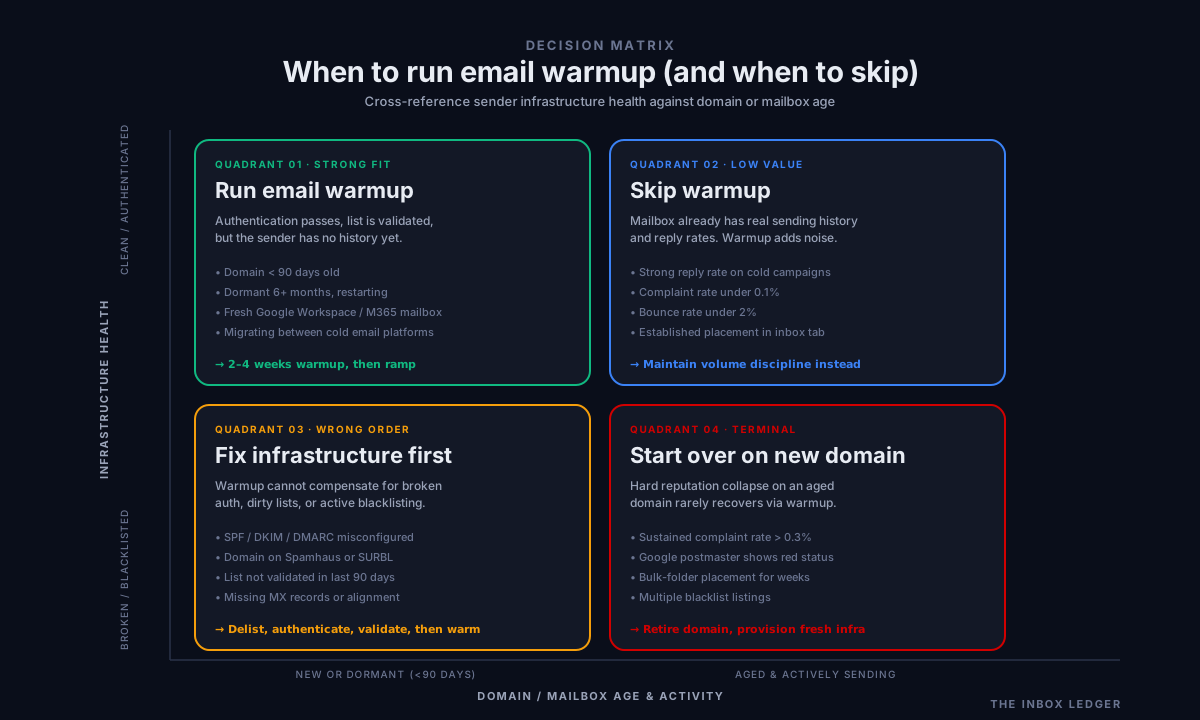
The honest decision matrix:
Run email warmup if:
- The sending domain is less than 90 days old
- The sending domain has been dormant for 6+ months
- The mailbox is new (fresh Google Workspace or Microsoft 365 user)
- You’re recovering from a soft reputation dip and complaint rate is now controlled
- You’re switching from one cold email platform to another and need to re-establish trust
Skip warmup if:
- The domain is on a blacklist (delist first, then warm)
- Authentication is broken (fix first)
- Your list has not been validated in the last 90 days (validate first)
- The mailbox is already sending real cold email with strong reply rates (warmup adds noise, not value)
- You’re trying to recover from a hard reputation collapse (start over on a new domain)
For teams running multi-mailbox infrastructure (which is most cold email programs in 2026), warmup configuration becomes a per-mailbox decision driven by mailbox age and recent activity. Our email warmup tools comparison walks through how the major platforms handle this at scale.
The practical email warmup checklist
Before you turn on any warmup tool, work this list top to bottom:
- Verify SPF, DKIM, and DMARC at MXToolbox. All three must pass.
- Check the sending domain against Spamhaus and other major blacklists.
- Validate the campaign list with EmailListVerify, ZeroBounce, or equivalent. Target bounce rate under 2 percent.
- Configure one-click unsubscribe per RFC 8058 if sending to consumer mailboxes.
- Enroll the domain in Google Postmaster Tools and Microsoft SNDS for monitoring.
- Set warmup volume to 5 to 10 sends per mailbox per day for the first week. Do not start higher.
- Set warmup reply rate target to 40 to 60 percent for the first two weeks, dropping to 30 to 40 percent in week three.
- Do not start real campaign sending until day 15 at the earliest.
- Monitor Postmaster Tools daily for the first 30 days. Spam rate must stay under 0.3 percent.
- Ramp warmup down by day 45 if real campaign reply rates are healthy.
- Re-validate the list every 60 to 90 days to keep bounce rate clean.
- Document the per-mailbox warmup phase in a tracking sheet so you know which mailboxes are warm, transitioning, or in maintenance.
That checklist is the same one we use on client audits. The teams we work with who follow it do not have warmup problems. The teams that skip steps 1 through 5 have nothing but warmup problems.
Frequently asked questions
How long does email warmup take to work?
Can I run email warmup and cold campaigns at the same time?
Does email warmup work on Microsoft 365 mailboxes?
Will email warmup get my domain off a blacklist?
Is free email warmup safe to use?
How many warmup tools should I use?
What happens if I stop warmup suddenly?
The bottom line on email warmup
Email warmup is a narrow, useful intervention that solves a specific problem: a sending domain or mailbox lacks the engagement history that filters use to make placement decisions. When the underlying authentication, list quality, and content are clean, email warmup is the missing piece that lets a new domain produce inbox placement faster than it would on its own.
When the underlying pieces are not clean, warmup is theater. It produces motion without movement. The teams we work with who run cold email at scale treat email warmup as a 30 to 60 day phase, not a permanent crutch, and they invest at least as much energy in list validation, authentication setup, and follow-up sequence quality as they do in warmup configuration. That is the difference between a working program and a burning domain.
If you’re starting a new cold email program, work through these in order: the email deliverability pillar guide for the system view, the 47-point deliverability checklist for the audit, the warmup tools comparison for platform selection, and the cold email outreach playbook for what you actually send once the infrastructure is ready. If you’re already running and seeing reply rates drop, our how to improve email deliverability guide covers the nine fastest fixes.
Subscribe to the weekly briefing for the operator-grade notes we send every Thursday on cold email infrastructure, deliverability shifts, and the warmup configurations actually working in client accounts this month.