SMTP relay in 2026: how to choose and configure it right
SMTP relay services in 2026: what they do, when you need one, how to choose, and the deliverability rules that matter for high-volume sending.
An SMTP relay is the layer between your application and the mailbox providers that actually deliver your mail. Choose well and you get inbox placement, deliverability monitoring, and clean separation of reputation. Choose badly and you spend the next 18 months fighting bounce rates, IP blocklists, and complaint thresholds that should never have been your problem.
This guide is the SMTP relay decision framework we use on every infrastructure build and every audit. It covers what an SMTP relay actually does, when you genuinely need one, how the protocol flow works, the 7 criteria that matter when picking a provider, and the configuration mistakes that account for most of the production incidents we see across audits. It is written for engineers and operators rather than marketers, but the deliverability rules are universal.
What an SMTP relay actually is
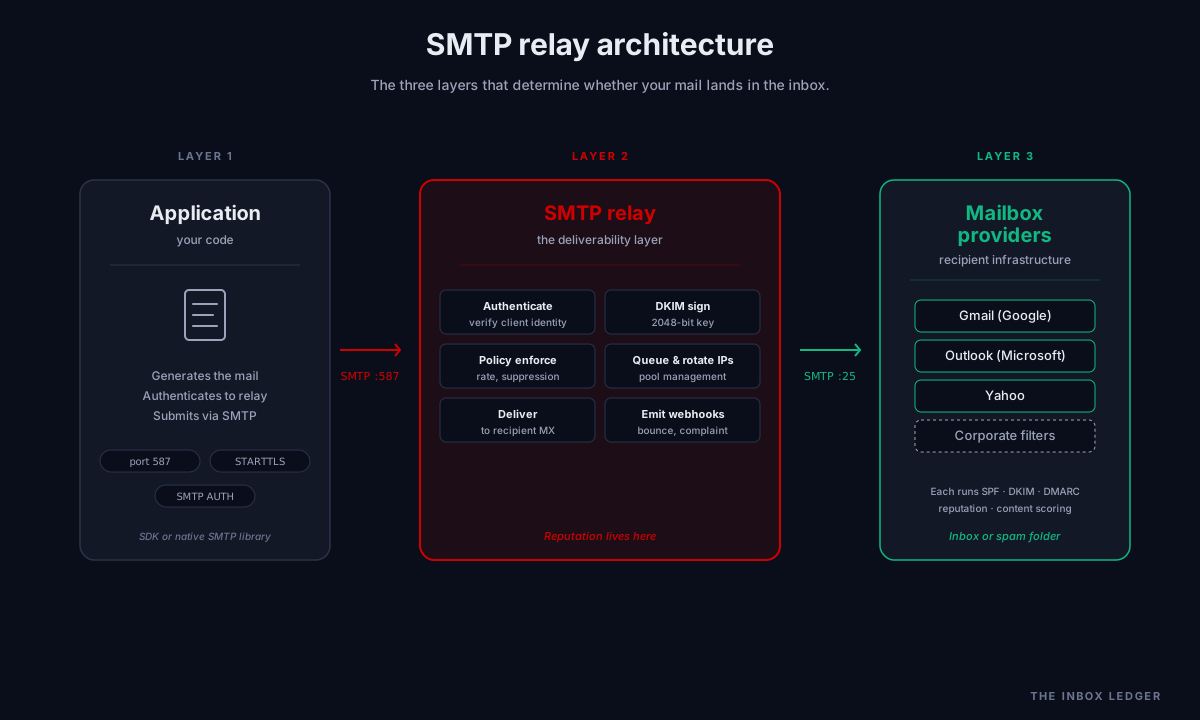
An SMTP relay server is a mail service that accepts outbound email from authenticated clients and forwards it to the recipient’s mailbox provider on their behalf. The application speaks SMTP to the relay (usually on port 587 with STARTTLS, or 465 with implicit TLS). The relay authenticates the connection, applies any sending policies, signs the message with DKIM, and hands it to the destination provider over its own established connection.
In practice, the relay sits between three things: your application code that generates the mail, the authentication and policy layer that proves the mail is legitimate, and the recipient mailbox providers (Gmail, Outlook, Yahoo, and the long tail of corporate filters) that decide whether the mail lands in the inbox.
The relay matters because the mailbox providers do not care about your application. They care about the sending IP’s reputation, the sending domain’s authentication, the complaint rate from the domain, and the bounce rate from the source. The relay is what produces those signals consistently and at scale.
When you need an SMTP relay (and when you do not)
Not every application needs an SMTP relay. Three scenarios where it is genuinely required:
Volume above a few hundred per day. Direct sending from your application server hits per-IP rate limits at major providers fast. Gmail starts throttling sustained sends from a single source at around 500 messages per day per IP without established reputation. Above that, a relay with rotated IPs and provider-trusted infrastructure is the only path to consistent delivery.
Mixed transactional and marketing email. Mixing transactional email (password resets, receipts, alerts) with bulk marketing on the same IP is one of the fastest ways to damage both. A spike in marketing complaints can suppress your password reset emails for weeks. A relay with separate sending streams isolates reputation by design.
Authentication and compliance complexity. SPF, DKIM, DMARC, RFC 8058 one-click unsubscribe, return-path alignment, ARC headers for forwarded mail. Building this stack correctly from scratch costs engineering time you do not need to spend. A competent SMTP relay handles authentication signing automatically and surfaces alignment failures before they cost you reputation.
Scenarios where you do not need an SMTP relay:
- Personal mail under 50 messages per day sent through Gmail or Outlook directly with normal credentials
- Internal team mail routed through Google Workspace or Microsoft 365 mailboxes (those services are themselves SMTP relays at scale)
- One-off scripts that send a handful of alerts to a known endpoint that explicitly accepts unauthenticated SMTP
For everything else above a trivial volume, an SMTP relay service pays for itself in avoided reputation damage within the first 90 days.
How SMTP relay works end to end
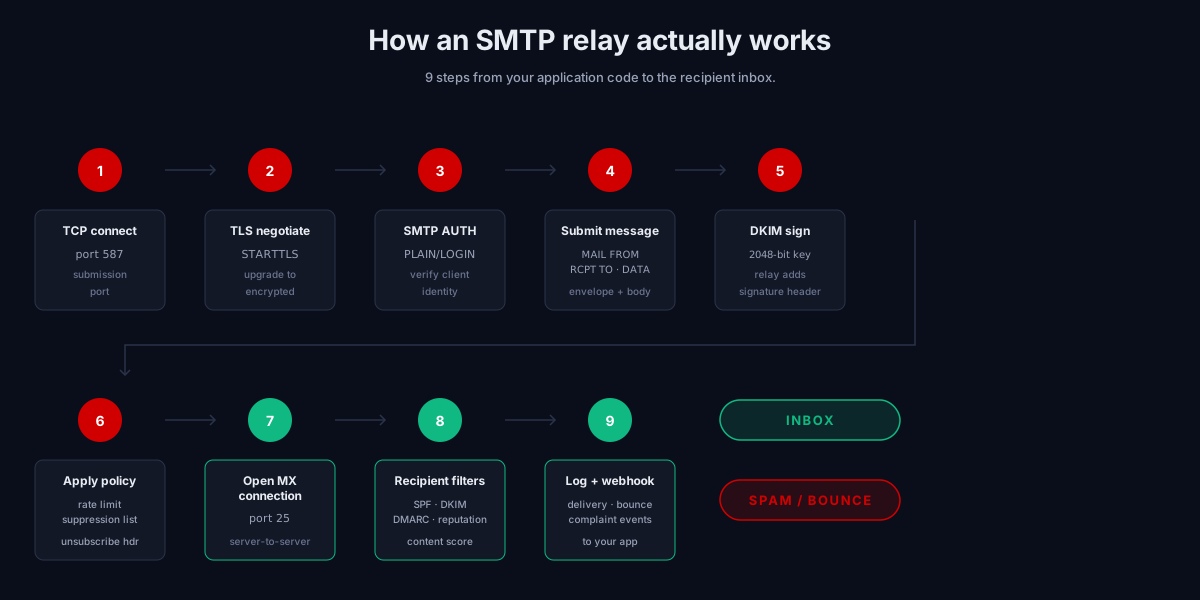
The protocol flow for a single message through the relay, simplified to the steps that matter:
-
The application opens a TCP connection to the relay on port 587 (submission with STARTTLS) or 465 (submission over implicit TLS). Port 25 is reserved for server-to-server delivery and is increasingly blocked at the ISP layer for outbound traffic from non-mail-server endpoints.
-
TLS negotiation upgrades the connection to encrypted before any credentials are exchanged. STARTTLS is mandatory on submission ports in 2026; relays that accept unencrypted credentials are misconfigured.
-
SMTP AUTH authenticates the client. Most relays support PLAIN and LOGIN over TLS; some require API keys instead of user-password credentials. The relay verifies the client is allowed to send on behalf of the configured domain.
-
The application submits the message envelope (MAIL FROM, RCPT TO) and the message data (headers and body). The envelope sender determines return-path alignment for SPF.
-
The relay signs the message with DKIM using the private key associated with the sending domain. The DKIM-Signature header is added to the message at this point. If DKIM signing fails, the message either bounces locally or sends unsigned (depending on the relay’s failure policy).
-
The relay applies any sending policies: rate limiting, suppression list checks (do not resend to addresses that previously bounced or complained), content scanning, and List-Unsubscribe header injection for bulk mail.
-
The relay opens its own SMTP connection to the recipient mailbox provider’s MX servers, identified by DNS MX records on the recipient domain. This is the actual delivery hop, server to server, typically on port 25.
-
The receiving server runs its filtering stack: SPF check against the connecting IP, DKIM verification against the signature in the message, DMARC alignment between the From header and SPF or DKIM, reputation lookups against the sending IP and domain, content scoring, and finally either acceptance, deferral (4xx), or rejection (5xx).
-
The relay logs the result and exposes it via webhook, API, or dashboard. Webhooks for bounce and complaint events are how your application knows to suppress further sends to that recipient.
The whole flow typically takes 200 milliseconds to 2 seconds for the application-to-relay leg, plus whatever the recipient provider takes for its filtering decision. Most well-designed SMTP relay services return a 250 OK to your application as soon as the message is accepted into their queue, then handle the delivery hop asynchronously.
SMTP relay vs the alternatives
The decision is rarely “relay or nothing.” The realistic alternatives in 2026:
Relay vs HTTP API
Most relay services offer an HTTP API alternative (Postmark, Mailgun, Amazon SES, SendGrid, all of them). The API does the same thing as SMTP, with these trade-offs:
- SMTP is universally supported. Every language and framework has an SMTP library. No SDK to install.
- API is faster for high throughput. No TLS handshake per message, batched submission, simpler error handling.
- API gives richer metadata. Per-message tagging, template injection, multi-recipient personalization without separate sends.
For most applications below a few hundred thousand messages per day, the difference is negligible. Pick whichever your codebase finds easier to integrate cleanly. The deliverability outcome is identical because both paths terminate at the same sending infrastructure.
Relay vs self-hosted mail server
Running your own Postfix or Exim instance is technically possible. In 2026, it is rarely advisable for transactional or bulk email at any meaningful scale because:
- IP reputation is yours to build from zero. A fresh VPS IP starts at zero reputation and requires 4 to 6 weeks of careful warmup to reach normal delivery rates. Commercial relays operate IP pools with established reputation across millions of customers.
- DMARC monitoring, blocklist remediation, and authentication are your problem. A managed SMTP relay handles all of this in the product. Self-hosting means building or buying the same monitoring separately.
- Mailbox provider trust is uneven. Major providers maintain explicit relationships with the large SMTP relay services. They do not maintain those relationships with your random VPS provider.
Self-hosting still makes sense for high-volume marketing platforms that own their reputation strategy completely, or for situations with regulatory requirements that prevent third-party processing. For everyone else, a competent relay is cheaper than the engineering time required to maintain the alternative.
Relay vs sending direct from a mailbox provider from Google Workspace or Microsoft 365
For low-volume internal or transactional mail (under a few hundred per day, all to known recipients), sending through Google Workspace SMTP or Microsoft 365 SMTP is fine. The mailbox provider acts as the SMTP relay implicitly.
Above that volume, both providers enforce daily limits and apply pattern detection that treats high-volume outbound from a single mailbox as suspicious. Cold email outreach especially should never run through these endpoints; see our cold email outreach guide for the per-mailbox limits and subdomain strategy that actually works.
The 7 criteria that matter when choosing a best SMTP relay provider
Across the audits we run, seven decision factors separate good SMTP relay choices from bad ones. Ranked by impact on outcome:
1. Reputation isolation between sending streams
The provider must support separate IP pools or sending streams for transactional and bulk email. Without this, a complaint spike on your marketing list silently degrades your password reset deliverability. Look for “message streams” (Postmark), “subaccounts” (SendGrid), “configuration sets” (Amazon SES), or equivalent.
2. Dedicated vs shared IP options
Shared IP pools work fine until they do not. Your reputation depends partially on every other sender in the pool. Above 100,000 messages per month, a dedicated IP with automated warmup is worth the cost. Below that volume, a well-managed shared pool from a quality provider outperforms a poorly-warmed dedicated IP.
3. DKIM, SPF, and DMARC handling
The relay should sign DKIM automatically using your domain key, support custom return-paths for SPF alignment, and surface DMARC alignment failures in the dashboard. Relays that require you to manually manage authentication are not worth the migration cost.
4. Webhook events for bounces and complaints
Without bounce and complaint webhooks, you have no way to maintain your suppression list. Without a suppression list, you keep sending to addresses that previously bounced or complained, and your reputation collapses. Every credible SMTP relay service offers webhook events; verify they fire reliably before scaling.
5. RFC 8058 one-click unsubscribe
Mandatory for any bulk sending above 5,000 messages per day to Gmail or Yahoo since the February 2024 requirements, expanded to Microsoft 365 since May 2025. The relay should inject the List-Unsubscribe and List-Unsubscribe-Post headers automatically for any campaign category mail. If it does not, you are building this layer yourself.
6. Deliverability monitoring and analytics
Inbox placement testing, reputation tracking against Google Postmaster and Microsoft SNDS, complaint rate trending, bounce categorization. The relay’s dashboard should answer “where is my mail actually landing?” without you needing a separate seed-list testing tool. The better providers also surface DMARC RUA report aggregation.
7. Suppression list management and compliance tools
Automatic suppression of hard-bounced addresses, unsubscribers, and complaint sources. Configurable retention windows. Manual override for false positives. Without these, your engineering team writes the same code every other team has written, and writes it slightly wrong.
The major SMTP relay providers, categorized
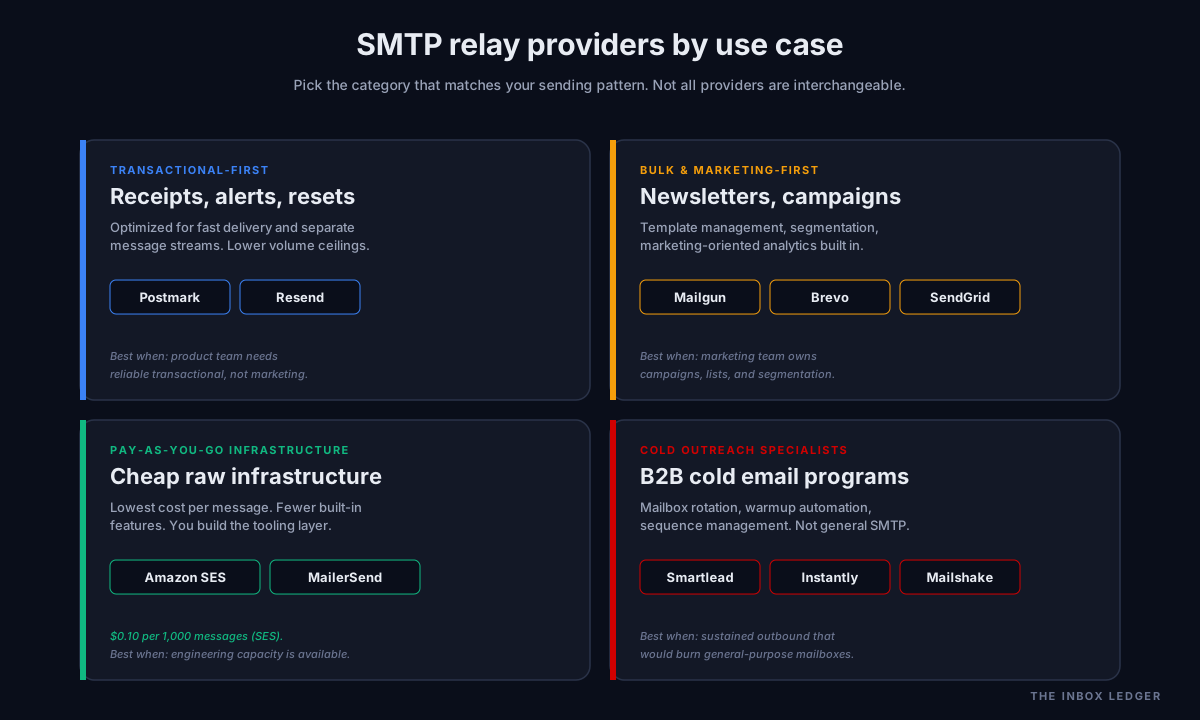
Rather than rank providers (rankings change quarterly), the framework we use is to categorize by primary use case and let the requirements decide:
Transactional-first. Postmark, Resend. Optimized for fast delivery of receipts, password resets, and alerts. Separate message streams. Strong API. Lower volume ceilings but excellent deliverability within them.
Bulk and marketing-first. Mailgun, Mailjet, Brevo, SendGrid. Built for high-volume marketing sends with template management, list segmentation, and analytics oriented toward marketing teams. SMTP relay is one feature among many.
Pay-as-you-go infrastructure. Amazon SES, MailerSend. Lowest cost per message. Fewer built-in features. Best for teams with the engineering capacity to build the surrounding tooling themselves. Amazon SES at $0.10 per 1,000 messages is hard to beat on raw cost; the price for that is that suppression lists, warmup, and deliverability monitoring are largely your problem.
Cold outreach specialist platforms. Smartlead, Instantly, Mailshake. Built specifically for cold email outreach with mailbox rotation, warmup automation, and sequence management. Not general-purpose SMTP relays, but the right choice for cold email programs at any scale.
Common SMTP relay configuration mistakes
The five mistakes we see most often on infrastructure audits:
1. Single sending stream for everything
Transactional, marketing, cold outreach, and product notifications all going through the same SMTP relay configuration. Reputation crossover is guaranteed. The fix is separate message streams, separate sending domains, or separate relay accounts depending on the provider.
2. Missing or misaligned DMARC
DKIM is signed by the relay, but the relay’s signing domain does not align with the From header domain. DMARC fails. Mail lands in spam at a steadily rising rate over weeks. The fix is configuring the relay to sign with a subdomain of your sending domain (CNAME the DKIM record back to the relay) so alignment is automatic.
3. No webhook handler for bounces
The application sends to bounced addresses again on the next campaign. Bounce rate climbs. Above 2 percent on a single send, reputation damage is immediate. Above 5 percent sustained, Gmail’s November 2025 enforcement triggers permanent 5xx rejections from your domain. The fix is implementing the bounce webhook and adding hard-bounced addresses to a suppression list before the next send.
4. Sending without a dedicated subdomain
Cold outreach mail going out from the root domain (yourcompany.com) instead of a sending subdomain (outreach.yourcompany.com). Reputation damage from cold sends contaminates account communications, transactional mail, and anything else from the parent domain. The fix is a dedicated sending subdomain with its own complete authentication stack; see our cold email deliverability checklist for the full setup pattern.
5. Treating SMTP relay as fire-and-forget
The relay is configured once, then ignored. No monitoring of bounce trends, complaint rates, or inbox placement. By the time someone notices delivery has degraded, the reputation damage is months deep. The fix is weekly review of relay metrics; this takes 10 minutes and prevents the kind of incidents that take 60 days to repair.
For the deeper diagnostic framework on each of these, see our 47-point cold email deliverability checklist and the email deliverability pillar guide.
SMTP relay providers and the 2026 bulk sender requirements
Every SMTP relay provider has had to adapt to the Google and Yahoo February 2024 sender requirements and the Microsoft May 2025 expansion. The requirements that hard-constrain any SMTP relay choice in 2026:
- DMARC must be configured with at least
p=noneand RUA reporting for any domain sending more than 5,000 messages per day to Gmail or Yahoo - One-click unsubscribe per RFC 8058 is required for bulk mail
- Spam complaint rate must stay below 0.3 percent (operating ceiling 0.1 percent)
- Hard bounce rate above 2 percent on a single send triggers reputation damage
- From header must align with the authenticated domain (no spoofing of arbitrary senders)
Any SMTP relay service worth using in 2026 handles these requirements automatically when configured correctly. If your provider does not surface compliance monitoring against these specific thresholds, change providers.
A practical SMTP relay setup checklist
When configuring an SMTP relay for the first time, this is the order of operations that prevents the configuration mistakes above:
- Choose a dedicated sending subdomain. Not the root domain. Something like
mail.yourdomain.comoroutreach.yourdomain.comdepending on use case. - Configure SPF for the subdomain with the provider’s recommended include. Verify under 10 DNS lookups total per RFC 7208.
- Configure DKIM signing. Most providers want a CNAME from your subdomain to their signing key. Validate with a test send and verify the DKIM-Signature header in the received message.
- Configure DMARC with
p=noneand an RUA reporting address you actually monitor. Tighten top=quarantineafter 30 days of clean reports. - Set up separate message streams for transactional and bulk traffic if the provider supports it. Different IPs, different reputation tracking.
- Implement the bounce and complaint webhooks before any production send. Connect them to your suppression list.
- Send a test campaign of 50 to 100 messages to a seed list and verify inbox placement before opening up traffic.
- Add weekly metric review to whoever owns deliverability internally. Bounce trends, complaint rates, inbox placement.
The whole setup takes 2 to 4 hours for an experienced operator. Skipping any step costs more than the time saved.
Frequently asked questions
What is an SMTP relay and why do I need one?
How does SMTP relay work end to end?
What is the best SMTP relay service for high deliverability?
What is the difference between SMTP relay and SMTP server?
What ports does SMTP relay use?
Do I need a dedicated IP for SMTP relay?
How do SMTP relay providers handle Google and Yahoo bulk sender requirements?
The bottom line on SMTP relay
The SMTP relay layer is where deliverability is won or lost for any application sending more than trivial volumes of email. The wrong choice (or the right choice configured wrong) produces months of unexplained inbox placement decline. The right choice fades into the background and stops being something you think about.
For the broader deliverability framework that sits on top of an SMTP relay choice, see the email deliverability pillar guide. For the diagnostic checklist when something has already gone wrong, see how to improve email deliverability. For the cold outreach use case specifically, see our cold email outreach playbook.
Subscribe to the weekly briefing for SMTP relay teardowns, infrastructure deep-dives, and deliverability tool comparison reports.
More on Sending Infrastructure
Cold email infrastructure: the complete 2026 build guide
Cold email infrastructure in 2026: the five layers, the build order, sending limits, the data mistake that burns domains, and when not to DIY.
Office 365 SMTP: the 5 relay methods that work in 2026
Office 365 SMTP relay in 2026: the 5 sending methods, which to pick by scenario, the Basic Auth deprecation, and the settings that actually work.