Cold email infrastructure: the complete 2026 build guide
Cold email infrastructure in 2026: the five layers, the build order, sending limits, the data mistake that burns domains, and when not to DIY.
Cold email infrastructure is the technical foundation that decides whether your outbound lands in the inbox or vanishes into spam, and in 2026 it is the single most underinvested part of most outbound programs. Teams spend weeks refining subject lines and sourcing better lists, then wonder why reply rates sit below one percent. The copy is rarely the problem. The system behind the copy almost always is. With global inbox placement averaging around 83 percent, the margin for error is thinner than most teams realize, and the difference between a program that reaches 95 percent inbox placement and one that burns domains every quarter is entirely in the infrastructure layer.
This guide is the build reference we use when teams ask how to set up cold email infrastructure correctly in 2026. It covers the five layers (secondary domains, DNS authentication, dedicated mailboxes, warmup, and sending tools), the order to build them in, the sending limits that keep domains alive, the single data mistake that burns infrastructure fastest, and the honest answer to when you should not build this yourself. Written for founders, SDRs, RevOps leads, and agencies who need outbound that actually reaches the inbox rather than a setup that constantly fights fires.
For the deliverability principles underneath all of this, see the email deliverability pillar. For the authentication layer specifically, see the SPF DKIM DMARC setup guide. For the operational baseline once infrastructure is live, see the cold email deliverability checklist.
What cold email infrastructure actually is
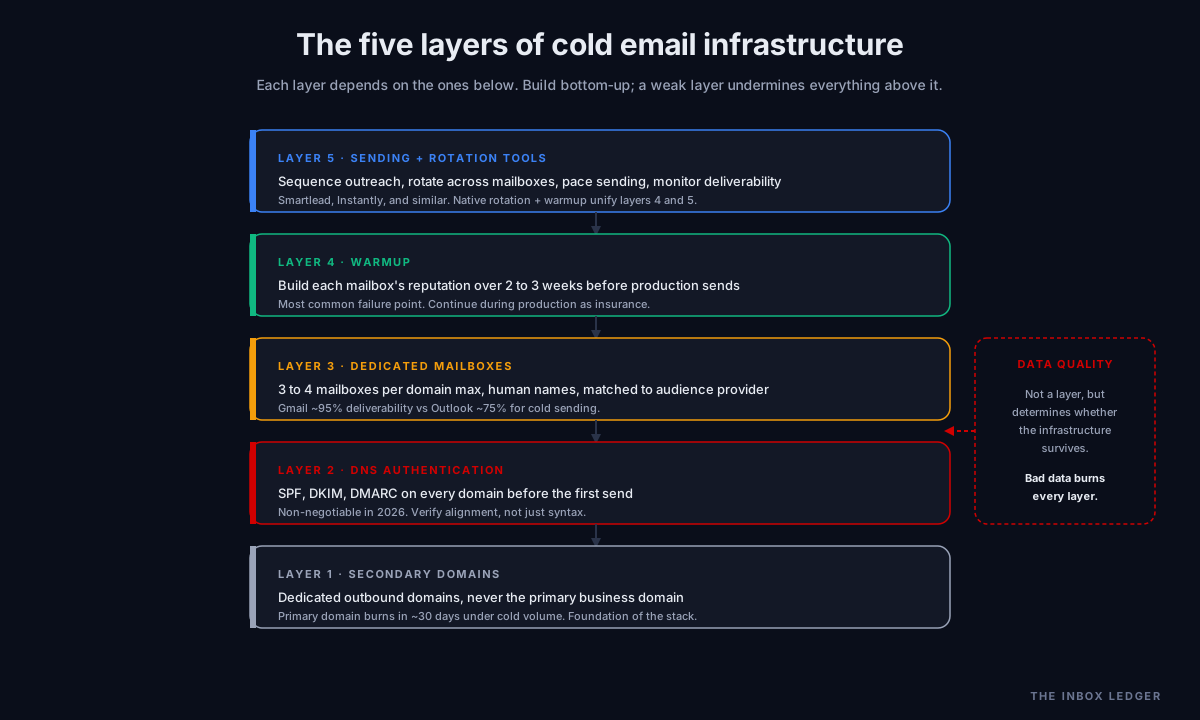
Cold email infrastructure is five layers working together, not a single product you buy. Each layer depends on the ones below it, which is why build order matters and why fixing one layer while ignoring another produces the same poor results.
Layer 1: Secondary sending domains. Dedicated domains used only for outbound, separate from your primary business domain. If domains define your identity, this is where the system starts.
Layer 2: DNS authentication. SPF, DKIM, and DMARC records on every sending domain, proving the mail is legitimately yours.
Layer 3: Dedicated mailboxes. The individual email accounts that send, provisioned on the sending domains, each with a human-sounding name.
Layer 4: Warmup. The 2 to 3 week minimum process of building each mailbox’s sending reputation before any production outreach.
Layer 5: Sending and rotation tools. The platform that sequences the mail, rotates across mailboxes, paces sending, and monitors deliverability.
The layers are not equally weighted, and provider choice within a layer matters more than most teams realize. Gmail mailboxes hit roughly 95 percent deliverability while Outlook sits closer to 75 percent for cold outbound; that gap is structural, not a minor detail. Get all five layers right and a well-run program reaches 95 percent or higher inbox placement. Get one layer wrong and you are paying for sequences nobody reads.
Layer 1: Secondary sending domains
The first rule of cold email infrastructure in 2026: never send cold outreach from your primary domain. Sending cold from your main domain risks burning the reputation your entire business depends on, and a high-volume campaign that runs into complaint problems can torch your primary domain in about 30 days.
The standard practice is a secondary domain that resembles your main one. If your company is at yourcompany.com, you register getyourcompany.com, yourcompany.io, tryyourcompany.com, or similar variations purely for outbound. These domains carry the cold email volume, and if one gets burned, you replace it without touching your primary.
Domain practices that matter:
- Buy domains that resemble your brand so recipients recognize the sender, but keep them entirely separate from the primary
- Register them with enough lead time to age slightly before warmup; brand-new domains carry less trust
- Spread volume across multiple domains rather than concentrating it; the domain-to-mailbox ratio in the next layer governs this
- Plan for replacement as an ongoing cost, not a one-time setup; domains get burned and replaced over a program’s life
Some sending platforms now sell pre-configured domains with authentication already set up, which collapses layers 1 and 2 into a single purchase. That is a convenience worth paying for if your team lacks DNS expertise, but understand what you are buying so you can diagnose problems later.
Layer 2: DNS authentication
Every sending domain needs SPF, DKIM, and DMARC configured correctly before the first email goes out. These are non-negotiable in 2026: after Google’s bulk sender requirements in February 2024 and Microsoft’s high-volume sender enforcement, mail without proper authentication is filtered or rejected regardless of content.
The three records, briefly:
- SPF: publishes which servers are authorized to send for the domain
- DKIM: cryptographically signs each message so receivers can verify it was not altered
- DMARC: ties SPF and DKIM together with a policy and enables reporting
For cold email infrastructure, DMARC at p=none is the practical starting point during initial warmup, escalating toward enforcement as the program stabilizes. The full configuration, including the alignment problems that block most setups and the 10-lookup SPF limit, is covered in the SPF DKIM DMARC setup guide, and the policy escalation in the DMARC policy guide.
The authentication layer is the one teams most often get wrong without realizing it. Records that look correct in a basic checker can still fail alignment, which means the mail authenticates as the sending platform rather than your domain. The sender reputation guide covers how to verify authentication is actually passing via Google Postmaster Tools rather than trusting a syntax checker.
Layer 3: Dedicated mailboxes
Mailboxes are where sending behavior lives. The infrastructure decision that matters most here is the domain-to-mailbox ratio and the provider choice.
The ratio: 3 to 4 mailboxes per domain, maximum. More than that starts to look suspicious to inbox providers, who read many mailboxes on one young domain as a spam pattern. If you need to send more volume, add more domains rather than stacking mailboxes on existing ones. A program sending from 10 mailboxes uses at least 3 domains, not one.
The provider choice: Google Workspace versus Microsoft 365. Google Workspace tends to have stronger native deliverability with Gmail recipients and is generally preferred for audiences that skew consumer or Gmail-heavy. Microsoft 365 performs better for corporate and enterprise B2B outreach where prospects are predominantly Outlook users. The practical 2026 reality is that Gmail mailboxes hit roughly 95 percent deliverability while Outlook sits closer to 75 percent for cold sending, so Google Workspace is the more common choice for pure cold volume, with Microsoft reserved for Outlook-heavy enterprise targeting.
Naming conventions matter more than teams expect. A sender of john.miller@getcompany.com looks real; outreach1@getcompany.com looks like exactly what it is. Use human first-and-last-name addresses on every mailbox. The sender name is part of the trust signal inbox providers and recipients both read.
The mailbox layer is also where dedicated mailboxes versus shared infrastructure becomes a cost decision. Dedicated mailboxes on your own domains give you control and portability; if you work with an agency, confirm you own the domains and mailboxes so the warmup history stays with you if the engagement ends.
Layer 4: Email warmup
Email warmup is the 2 to 3 week minimum process of gradually building each mailbox’s sending reputation before production outreach. It is the single most common point of failure in new cold email infrastructure: skipping or rushing warmup is the fastest way to destroy deliverability on an otherwise correct setup.
Warmup works by simulating the engagement patterns of a real, established mailbox. Warmup tools send mail between participating mailboxes, open it, reply to it, and mark it important, generating the positive engagement signals that tell inbox providers this is a trustworthy sender. Over 2 to 3 weeks the daily volume ramps from a handful of messages to the mailbox’s target sending rate.
The practical warmup discipline:
- Minimum 2 to 3 weeks before any production send; rushing this is the most common cause of new-campaign deliverability failure
- Continue warmup during production, not just before it; ongoing warmup acts as insurance against reputation dips
- Ramp gradually to the target sending rate rather than jumping to full volume on day one
- Watch reputation during ramp via Google Postmaster Tools, pausing the ramp if domain reputation drops
The deeper treatment of warmup as a continuous discipline rather than a one-time onboarding step is in the email warmup tools guide. For most modern sending platforms, warmup is built in and starts automatically when a new mailbox is connected, which is one reason the tool choice in layer 5 matters.
Layer 5: Sending and rotation tools
The sending tool is the control layer that turns the lower four layers into a running program. Its job is to sequence the outreach, rotate sending across mailboxes so no single mailbox exceeds safe limits, pace the sending to look human, and monitor deliverability.
The features that matter for infrastructure (as opposed to just sending):
- Inbox rotation: distributing sends across all connected mailboxes so each stays under its safe daily limit
- Warmup automation: built-in warmup that starts when a mailbox connects, so layers 4 and 5 are unified
- Sending pace control: throttling and randomizing send timing so the pattern looks human rather than machine-blasted
- Deliverability monitoring: tracking inbox placement and reputation so problems surface before they burn domains
This is where the platform comparison matters. The best cold email software guide covers the full landscape, and the instantly vs smartlead comparison covers the two tools teams most often choose for the infrastructure layer. The key infrastructure question is whether the tool handles rotation and warmup natively, because stitching those from separate tools adds failure points.
Sending limits: the numbers that keep domains alive
The sending limits are the operational constraint that governs how much volume the infrastructure can carry safely. Exceed them and reputation degrades; respect them and the infrastructure stays healthy.
The practical 2026 limits:
- 30 to 50 emails per mailbox per day is the safe ceiling for a warmed mailbox, depending on engagement levels
- 3 to 4 mailboxes per domain maximum, as covered in the mailbox layer
- Gradual ramp to those limits over the warmup period, never jumping straight to the ceiling
- Volume scales by adding mailboxes and domains, not by pushing individual mailboxes past safe limits
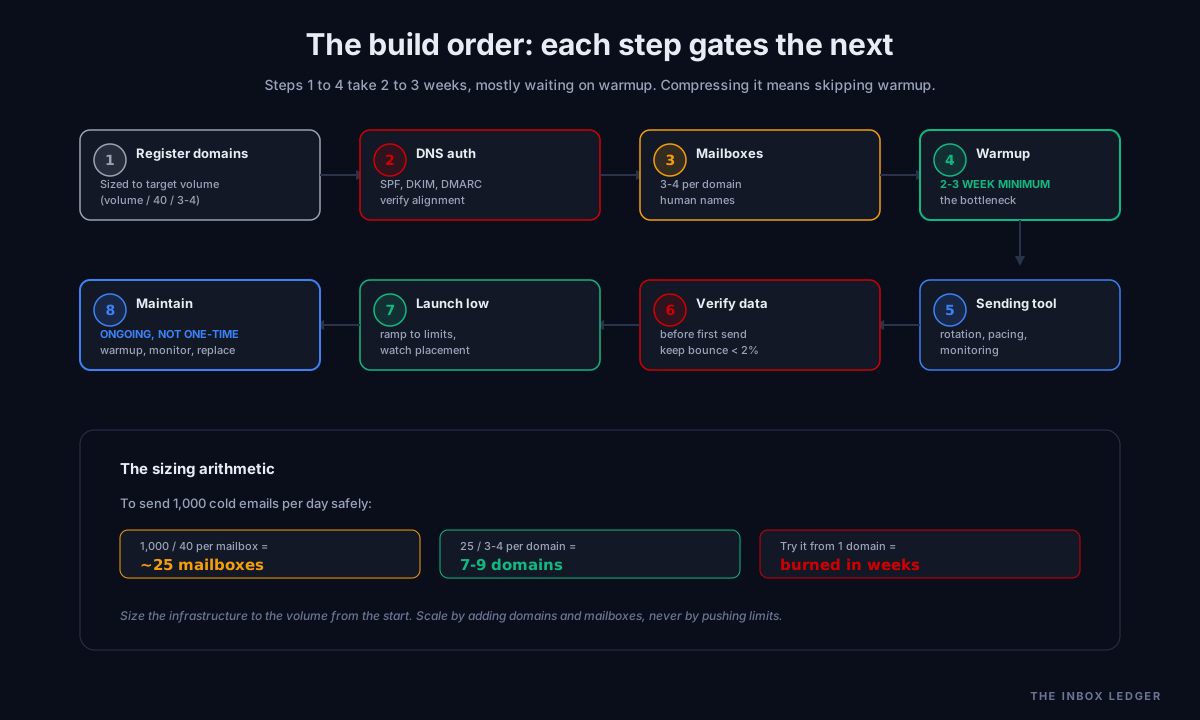
The arithmetic determines your infrastructure size. To send 1,000 cold emails per day safely at 40 per mailbox, you need about 25 mailboxes, which at 3 to 4 mailboxes per domain means 7 to 9 sending domains. Teams that try to send that volume from 3 mailboxes on one domain burn the domain in weeks. The infrastructure has to be sized to the volume from the start.
This is also why higher volume is genuinely more expensive infrastructure, not just a bigger number in a sending tool. Each domain has a registration and warmup cost; each mailbox has a Google Workspace or Microsoft 365 license cost. A program sending 1,000 per day runs real monthly infrastructure cost across domains and mailbox licenses before the sending tool subscription.
The data mistake that burns infrastructure fastest
The single fastest way to burn correctly-built cold email infrastructure is sending to bad data. A perfect five-layer setup sending to an unverified list produces high bounce rates, and bounce rates above 2 to 5 percent damage sender reputation faster than almost anything else.
What we see most often is teams that invest in domains, authentication, mailboxes, and warmup, then send to a list scraped or bought without verification. The bounces spike, the reputation drops, and the infrastructure they built carefully gets burned by the one layer they skipped: list quality.
The fix is list verification before every send, covered in the email hygiene guide. Run lists through a verification service (EmailListVerify, ZeroBounce, NeverBounce) to remove invalid addresses, catch spam traps, and keep bounce rates under 2 percent. The data layer is not technically part of the sending infrastructure, but it determines whether the infrastructure survives contact with real campaigns. For the data sources themselves and how to choose them, see the Apollo alternatives guide.
How to build cold email infrastructure, in order
The build order matters because each layer depends on the ones below. The sequence we use:
- Register secondary domains sized to your target volume (use the sending-limits arithmetic: target daily volume divided by 40, then divided by 3 to 4 for domain count)
- Configure DNS authentication (SPF, DKIM, DMARC) on every domain before any mailbox sends, verified with a real tool not just a syntax checker
- Provision mailboxes at 3 to 4 per domain, with human first-and-last-name addresses, on the provider matched to your audience (Google for Gmail-heavy, Microsoft for Outlook-heavy enterprise)
- Start warmup on every mailbox, 2 to 3 weeks minimum, ramping gradually and watching reputation
- Connect the sending tool with inbox rotation, pace control, and deliverability monitoring configured
- Verify the data through a list verification service before the first production send
- Launch at low volume and ramp toward sending limits while monitoring inbox placement
- Maintain continuously: ongoing warmup, reputation monitoring, domain replacement as needed, list hygiene every send
Steps 1 through 4 take 2 to 3 weeks, mostly waiting on warmup. Teams that try to compress this to a few days are skipping warmup, which is the fastest route to a burned setup. The discipline that separates programs that work from programs that constantly fight fires is treating step 8 as ongoing rather than treating the whole list as one-time setup.
When you should not build cold email infrastructure yourself
Most infrastructure guides are written by infrastructure providers, so they rarely tell you when not to build it. The honest answer: building and maintaining cold email infrastructure is an ongoing operational discipline, not a one-time project, and there are situations where building it yourself is the wrong call.
Do not build it yourself if you lack the operational capacity to maintain it. Infrastructure is not set-and-forget. Domains get burned and need replacing, mailboxes age out, reputation needs daily monitoring during campaigns, and lists need verification every send. A team without someone owning this ends up with broken infrastructure and worse results than buying a managed setup.
Consider a managed setup or an agency if outbound is not your core competency. Agencies and managed-infrastructure providers run the domains, mailboxes, warmup, and monitoring as a service. The cold email agency guide covers the build-versus-outsource decision in depth. The key consideration: if you use an agency, confirm you own the domains and mailboxes so the warmup history and infrastructure stay with you if the engagement ends.
Build it yourself if outbound is central to your growth and you have the capacity. Owning the infrastructure gives you control, portability, and the ability to experiment without per-seat platform constraints. For teams where outbound is a core motion, the control is worth the operational cost.
The decision is not technical capability; the DNS and mailbox setup is well documented. The decision is whether you have the ongoing operational discipline to maintain a living system. Infrastructure that is built well and maintained poorly produces worse results than a managed setup.
How cold email infrastructure connects to the rest of outbound
Cold email infrastructure is the foundation the entire outbound program sits on. Above it sit the data, the sequences, and the messaging; below it is nothing, which is why getting it wrong means nothing above it works.
The full outbound stack:
- Infrastructure (this guide: domains, authentication, mailboxes, warmup, sending tools)
- Data (the Apollo alternatives guide and data source choice)
- List verification (the email hygiene guide)
- Sequencing and messaging (the cold email outreach guide, cold email templates guide, and cold email follow-up guide)
- Ongoing deliverability (the sender reputation guide and cold email deliverability checklist)
Teams that obsess over messaging and data while treating infrastructure as an afterthought get the same poor results regardless of how good the copy is, because the mail never reaches the inbox. Teams that build infrastructure correctly and maintain it create the headroom to experiment with messaging and targeting safely, because stable deliverability means a bad campaign damages results without burning the whole system.
For the deliverability principles underneath, see the email deliverability pillar and the how to improve email deliverability walkthrough. For the tool choices within the infrastructure, see the best cold email software guide and the SMTP relay guide.
Frequently asked questions
What is cold email infrastructure?
How long does it take to set up cold email infrastructure?
Can I send cold email from my main domain?
How many mailboxes can I have per domain?
What are safe cold email sending limits?
Should I use Google Workspace or Microsoft 365 for cold email?
What burns cold email infrastructure fastest?
The bottom line on cold email infrastructure
Cold email infrastructure is five layers (secondary domains, DNS authentication, dedicated mailboxes, warmup, and sending tools) that work together as a system, and the system is only as strong as its weakest layer. The teams we work with that build infrastructure correctly start with secondary domains, never the primary; size the domain and mailbox count to their target volume using the sending-limit arithmetic; warm every mailbox for 2 to 3 weeks before production; verify their data before every send; and treat maintenance as ongoing rather than one-time. That discipline produces 95 percent or higher inbox placement and the headroom to experiment with messaging safely.
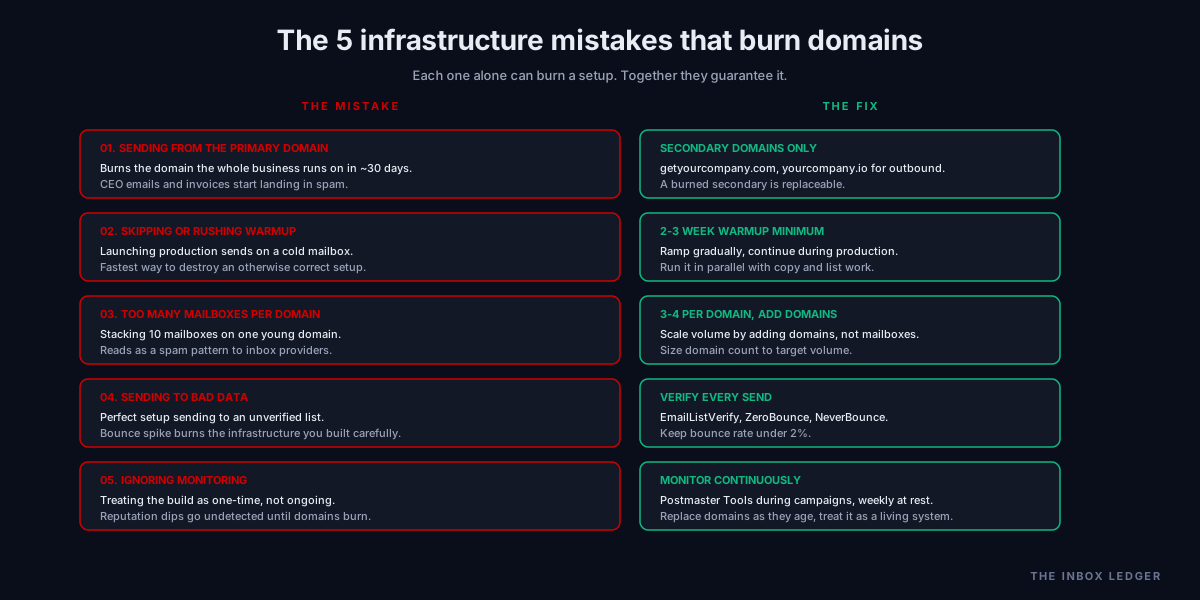
The teams that get it wrong send from the primary domain, skip warmup to launch faster, stack too many mailboxes on too few domains, send to unverified data, and treat the whole thing as one-time setup. Each of those individually can burn the infrastructure; together they guarantee it. The infrastructure is not glamorous, but it is the difference between a scalable outbound motion and one that constantly fights fires.
For the layers underneath, see the email deliverability pillar, the SPF DKIM DMARC setup guide, and the sender reputation guide. For the tools and data that sit on top, see the best cold email software guide, the Apollo alternatives guide, and the cold email deliverability checklist.
Subscribe to the weekly briefing for operator-grade cold email and infrastructure notes, one short email every week.
More on Sending Infrastructure
Office 365 SMTP: the 5 relay methods that work in 2026
Office 365 SMTP relay in 2026: the 5 sending methods, which to pick by scenario, the Basic Auth deprecation, and the settings that actually work.
SMTP relay in 2026: how to choose and configure it right
SMTP relay services in 2026: what they do, when you need one, how to choose, and the deliverability rules that matter for high-volume sending.