Cold email templates 2026: 8 frameworks that get replies
Cold email templates that convert in 2026: the 8 frameworks that produce replies, why most templates fail now, and how to personalize right.
Cold email templates in 2026 are not a copy problem. They are a structural problem. The SERP for “cold email templates” is full of 20+ template listicles (“steal these proven templates”) that promise reply rates the templates themselves cannot produce, because the templates are detached from the deliverability infrastructure, list quality, and signal-based personalization that actually generate the replies. A perfect cold email template sent from a poorly-warmed mailbox to an unverified list will get 0.4 percent reply rates. A mediocre template sent from a properly-warmed mailbox to a verified, signal-targeted list will hit 8 to 12 percent. The template carries less weight than the surrounding system; templates only matter once everything else is right.
This guide is the b2b cold email templates framework we use on every B2B outbound program. It covers the 8 template structures that produce replies in 2026 (with full annotated examples), the brevity and personalization rules that separate the templates that work from the ones that get filtered, why “copy-paste these 27 templates” advice fails after the February 2024 Google and Yahoo bulk sender requirements and the Microsoft May 2025 enforcement, and the subject line patterns that get opened without triggering spam filters. Written for operators who need their cold email templates to survive contact with current enforcement.
Why most cold email templates fail in 2026
Three things changed between 2022 and 2026 that broke roughly 80 percent of the cold email templates still circulating online:
Brevity became mandatory. Top-performing campaigns in 2026 average under 80 words per first-touch email; Instantly’s 2026 cold email benchmark report confirms the same pattern across millions of sends. Templates from 2022 that ran 150 to 250 words now underperform because they look like marketing email to filters and like work to recipients. The cold email templates that convert in 2026 fit on a phone screen without scrolling.
Personalization moved from cosmetic to structural. Merge fields like {first_name} and {company} no longer count as personalized; mailbox provider filters and recipients both recognize them as templated. Effective personalization in 2026 references a specific trigger event (funding round, job change, product launch, recent post) in the first line. Generic openers like “I hope this email finds you well” or “My name is…” are instant-delete signals.
Bulk sender enforcement changed what content patterns survive. Templates with HTML formatting, tracking pixels, multiple links, attachments, or anything that looks transactional now correlate with spam folder placement. Plain-text templates with one link and no images consistently outperform polished HTML cold email templates in 2026.
The implication: cold email templates pulled from articles that have not been updated since 2023 mostly do not work. The structures below are the ones we see producing replies in current campaigns.
The 5 elements of cold email templates that convert
Every cold email template that works in 2026 has the same structural elements. The differences are in tone and angle, not in structure:
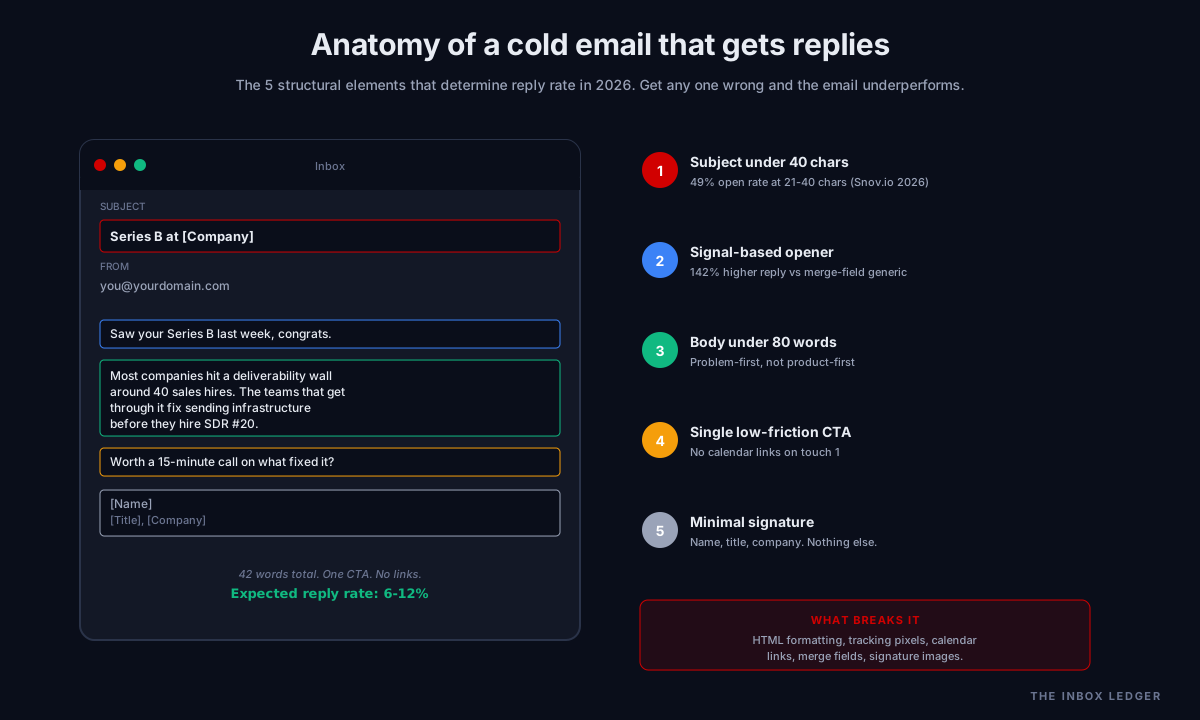
1. Subject line under 40 characters
Subject lines between 21 and 40 characters achieve 49 percent average open rates in 2026 (per Snov.io’s 2026 data). Subject lines under 6 words consistently outperform longer ones. Questions in subject lines boost opens by 21 percent. Trigger-event subject lines (referencing funding, job change, product launch) hit 54 percent open rates. Subject lines containing “free,” “guaranteed,” excessive punctuation, or ALL CAPS get filtered.
2. Personalized first line referencing a specific signal
The first sentence must prove you did the research. Reference a LinkedIn post, recent company event, funding announcement, product launch, or job change. Generic openers (“I hope this finds you well”) are 142 percent less effective than signal-based openers (per Martal Group 2025 data). One sentence, specific, and accurate; getting the signal wrong is worse than not having one.
3. Value-first body under 80 words
State the prospect’s problem (or relevant pattern), then state what you do that addresses it. Lead with the problem, not the product. Top-performing first-touch emails average under 80 words total (Instantly 2026 benchmark). Skip the “I noticed your company is…” framing; get to the value statement in sentence 2.
4. Single low-friction CTA
One CTA per email. “Open to a 15-minute call next Tuesday?” works. “Want me to send a 2-minute video?” works. “Worth a quick call?” works. “Book time on my calendar [link]” does not work in the first touch; calendar links signal “this is a sales pitch” and reduce reply rates significantly. Move calendar links to email 3 or 4 in the sequence, never the first.
5. Signature without calendar links or marketing copy
Name, title, company. That is it. No company tagline, no social links, no email signature image, no “Sent from my iPhone.” The shorter the signature, the higher the reply rate. Anything that looks like a marketing email gets treated like one.
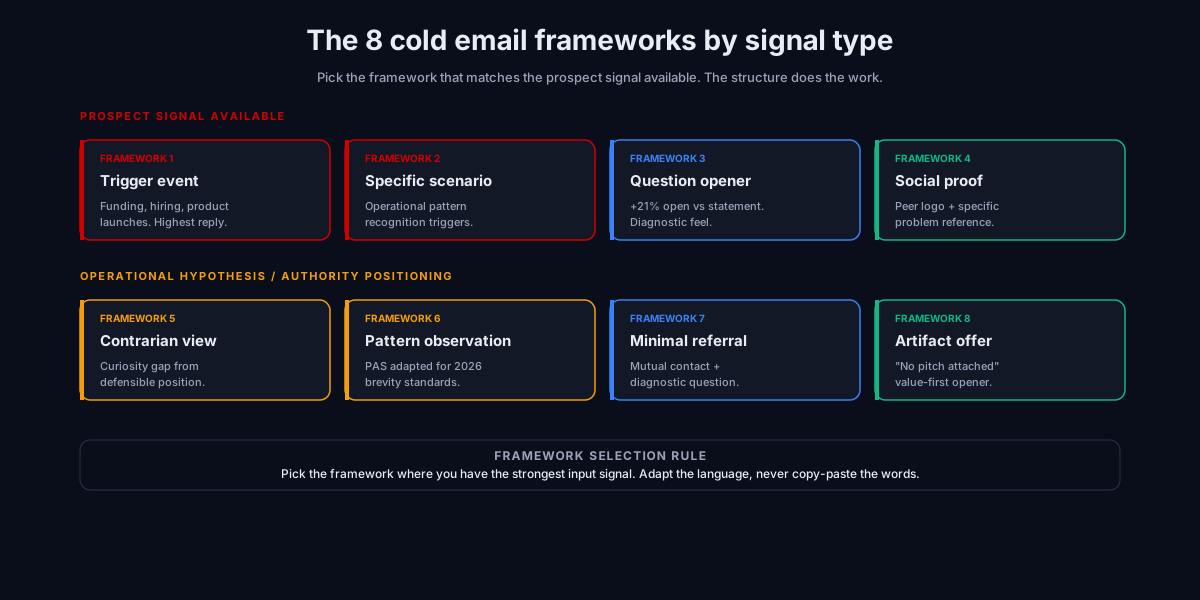
The 8 cold email template frameworks that work in 2026
These are the 8 structural patterns we see producing 6 to 15 percent reply rates in current B2B campaigns. Each is shown with annotated cold email examples using a fictional scenario (we never use real client copy in published articles).
Framework 1: The trigger-event opener
Use case: Funding rounds, leadership changes, product launches, expansions. Highest reply rates of any cold email template framework.
Subject: Series B at [Company] Body:
Saw your Series B last week, congrats.
Most companies hit a deliverability wall around 40 sales hires when they scale outbound. The teams that get through it usually fix sending infrastructure before they hire SDR #20.
Worth a 15-minute call on what fixed it?
Why it works: The trigger event makes the opener feel like a real reference. The specific scenario (40 sales hires, SDR #20) shows you understand the recipient’s world. One CTA, no link.
Framework 2: The specific-scenario template
Use case: When the prospect’s exact situation is recognizable but not publicly announced. Works for verticals with consistent operational patterns.
Subject: Question on the [specific operational pattern] Body:
Most [specific role] at companies in [specific stage] hit the same problem around [specific symptom]. Usually it traces back to [specific cause], not [common misdiagnosis].
If that pattern matches what you are seeing, happy to walk through how the teams we work with fix it.
Worth 15 minutes?
Why it works: Self-recognition triggers when the description feels uncomfortably accurate. The prospect mentally fills in their own example before they finish reading. Works without requiring publicly available trigger events.
Framework 3: The question-based opener
Use case: When you have a specific operational hypothesis about the prospect’s situation and want them to engage with the diagnosis.
Subject: Quick question on [specific operational area] Body:
Are you still running [specific tool or pattern] for [specific use case]?
Asking because most [specific role] we work with switched off it in 2025 after [specific cause]. Made a noticeable difference on [specific metric].
Happy to share what they switched to if useful.
Why it works: Questions get reply rates 21 percent higher than statements. The question feels diagnostic rather than salesy because the second paragraph supplies context without pitching.
Framework 4: The social proof reference
Use case: When you have credible peer logos that the prospect would recognize, and the work is genuinely comparable.
Subject: How [recognizable peer company] handled [specific problem] Body:
The [specific role] at [recognizable peer company] hit the same [specific problem] last quarter. We worked through it with them; happy to share what we changed.
15-minute call if useful, or I can send the breakdown directly.
Why it works: Specific peer reference plus specific problem creates immediate relevance. Two CTAs work here because they are different friction levels (call vs receive a doc). Only use if you actually have the case study and the peer would tolerate being named.
Framework 5: The contrarian observation
Use case: When you have a defensible operational point of view that goes against current conventional wisdom in the prospect’s space.
Subject: Most [specific role] are doing [specific tactic] wrong Body:
Most [specific role] try to fix [specific symptom] by [common approach]. In our experience that makes it worse 60 percent of the time, because [specific reason].
The teams that fix it usually do [counter-intuitive approach] instead.
Worth a quick call if you want the breakdown.
Why it works: Contrarian openers create curiosity gap. Recipients reply to find out if you are right, even when they disagree. Only works if you actually have a defensible operational position; bluffing on this template kills reply rates.
Framework 6: The pattern observation (PAS variant)
Use case: When prospect’s category has a known recurring problem and your solution is the standard fix.
Subject: Pattern we see in [prospect’s category] Body:
Roughly two-thirds of [prospect’s category] companies hit [specific problem] within 18 months of [specific milestone]. Usually shows up as [observable symptom].
If you are seeing that pattern, the fix is [brief solution description]. Takes about [realistic time] to implement properly.
Worth a call to walk through it?
Why it works: Problem-Agitation-Solution structure adapted to 2026 brevity standards. The specific numbers (two-thirds, 18 months) signal real pattern recognition vs generic claims.
Framework 7: The minimal context referral
Use case: Warm introductions or weak referrals that you want to leverage without overselling the connection.
Subject: [Mutual contact name] mentioned you Body:
[Mutual contact name] said you were the right person to ask about [specific operational area] at [Company].
Quick question: are you still using [specific approach] for [specific use case]? Asking because we work with similar teams and I have a specific recommendation if you are open.
Why it works: Mutual contact reference removes the “who are you” friction. Then immediately gets to the diagnostic question rather than dwelling on the connection. Only use when the referral is genuine.
Framework 8: The artifact offer
Use case: When you have a genuinely valuable asset (audit, calculator, framework document) the prospect would actually want, regardless of buying intent.
Subject: [Specific artifact] for [Company] Body:
We put together a [specific artifact type] for [prospect’s category] in 2026. It covers [3 specific things the artifact addresses].
Want me to send it over? No pitch attached.
Why it works: The “no pitch attached” framing reduces guard, and the specificity of the artifact makes it feel real vs lead-magnet bait. Only works if the artifact is actually useful and you actually send it without a sales follow-up. Builds reply momentum that converts in later touches.
For the broader sequence strategy that these cold email templates plug into, see our cold email follow up guide.
Cold email subject lines that get opened in 2026
Subject lines determine open rates; open rates determine whether your cold email templates ever get tested. Five patterns that consistently work in 2026:
1. Trigger-event subject lines
- “Series B at [Company]”
- “[Specific role] role at [Company]”
- “[Company]‘s [recent product launch]”
Hit 54 percent average open rates when the trigger is genuine.
2. Question subject lines
- “Quick question on [specific area]”
- “[Specific tool] for [use case]?”
- “Still using [specific tactic]?”
21 percent higher opens than statements. Avoid generic questions like “Are you the right person?“
3. Mutual reference subject lines
- “[Mutual contact] mentioned you”
- “From [referrer’s company]”
- “[Mutual contact name] said to reach out”
Highest reply rates among any subject line category when the reference is real.
4. Specific-pattern subject lines
- “Pattern we see in [prospect’s category]”
- “Most [specific role] miss this”
- “What [peer company] changed last quarter”
Performs best when the body delivers on the pattern claim immediately.
5. Numbers in subject lines
- “3 things [peer company] changed”
- “60% of [category] are still doing X”
- “$2M saved by [specific approach]”
113 percent improvement in open rates when numbers are specific and credible.
Subject line patterns to avoid in 2026:
- Anything with “free,” “guaranteed,” “discount,” “urgent”
- Excessive punctuation (!!!, ???)
- ALL CAPS or mostly capitalized words
- More than 50 characters total
- Generic “Hi [Name]” or “Following up” without specific context
- Anything that reads like a marketing email subject
Personalization rules that make cold email templates work
The single biggest predictor of reply rate is whether the first line is personalized based on a real signal. Personalization rules we use:
Signal-based personalization (works)
- Reference to a specific LinkedIn post the prospect published
- Reference to a recent company announcement (funding, hiring, product launch)
- Reference to a podcast appearance or recent press
- Reference to a job change or role expansion
- Reference to a specific peer they should be aware of
Merge-field personalization (does not work)
"Hi {first_name}""I saw {company} is growing""Hope things at {company} are going well""I came across {company} on {industry_list}"
Merge field personalization registers as templated to both filters and recipients. It does not produce the personalization signal that lifts reply rates; it just produces a more polite generic email.
What signal-based personalization requires
Researching individual prospects takes 3 to 7 minutes per contact when done well. For a 500-prospect campaign, that is 25 to 60 hours of upfront work. Most teams cannot sustain this manually, which is why:
- AI-powered personalization tools (Clay, Lavender, Smartlead’s built-in AI personalization) automate the research-to-first-line workflow
- Specialized list providers package signal data (funding events, hiring patterns, tech stack changes) for direct use in personalization
- Top-performing teams invest in the personalization research even when it slows volume, because the reply rate uplift more than compensates
Cold email sequence structure: how templates fit together
A single cold email template is one touch in a sequence. The sequence is what produces booked meetings, not any single email. Standard sequence structure that works in 2026:
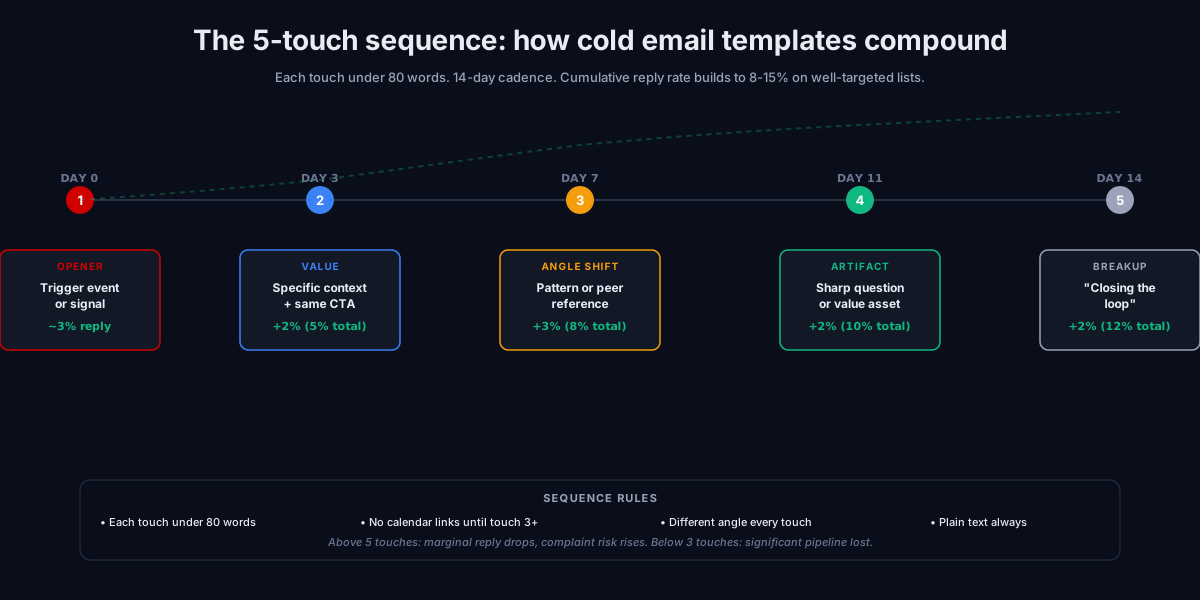
Day 0: Email 1, the opener. Trigger event or signal-based opener. Under 60 words. Single CTA. This is where the cold email templates that convert most often live (frameworks 1, 2, or 3 above).
Day 3: Email 2, the value-first context. Adds one specific piece of value or context the opener did not have room for. Under 80 words. Same CTA or a softer CTA (artifact offer).
Day 7: Email 3, the pattern or peer reference. Frameworks 4, 5, or 6 above. The “if my opener did not land, here is a different angle” touch. Under 80 words.
Day 11: Email 4, the artifact or specific question. Framework 8 (artifact offer) or a sharp direct question. Different framing than touches 1 to 3.
Day 14: Email 5, the minimal breakup. “Closing the loop, no pressure” message. One sentence body. Often produces the highest single-email reply rate of any touch because of the reciprocity it triggers.
Total: 5 touches, 14 days, each under 80 words. Cumulative reply rates from this structure typically run 8 to 15 percent on well-targeted lists. For deeper sequence design, see our cold email follow up guide.
Common mistakes with cold email templates
The five patterns we see most often when teams underperform with their cold email templates:
1. Copy-pasting templates without changing the framework
The templates above work because of the structural pattern, not the specific words. Teams that copy the exact wording but change “Series B” to “Series A” without adjusting the rest of the email get fewer replies because the structure becomes mismatched. Use the framework, adapt the language to your specific scenario.
2. Adding HTML formatting and tracking pixels
Plain-text emails consistently outperform HTML cold email templates in 2026. Tracking pixels (the invisible image that reports opens) trigger spam filters and reduce deliverability. Modern cold email platforms (Smartlead, Instantly) offer the option to disable open tracking; use it on cold outreach. The 5 percent open-rate visibility is not worth the deliverability cost.
3. Calendar links in the first email
The first cold email should never contain a calendar booking link. Calendar links signal “this is a sales pitch about to happen” and reduce reply rates by 30 to 50 percent in our audit data. Move calendar links to touch 3 or later in the sequence, after the prospect has signaled some interest. The first email asks for a reply, not a booking.
4. Sending templates without verifying the list
A 7 percent bounce rate on an unverified list kills inbox placement within 2 weeks, after which no template performs because nothing lands in the inbox. Verify lists before sending; bounce rates above 2 percent on a single send trigger immediate reputation damage. See our email hygiene guide for the verification practice.
5. Treating templates as the variable
Most teams iterate on template copy when reply rates are low. The actual variable is usually one tier above: list quality, targeting precision, sending infrastructure, or warmup state. The cold email template is the last thing to optimize, not the first. See the 47-point cold email deliverability checklist for the diagnostic framework.
The practical workflow for using cold email templates
When deploying a new cold email template into a campaign, the order of operations that produces results:
- Verify the list (under 2 percent bounce rate target) using EmailListVerify, ZeroBounce, or NeverBounce
- Confirm the sending infrastructure is warmed up properly (see email warmup tools) and authentication is configured (SPF, DKIM, DMARC; see SMTP relay guide)
- Pick the framework from the 8 above that matches your prospect signal (trigger event, peer reference, pattern observation, etc.)
- Adapt the language to your specific scenario; do not copy-paste the exact words
- Test with a 100-prospect batch before scaling to 1,000+
- Measure reply rate, not open rate (open rate is unreliable since Apple Mail Privacy Protection)
- Iterate the personalization first if reply rate is below 3 percent; iterate the template only if personalization is already strong
For the broader cold email outreach playbook that templates sit inside, see our cold email outreach guide.
Frequently asked questions
What is the best cold email template for B2B in 2026?
How long should a cold email be in 2026?
Do cold email templates still work in 2026 with bulk sender enforcement?
What is the ideal cold email subject line length?
Should I use HTML or plain text cold email templates?
How many follow-ups should a cold email sequence have?
Can I use AI to generate cold email templates?
The bottom line on cold email templates in 2026
Cold email templates produce replies when they sit on top of a working sending system: verified list, warmed mailboxes, properly authenticated sending domain, and signal-based personalization on every first line. The 8 framework structures above are the patterns that work; the specific words matter less than picking the right framework for your prospect signal and executing the personalization correctly.
The teams getting 10+ percent reply rates in 2026 are not using better cold email templates; they are running better systems around average cold email templates. The mistake we see most often is teams obsessing over template copy when the actual constraint is list quality or sending infrastructure. Fix the system first, then iterate the templates on top of it.
For the broader cold email outreach framework that templates plug into, see our cold email outreach playbook. For the follow-up sequence design, see our cold email follow up guide. For the infrastructure these cold email templates need to run on, see our SMTP relay guide, email warmup tools guide, and the 47-point cold email deliverability checklist. For the agency-vs-in-house decision that sits above platform choice, see our cold email agency guide and best cold email software guide.
Subscribe to the weekly briefing for cold email template teardowns, sequence frameworks, and outreach deep-dives.
More on Cold Email
Best cold email software 2026: 8 platforms by use case
Best cold email software 2026: the 8 platforms that actually work, categorized by operator profile, with pricing, deliverability, and use case fit.
Cold email agency: how to choose one that books meetings
Cold email agency hiring guide for 2026: what they actually do, how to evaluate them, the red flags, the questions to ask, and when to hire vs DIY.
Cold email follow up: the 2026 sequence that gets replies
How to structure a cold email follow up sequence in 2026: number of touches, timing, what each message should say, and the deliverability rules.