Email hygiene in 2026: the playbook for clean sender lists
Email hygiene in 2026: how to verify lists, suppress bounces, manage complaints, and keep sender reputation healthy across cold and bulk email.
Email hygiene is the ongoing operational discipline of keeping your sending list, your suppression list, and your engagement signals clean enough that mailbox providers continue trusting you to land in the inbox. In 2026, with Google and Yahoo’s 2024 bulk sender requirements and Microsoft’s 2025 expansion actively enforced, hygiene is not a quarterly tidy-up anymore. It is a continuous practice that determines whether your sends reach the primary inbox or get filtered.
This guide is the email hygiene framework we use across every cold email and bulk email program. It covers the four operational layers of hygiene, the verification practices that prevent bounce-rate disasters, the suppression discipline that keeps complaint rates under the enforcement threshold, the re-engagement and sunset policies that protect your reputation over time, and the email hygiene tools that automate the parts you should not do manually. It is written for operators who need their list cleaning practice to survive contact with enforcement.
Why email hygiene matters more in 2026
The bulk sender requirements rolled out across 2024 and 2025 changed what constitutes acceptable hygiene practice. Three thresholds matter operationally:
-
Spam complaint rate ceiling of 0.3 percent. Above this, Gmail, Yahoo, and Microsoft trigger enforcement: deferrals, spam folder placement, and eventually outright rejection. The operating ceiling is 0.1 percent. A program running at 0.15 percent is on borrowed time even if it is technically compliant.
-
Bounce rate ceiling of 2 percent on any single send. Above this, immediate reputation damage. Since Gmail’s November 2025 sustained-bounce enforcement, sustained bounces above 5 percent can trigger permanent 5xx rejections from your domain.
-
One-click unsubscribe per RFC 8058 required for bulk mail. Without it, recipients who want out hit “Report Spam” instead, which counts against your complaint rate and damages reputation faster than the unsubscribe would have.
Email hygiene is the operational practice that keeps you below all three thresholds continuously. Without it, the question is not whether your reputation collapses; it is how many weeks of unmonitored sending it takes.
The four layers of email hygiene
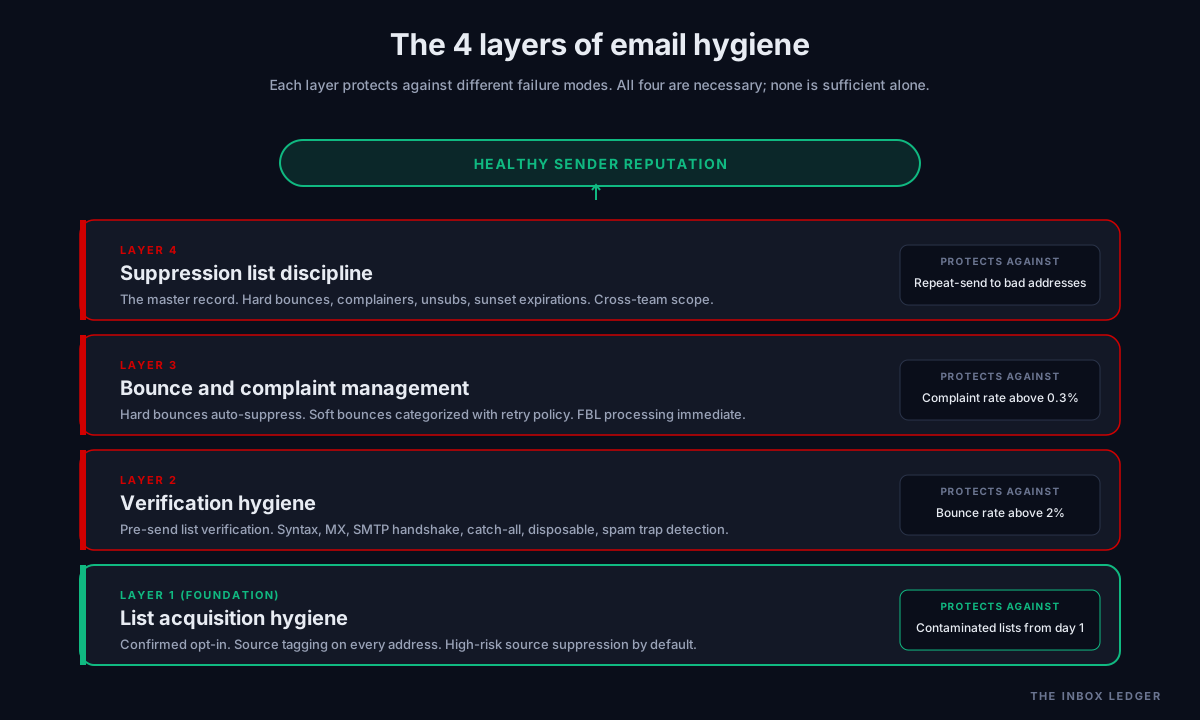
Email hygiene practice operates at four distinct layers. Each protects against different failure modes:
Layer 1: List acquisition hygiene. The discipline applied when addresses enter your sending universe in the first place. Confirmed opt-in, source tracking, consent documentation, and reasonable suppression of high-risk acquisition channels.
Layer 2: Verification hygiene. Ongoing technical verification of address validity before sending. Removes hard-bouncing addresses, role accounts, disposable domains, and spam traps before they hit your sender reputation.
Layer 3: Bounce and complaint management. Active response to delivery signals. Hard bounces and complaints feed into suppression automatically. Soft bounces get categorized and re-tried with the right cadence. Patterns inform list-level decisions.
Layer 4: Suppression list discipline. The systematic exclusion of addresses that should never receive another send: unsubscribers, hard bounces, complainers, and dormant addresses past your sunset threshold.
The four layers work together. A clean list (Layer 1) still needs verification (Layer 2) because addresses go stale at 25 to 28 percent per year. A verified list (Layer 2) still needs bounce management (Layer 3) because some bounces only show up at send time. Active bounce management (Layer 3) still needs suppression discipline (Layer 4) because some addresses keep accepting mail but stop engaging. Each layer is necessary; no layer is sufficient.
Layer 1: List acquisition hygiene
The cleanest list is one that never accepts a contaminating address in the first place. Three practices matter:
Confirmed opt-in for marketing and newsletter sources
For any list that recipients knowingly join (newsletter signups, downloadable content gates, webinar registrations), confirmed opt-in (also called double opt-in) is the operational standard. Send a confirmation email, require the click, only add verified clicks to the active list. The conversion penalty is real (5 to 15 percent of single-opt-in subscribers do not confirm) but the deliverability benefit compounds over years.
For cold email outreach lists, confirmed opt-in does not apply (the recipient never opted in). The acquisition hygiene equivalent is data source quality: only buy or source from providers with verified, recent data, and never use scraped lists. Scraped lists routinely contain 10 to 20 percent invalid addresses plus 1 to 3 percent active spam traps; both numbers are reputation incinerators.
Source tagging on every address
Every address in your sending universe should be tagged with how it entered and when. When deliverability degrades, source tagging is what lets you isolate which acquisition channel produced the problem. A list with no source tags is a list with no diagnostic path when something goes wrong.
High-risk source suppression
Some acquisition sources produce reliably bad outcomes regardless of how well you run the rest of your hygiene practice. Free email giveaway entries. Trade show badge scans (the recipients often did not actually consent). Lists purchased without verification records. Treating these sources as suspect by default and requiring extra verification before sending to them prevents most acquisition-driven hygiene incidents.
Layer 2: Verification hygiene
Email list cleaning before every major send is the single highest-leverage hygiene practice. B2B email lists decay at roughly 25 to 28 percent per year as recipients change jobs, companies fold, and addresses go stale. A list verified six months ago will produce 5 to 15 percent bounces on its next send.
What address verification actually does
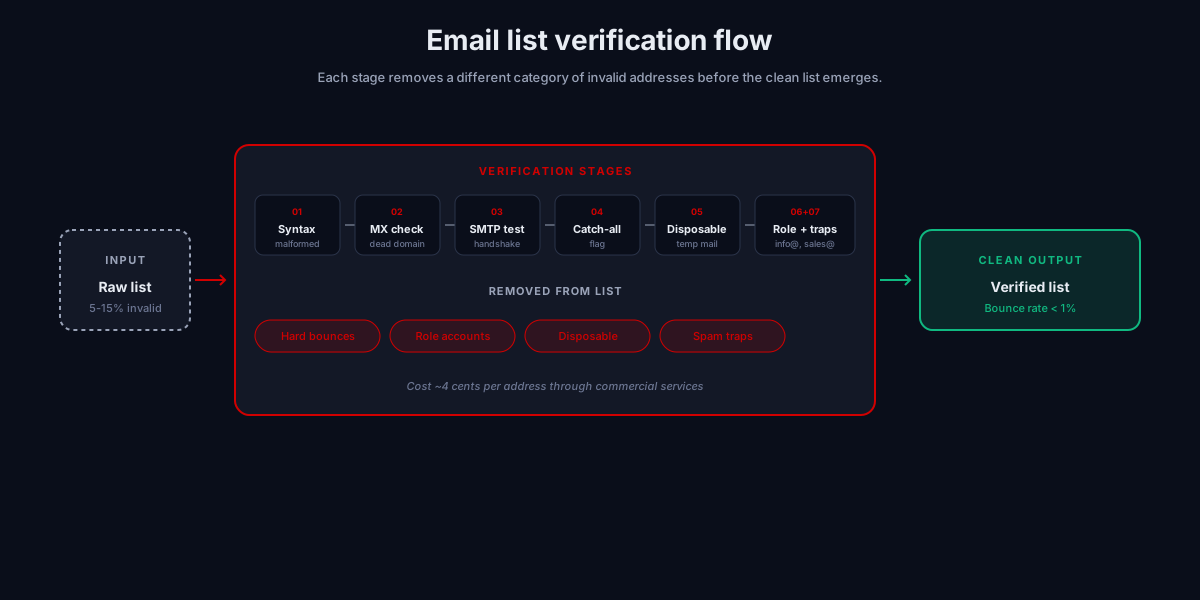
Modern verification services run each address through a sequence of checks:
- Syntax validation. Removes addresses with malformed structure (missing @, invalid characters, length violations).
- MX record check. Confirms the domain has mail exchanger records that can accept email. Removes addresses on dead domains.
- SMTP handshake. Opens an SMTP connection to the recipient mail server and runs
MAIL FROMandRCPT TOcommands without actually sending. Removes addresses the receiving server rejects. - Catch-all detection. Identifies domains that accept all mail (and may bounce at delivery time). Flagged separately for risk-managed sending.
- Disposable domain filtering. Removes addresses on known temporary-mail services.
- Role account flagging. Identifies generic addresses (info@, sales@, support@) that typically generate complaints when included in cold campaigns.
- Spam trap detection. Some services maintain known spam trap databases and flag matches.
Quality verification costs roughly 4 cents per address through commercial services. The cost of skipping verification (bounce rates above 2 percent, reputation damage, weeks of recovery) is orders of magnitude higher.
Verification cadence
For active cold email and bulk programs, the verification cadence we use:
- Pre-launch verification on any new list segment before its first send
- Re-verification every 60 to 90 days for active lists, more frequently for B2B segments with high job-change velocity
- Just-in-time verification for any list that has been dormant 6+ months before re-engaging
- Per-campaign verification for cold outreach campaigns where the consequence of a 5 percent bounce rate is reputation damage
The email hygiene discipline that prevents most reputation incidents: never send to an unverified or stale list, regardless of how much pressure there is to ship the campaign.
Layer 3: Bounce and complaint management
Once mail starts going out, the signals coming back are what drive ongoing email hygiene. Two signals dominate.
Hard bounce processing
A hard bounce (5xx SMTP response) means the address is permanently invalid. The mailbox does not exist, the domain rejects you, or the account is closed. Hard bounces should automatically and immediately move to your suppression list. No retries. No “let’s try again next campaign.” A single hard bounce processed correctly costs you nothing; the same address re-tried across three more campaigns produces three more bounces and stacks reputation damage.
Soft bounce categorization
A soft bounce (4xx SMTP response) means the message could not be delivered right now but might succeed later. Mailbox full, server temporarily down, content filtering deferral. Soft bounces need categorization:
- Temporary infrastructure issues (server timeout, connection failures): retry with backoff
- Mailbox full: retry once after 24-48 hours; suppress after second soft bounce
- Content deferral (4.7.x codes): stop retrying, investigate the content trigger
- Rate limiting (4.7.0, 4.4.x): respect the limit, retry at lower pace
Suppressing all soft bounces immediately is overcorrection. Retrying soft bounces indefinitely is undercorrection. Categorized retry policy is the middle path.
Complaint processing
When a recipient hits “Report Spam,” the mailbox provider sends a complaint feedback loop (FBL) report to the sender. Major providers offering FBL include Yahoo, AOL, Microsoft (Hotmail/Outlook), and Comcast. Google does not provide a per-message FBL but does surface aggregate complaint data via Postmaster Tools.
Every complaint should immediately suppress the complaining address. No “second chance.” No “maybe they meant to click something else.” The address goes to suppression and stays there permanently. Programs that ignore complaint feedback compound the problem campaign over campaign.
Layer 4: Suppression list discipline
The suppression list is the master record of every address that should never receive another send from you. The discipline:
What goes on the suppression list
Five categories of addresses belong on the suppression list permanently:
- Hard bounces: invalid addresses, automatic from Layer 3 processing
- Spam complainers: anyone who hit Report Spam, automatic from FBL processing
- Unsubscribers: both one-click and link-based, automatic from your unsubscribe handler
- Manual additions: addresses you have specific reason to exclude (legal request, sensitive context, requested removal outside the unsubscribe flow)
- Sunset-policy expirations: addresses that have not engaged in your defined dormancy window (typically 180 to 365 days for marketing lists)
Suppression list scope
The suppression list applies across every program, every campaign, every team. An address on the marketing suppression list should not receive cold outreach from the sales team. An address that complained about your transactional mail should not receive your newsletter. Cross-team suppression discipline is what separates mature email hygiene practice from “we have a suppression list on paper but each team manages their own.”
Suppression list integrity
Two operational checks matter:
- Suppression checks before every send. The sending platform must check the suppression list before queuing any campaign. Most modern platforms do this automatically; verify yours does, particularly when sending across multiple platforms.
- Suppression list backup and portability. Your suppression list is one of the most valuable operational assets you maintain. Export it monthly. Keep backups outside your sending platform in case of migration, account loss, or vendor issues.
For the broader framework that suppression sits inside, see our 47-point cold email deliverability checklist and the email deliverability pillar guide.
Re-engagement vs sunset policies
The hygiene decision that catches most operators off guard: what to do with addresses that have not engaged in months but have not bounced or complained either. The two options:
Re-engagement campaigns
A re-engagement campaign sends a deliberately low-volume, high-value message to dormant addresses, asking them to take an action (click, reply, update preferences). Recipients who engage stay on the active list. Recipients who do not are moved to suppression. Reasonable in concept; risky in execution because dormant addresses produce disproportionately high complaint rates (often 3 to 5x the normal rate on the same content).
Best practice: send re-engagement to small dormant segments at a time (under 5,000), monitor complaint rate carefully, and pull back immediately if complaints spike above 0.3 percent. Many operators have damaged active reputations attempting to “save” dormant segments through aggressive re-engagement.
Sunset policies
A sunset policy moves dormant addresses directly to suppression without a re-engagement attempt. The typical dormancy threshold is 180 to 365 days of no engagement (no opens, clicks, or replies). Aggressive but protective: the addresses you would “save” through re-engagement are statistically more likely to complain than to convert.
The right choice depends on your sending program. For high-volume marketing with a strong brand relationship, sunset policies at 365 days work well. For cold email outreach where there was no opt-in to begin with, sunset policies at 90 to 180 days are more conservative and protect reputation more aggressively.
The email hygiene tools that matter
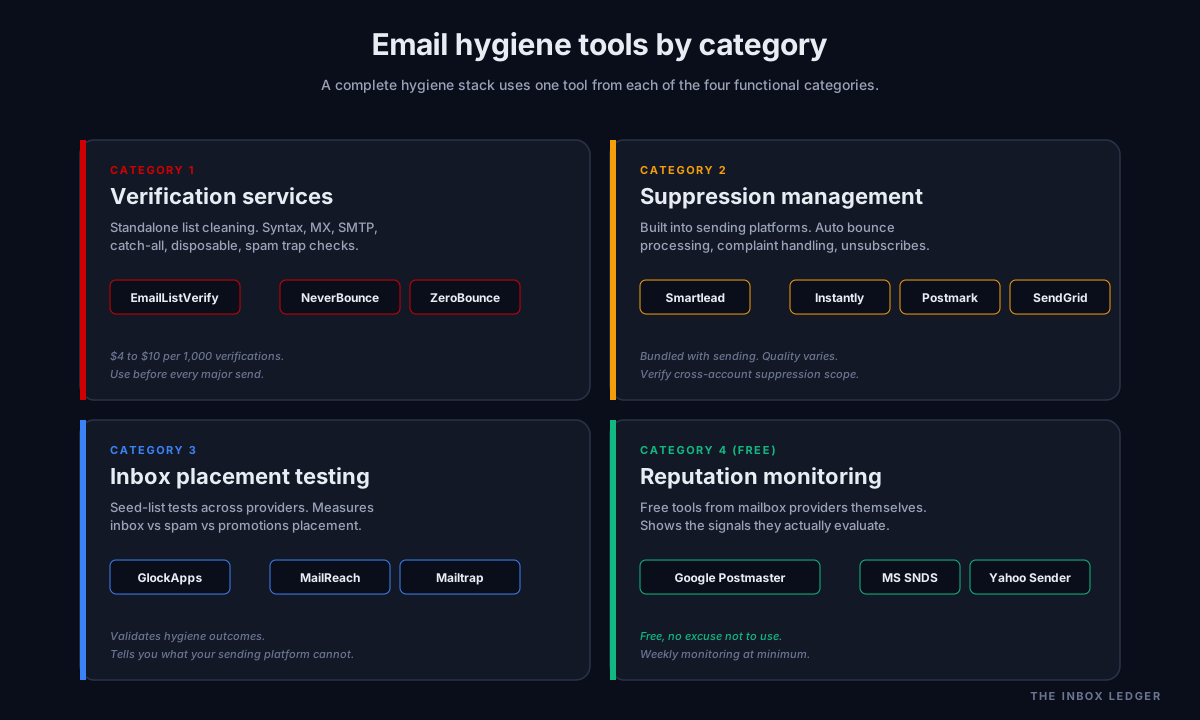
Email hygiene tools fall into four functional categories:
Verification services
Standalone tools that take a list and return verified results. Major providers: EmailListVerify, NeverBounce, ZeroBounce, Bouncer, Kickbox. Pricing typically $4 to $10 per 1,000 verifications with bulk discounts. All do roughly the same checks; the differentiators are catch-all detection accuracy, spam trap database size, and API integration quality.
Sending platform suppression management
Modern sending platforms (Smartlead, Instantly, Mailgun, Postmark, SendGrid, Brevo) manage suppression lists internally. Bounce processing, complaint processing, unsubscribe handling all happen automatically. The quality of the suppression management varies between platforms; some provide cross-account suppression lists, some only per-campaign suppression.
Inbox placement testing
Tools that send seed-list test messages across major providers to measure inbox vs spam vs promotions placement. Major tools: GlockApps, MailReach, Mailtrap deliverability suite. Used to validate that hygiene practice is producing the desired outcome (mail landing in primary inbox).
Reputation monitoring
Free tools provided by mailbox providers themselves: Google Postmaster Tools, Microsoft Smart Network Data Services, Yahoo Sender Hub. These show the metrics the providers are using to evaluate your sender reputation. Hygiene practice that does not monitor these signals is operating blind.
Common email hygiene mistakes
The five patterns we see most often on hygiene audits:
1. Verifying once and never again
A list verified at acquisition time decays at 25 to 28 percent per year. By month six, you are sending to a meaningfully different list than the one you verified. The fix is re-verification on a 60 to 90 day cadence for active lists, just-in-time verification for dormant ones.
2. Treating soft bounces like hard bounces
Suppressing every soft bounce after a single attempt removes addresses that were legitimately deliverable but temporarily unreachable. Over a year, this can shrink an active list by 5 to 10 percent unnecessarily. The fix is categorized soft bounce retry policy with suppression only after sustained failure.
3. Per-team suppression lists
Each team (sales, marketing, support, product) maintaining their own suppression list, with no cross-team sharing. The same complainer receives outreach from three different teams over six months and complains about each one. The fix is a unified suppression list that applies across every sending program.
4. No sunset policy
Dormant addresses stay on the active list forever, generating no engagement and a steady trickle of “why am I still getting this?” complaints. Over time the dormant portion of the list becomes a complaint-rate liability. The fix is an explicit sunset policy moving 180 to 365 day dormants to suppression.
5. Ignoring catch-all flagged addresses
Verification services flag catch-all domains because they cannot confirm specific address validity. Some operators treat catch-all flags as deliverable and send anyway. Some catch-all domains genuinely deliver; many bounce silently at delivery time. The fix is risk-managed sending to catch-all addresses (lower volume, separate sending stream, careful bounce monitoring) rather than treating them as standard.
For the operational deliverability framework these mistakes sit inside, see how to improve email deliverability and the cold email outreach playbook.
The email hygiene best practices summary
The practices that produce sustained healthy reputation, in order of impact:
- Verify every list before every major send. Re-verification cadence: 60 to 90 days for active lists, just-in-time for dormant.
- Process bounces and complaints into suppression automatically. Hard bounces and complaints suppress immediately; soft bounces follow categorized retry policy.
- Maintain a unified suppression list that applies across every sending program in your organization.
- Run a sunset policy moving dormant addresses to suppression at 180 to 365 days depending on program type.
- Implement RFC 8058 one-click unsubscribe for every bulk send. Required by Google, Yahoo, and Microsoft for high-volume senders.
- Monitor reputation signals via Google Postmaster Tools and Microsoft SNDS weekly.
- Tag every address with its source so deliverability issues can be isolated to acquisition channels when they occur.
- Maintain email list hygiene continuously rather than reactively. The reactive approach loses to enforcement before the operator notices the problem.
Hygiene practice is one of those operational disciplines that pays back nothing on the day you do it correctly and pays back enormously on the day someone else’s list collapses. The practice that prevents the incident is invisible; the incident that the practice prevented would have been very visible. This asymmetry is why hygiene gets deprioritized, and it is also why it should not be.
Frequently asked questions
What is email hygiene and why does it matter?
How often should I clean my email list?
What are the best email hygiene tools?
What should go on my email suppression list?
How do I maintain email list hygiene without a dedicated tool?
What is the difference between email hygiene and email deliverability?
Can email hygiene fix deliverability problems after they happen?
The bottom line on email hygiene
Email hygiene in 2026 is the operational discipline that determines whether your sender reputation survives the next 12 months. The mailbox providers have made the rules explicit through bulk sender requirements; the operators who treat hygiene as continuous practice rather than quarterly cleanup are the ones whose programs scale without periodic reputation collapses.
For the broader deliverability framework that hygiene sits inside, see the email deliverability pillar guide. For the diagnostic framework when hygiene has slipped, see how to improve email deliverability. For the cold outreach use case where hygiene practice is especially load-bearing, see the cold email outreach playbook. For the infrastructure that hygiene practice runs on top of, see the SMTP relay guide and the email warmup tools guide.
Subscribe to the weekly briefing for hygiene deep-dives, verification tool comparisons, and deliverability diagnostics.
More on Deliverability
Email blacklist removal 2026: the operator playbook
Email blacklist removal in 2026: diagnose the root cause first, identify the tier, delist in the right order, prevent re-listing. The full playbook.
Email deliverability monitoring vs warmup: 2026 guide
Email deliverability monitoring vs warmup in 2026: what each does, when you need both, and why monitoring is non-negotiable post-enforcement.
Spam complaint rate 2026: the 0.3% operator playbook
Spam complaint rate in 2026: the 0.3% threshold explained, why ESP dashboards underreport, the five drivers of complaints, and the recovery playbook.