DMARC monitoring 2026: from RUA reports to enforcement
DMARC monitoring in 2026: how to ingest RUA reports, decode alignment failures, build a weekly triage workflow, and move safely to enforcement.
DMARC monitoring in 2026 is the difference between knowing what is happening to your domain’s authentication and finding out about it through customer complaints. The numbers tell the story: 81.6 percent of the top 10 million domains have no DMARC record at all, and among the domains that do, 47.7 percent never configured a rua reporting address. That second number is the more painful one. Those teams set up the security camera and pointed it at the wall. They have authentication policy on paper, no visibility into what is actually happening, and no way to know whether legitimate senders are being blocked or whether attackers are still spoofing the domain. After Google’s 2024 bulk sender requirements and Microsoft’s high-volume sender enforcement, DMARC monitoring stopped being optional for anyone sending meaningful volume.
This guide is the DMARC monitoring playbook we use when teams ask how to actually use the reports they are receiving (or how to start receiving them). It covers what DMARC monitoring is and is not, the four jobs the monitoring data solves, how to read aggregate (RUA) XML reports without losing your mind, the alignment trap that surprises teams who think SPF and DKIM passing means DMARC passing, the weekly triage workflow that turns reports into action, and the decision framework for moving from p=none through p=quarantine to p=reject without breaking legitimate mail.
For the broader auth foundation, see the SPF DKIM DMARC setup guide and the DMARC policy guide. For where DMARC monitoring fits in the broader deliverability operations layer, see the email deliverability monitoring vs warmup guide and the sender reputation guide.
What DMARC monitoring actually is
DMARC monitoring is the practice of collecting and reviewing DMARC aggregate reports (RUA) so you can see who is sending mail using your domain and whether that mail is authenticating and aligning correctly. Whether you do it with raw XML, a paid tool, or a self-hosted parser, the goal is the same: turn the reports into an accurate sender inventory and a clear enforcement plan.
The mechanism: every domain with a rua= tag in its DMARC record receives daily XML reports from Gmail, Outlook, Yahoo, and other receiving mail servers. Each report contains aggregated statistics on the messages those receivers handled for your domain: how many passed SPF, how many passed DKIM, how many aligned, what source IPs sent them, and what policy was applied. The reports are defined in RFC 7489 and arrive as gzipped XML attachments to the email address you configured in the rua tag.
What DMARC monitoring is not:
- Not the DMARC record itself. Publishing a DMARC record without rua is the security camera pointed at the wall. Configuring rua and parsing what arrives is the actual monitoring
- Not real-time alerting. Reports arrive daily, aggregated for the previous 24 hours. A spoofing campaign starting at 9am Monday shows up in Tuesday’s report at the earliest
- Not the same as forensic (RUF) reports. RUF is message-level, optional, increasingly rare due to privacy restrictions, and not a replacement for RUA
- Not a substitute for SPF, DKIM, or other authentication. DMARC monitoring tells you whether your authentication is working; it does not authenticate anything itself
The data DMARC monitoring produces is the single highest-signal diagnostic for email authentication health. Teams that look at it consistently catch problems within days that teams without monitoring discover months later through deliverability collapse.
The four jobs DMARC monitoring solves
Most articles on DMARC monitoring focus on the tool comparisons or the XML format. The job-to-be-done view is more useful for picking what to focus on:
Job 1: Sender inventory (most immediate value). The first week of DMARC monitoring almost always reveals legitimate senders nobody documented. Marketing automation platforms, CRMs, support desks, billing systems, partner tools, internal scripts running from a forgotten server. These all send as your domain, and until you have the RUA reports, you have no idea who they are.
Job 2: Alignment debugging. A DMARC analyzer surfaces the cases where SPF passes, DKIM passes, but DMARC fails. The cause is almost always alignment: the From-header domain does not match the authenticated domain. The reports show exactly which sources have alignment problems and which authentication method (SPF or DKIM) they are failing on.
Job 3: Enforcement readiness. Moving from p=none to p=quarantine to p=reject requires confidence that legitimate senders authenticate correctly. The reports tell you when that confidence is justified and when it is not. Teams that move to enforcement without report-driven readiness usually have to roll back within days.
Job 4: Threat detection. Unknown IPs sending unauthenticated mail as your domain are usually spoofing attempts. Once your sender inventory is documented (Job 1), the residual unknown traffic in the reports is the threat surface. Most domains discover at least one active or attempted spoofing campaign within the first month of monitoring.
The picks for which tool and how much process to invest depend on which of these four jobs is your primary need. A new program prioritizes Jobs 1 and 2 (inventory and alignment). A mature program operating at p=reject prioritizes Jobs 3 and 4 (ongoing readiness and threats). Most teams in 2026 need all four.
How to read aggregate (RUA) reports
The aggregate report is XML with a specific schema. The fields that matter for DMARC monitoring, with the corresponding interpretation:
<report_metadata> identifies the receiving mail provider (Google, Yahoo, Microsoft, others), the date range the report covers, and the report ID. This is housekeeping; the interesting data is below.
<policy_published> echoes back the DMARC record they saw in your DNS. Confirm this matches what you published. A drift between published and observed indicates DNS issues or caching problems.
<record> blocks are where the actual data lives. Each record represents one or more messages from a specific source IP with specific authentication results. The key sub-fields:
<source_ip>: the IP that sent the message. This is your sender inventory data<count>: how many messages this record represents<policy_evaluated>/<disposition>: what the receiver did (none, quarantine, reject)<auth_results>: whether SPF and DKIM passed, and crucially whether they aligned with the From-header domain
The pattern to look for: source IPs you do not recognize sending counts you cannot explain. That is either Job 1 surfacing unknown legitimate senders or Job 4 surfacing potential spoofing. Either way it is actionable.
Reading XML by hand is tedious for low volume, painful at scale, and impossible above ~50 reports per day. The standard 2026 approach is a tool that ingests the XML, normalizes it into structured data, and presents dashboards. The choice depends on volume, complexity, and budget.
DMARC monitoring tools by tier
Four practical tiers in 2026, matched to team size and complexity:
Free / DIY tier. parsedmarc (open-source Python tool that parses XML and stores results in Elasticsearch, OpenSearch, or PostgreSQL) and MXToolbox’s free paste-and-parse for ad-hoc checks. parsedmarc with an ELK stack is the standard self-hosted choice for technical teams that want full data ownership; MXToolbox handles one-off XML inspection when you do not want a recurring tool. Postmark also runs a free DMARC monitoring service that is genuinely useful at small scale.
Mid-tier paid (most common pick). EasyDMARC, Dmarcian, DMARC Report. All three handle the full ingestion, parsing, and dashboard workflow with reasonable dashboards and reasonable pricing. EasyDMARC tends to win on UX for less technical teams; Dmarcian is the longer-running specialist with deeper auth domain knowledge; DMARC Report scales well for multi-domain operations. Typical pricing $20 to $200 per month depending on volume and feature tier.
Enterprise tier. Valimail, Proofpoint. Higher cost, deeper integration, threat intelligence layered on top, designed for large organizations with multiple sending domains and complex sender infrastructure. Pricing typically $1,000+ per month and often custom contracts.
Bundled with sending platforms. Some sending platforms (Postmark in particular) include DMARC monitoring as a feature for accounts on the platform. Useful if you are already on the platform and the monitoring covers the domains you need.
The picking criteria: for teams under 5 domains and basic monitoring needs, free options (parsedmarc, Postmark free DMARC) cover the job. For ongoing operational monitoring without DIY overhead, EasyDMARC or Dmarcian are the standard mid-tier picks. For enterprise multi-domain operations with threat intelligence needs, Valimail or Proofpoint. The middle path (buying a $200/month tool to monitor one domain because the marketing page looked impressive) is the most common overspending pattern we see.
The alignment trap
On the audits we run, the single most common surprise in DMARC monitoring: SPF passes, DKIM passes, and DMARC still fails. This is the alignment trap, and it accounts for a significant share of the failures we see in DMARC reports on the audits we run.
DMARC = pass + align, not just pass.
Alignment means the domain in the visible From header (RFC 5322.From) matches the domain authenticated by SPF or DKIM. SPF authenticates the envelope sender (RFC 5321.MailFrom). DKIM authenticates the d= domain in the signature. DMARC requires that at least one of those authenticated domains aligns with the From header. Two ways this commonly breaks:
SPF alignment failure. Your marketing platform sends from noreply@yourcompany.com (the From header) but the envelope sender is bounces@platform.com. SPF passes on platform.com. DMARC checks alignment between yourcompany.com (From) and platform.com (envelope). They do not align. DMARC fails despite SPF passing.
DKIM alignment failure. Your CRM signs mail with DKIM using d=crm-service.net. The From header is sales@yourcompany.com. DKIM passes on crm-service.net. DMARC checks alignment between yourcompany.com and crm-service.net. Mismatch. DMARC fails despite DKIM passing.
The fix depends on the relationship:
- Same organization, owned domain: configure DKIM with
d=yourcompany.comand a custom selector on the sending platform (most platforms support this; it requires DNS records pointing to platform-provided keys) - External vendor sending on your behalf: either get them to support DKIM alignment with your domain, or use a subdomain (
mail.yourcompany.com) for that traffic specifically with explicit policy for the subdomain - Aspf and adkim relaxed mode (default): allows alignment between organizational domain and subdomains (
yourcompany.comaligns withmail.yourcompany.com). Strict mode requires exact match. Most teams want relaxed
The reports in DMARC monitoring tell you exactly which sources have alignment problems and which method (SPF, DKIM, or both) is failing. This is Job 2 in action; without the reports, alignment failures look identical to authentication failures and the fix is different.
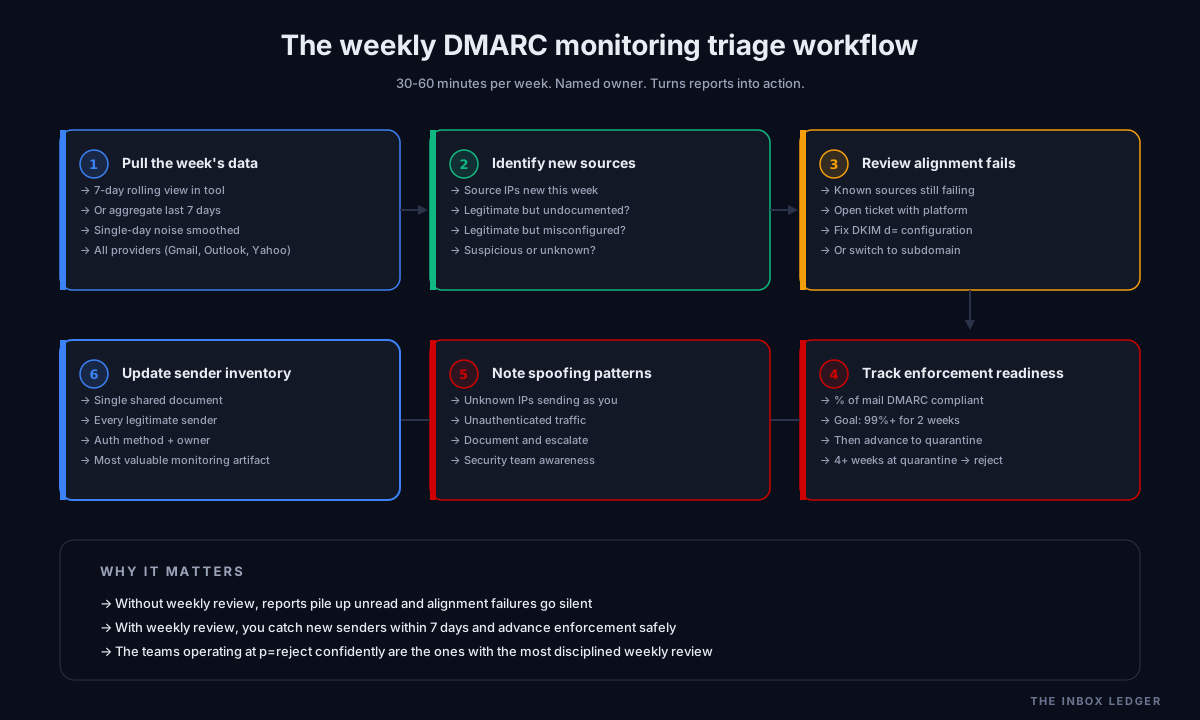
The weekly DMARC monitoring triage workflow
The reports arrive daily but the right cadence to act on them is weekly. The workflow we use:
1. Pull the week’s data. Either through the tool’s dashboard view (most tools default to a 7-day view) or by parsing the last 7 days of XML. You want a week of data because daily volume fluctuates and false alarms are common from a single day’s anomalies.
2. Identify new sources. Source IPs and organizations that appear in this week’s data but not in your documented sender inventory. Three categories to triage into:
- Legitimate but undocumented: add to the sender inventory, ensure DKIM alignment is configured
- Legitimate but misconfigured: open a ticket with the platform or internal team to fix alignment
- Suspicious or unknown: investigate, escalate to security if persistent and unauthenticated
3. Review alignment failures on known sources. Sources you already documented but that are still showing alignment failures. These are operational tasks for the responsible team: fix the DKIM configuration, switch to a domain-aligned subdomain, update the platform settings.
4. Track enforcement readiness. What percentage of your mail volume is passing DMARC correctly? Tools surface this as a percentage of “DMARC compliant” mail. When the number is consistently above 99 percent for two weeks straight and the residual is either threats or low-volume edge cases you have decided to ignore, you are ready to advance the policy.
5. Note any spoofing patterns. Sources you cannot identify, sending unauthenticated mail as your domain. Even if low-volume, document these. Increasing volume of spoofing attempts is a signal worth security awareness.
6. Update the sender inventory document. This document is the single most useful artifact from DMARC monitoring. It lives somewhere shared and lists every legitimate sender, the authentication method they use, and the contact owner. Keep it updated. The teams we work with that lose track of this end up unable to move to p=reject because they cannot confidently say what should be authenticated.
When to advance from p=none to p=quarantine to p=reject
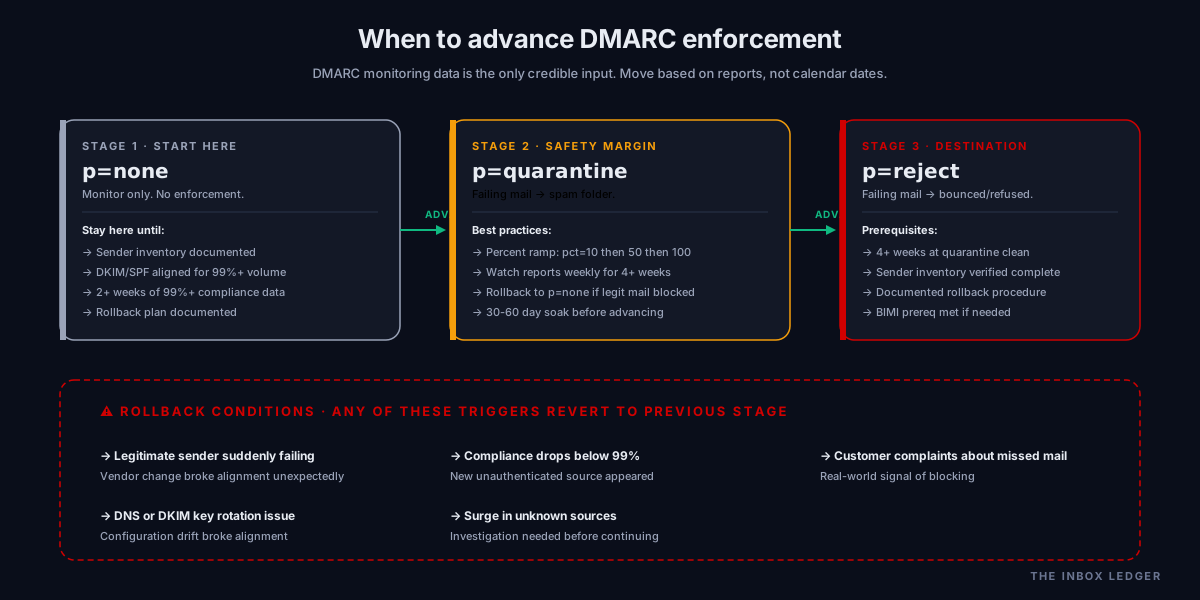
DMARC enforcement progression is one of the highest-stakes operations in email authentication. Move too fast and you block legitimate mail; move too slow and you leave spoofing windows open longer than necessary. DMARC monitoring data is the only credible input to this decision.
At p=none. No enforcement action; reports flow, providers take no action on misaligned mail. This is the right starting policy for almost every domain. Stay here until you have:
- A documented sender inventory covering at least 99 percent of your legitimate mail volume
- DKIM or SPF alignment configured for every documented sender
- 2+ weeks of report data showing 99%+ DMARC compliance on identified senders
- A rollback plan if quarantine causes unexpected breakage
Advancing to p=quarantine. Failing mail goes to spam at receivers that honor the policy. Less destructive than reject; provides a safety margin. Many teams pause here for 30 to 60 days while watching report trends. Use percent-based deployment if your tool supports it: p=quarantine; pct=10; starts at 10 percent enforcement and ramps weekly.
Advancing to p=reject. Failing mail is bounced or refused entirely. This is the destination; it is also the most operationally risky transition. Prerequisites:
- 4+ weeks at p=quarantine with no rollbacks or unexpected legitimate mail failures
- Sender inventory verified as complete (not just 99%, actually complete)
- A documented rollback procedure that can drop you back to p=quarantine within an hour
- BIMI prerequisite is met if you plan to display brand logo via BIMI (BIMI requires p=quarantine or p=reject with pct=100)
The teams that get this progression right treat it as a multi-week operational project with explicit readiness gates; the teams that get it wrong jump straight from p=none to p=reject because someone in security said it was required, and then block legitimate mail for three days before the rollback. DMARC monitoring data is what separates those two outcomes.
Common DMARC monitoring mistakes
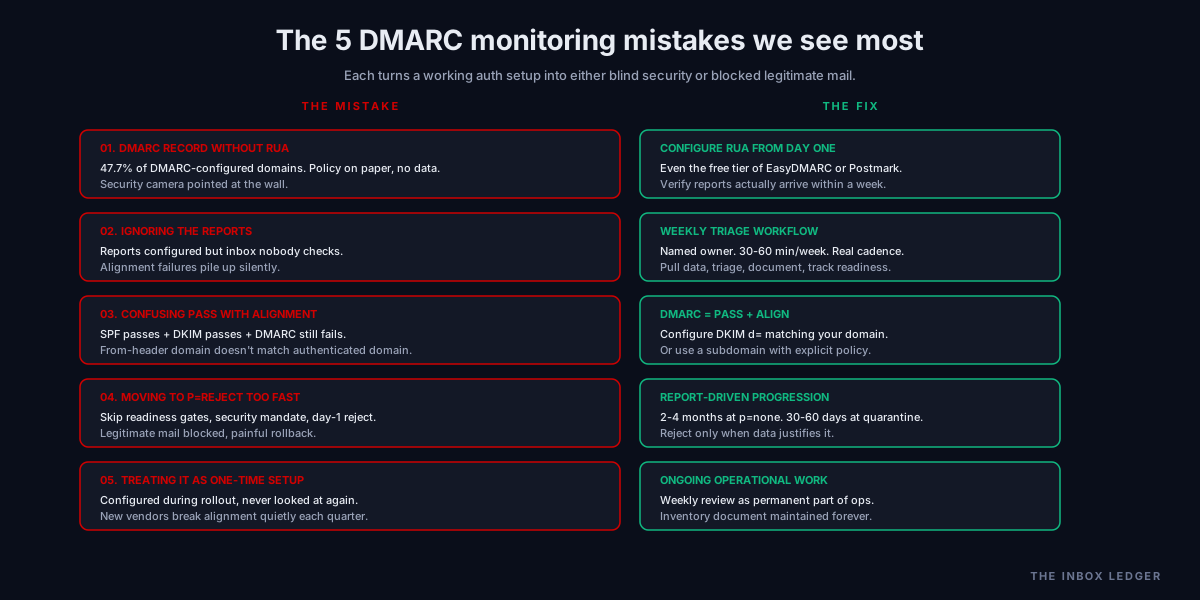
Five patterns from what we see most often when teams configure DMARC monitoring:
1. Publishing the DMARC record without rua
The most common mistake by raw count. A DMARC record without a working rua address provides no monitoring data; you have published policy and given yourself no visibility into what is happening. The fix is configuring rua from day one, even if you use the free tier of a tool, and verifying that reports actually arrive within a week.
2. Ignoring the reports once they arrive
Configuring rua to an inbox that nobody checks. Reports pile up unread, alignment failures go unnoticed, and the team only looks when something has already broken. The fix is the weekly triage workflow above, with a named owner who actually looks at the dashboard.
3. Confusing SPF/DKIM pass with DMARC pass
The alignment trap above. SPF passing on the envelope sender does not mean DMARC passes on the From-header domain; same for DKIM. The fix is treating alignment as a first-class concept in DMARC monitoring and configuring sender platforms for DKIM alignment with your domain.
4. Moving to p=reject too fast
Skipping the report-driven readiness gates and going straight from p=none to p=reject because of a security mandate. Legitimate mail gets bounced, rollback is painful, the team loses confidence in DMARC entirely. The fix is the progression above: months at p=none for sender discovery, weeks at p=quarantine for safety verification, only then p=reject.
5. Treating DMARC monitoring as one-time setup
Configuring monitoring during the initial DMARC rollout, then never looking at it again. New senders get added every quarter; vendor configurations change; DKIM keys rotate. DMARC monitoring is ongoing operational work, not a one-time configuration. The fix is the weekly triage workflow as a permanent part of deliverability operations.
How DMARC monitoring fits the broader deliverability stack
DMARC monitoring is one layer in the broader email authentication and deliverability operations stack:
- Authentication foundation (the SPF DKIM DMARC setup guide covers the records themselves)
- DMARC policy (the DMARC policy guide covers the p=none through p=reject progression in depth)
- DMARC monitoring (this article: the reports, the triage workflow, the data that drives enforcement decisions)
- BIMI prerequisites (the BIMI email guide covers logo display, which requires DMARC enforcement)
- Sender reputation (the sender reputation guide covers what DMARC monitoring protects)
- Deliverability monitoring (the email deliverability monitoring vs warmup guide covers the broader visibility layer DMARC monitoring is part of)
- Recovery (the email blacklist removal guide covers what to do when monitoring catches a failure too late)
- Infrastructure (the cold email infrastructure guide covers the sending foundation underneath)
DMARC monitoring is where the authentication layer becomes operational discipline. Teams that publish DMARC records and configure DKIM but never read the reports get a fraction of the value the auth investment promised; teams that actually use the monitoring data discover senders, fix alignment, advance enforcement safely, and catch spoofing. The investment is small (often free or under $50/month for small teams) and the leverage is large.
The teams we work with that operate at p=reject confidently are not the teams with the strictest auth setup; they are the teams with the most disciplined DMARC monitoring practice. The records do not enforce themselves; the people reading the reports do.
The practical DMARC monitoring decision framework
The decision process we use when teams ask how to set up DMARC monitoring:
- Confirm DMARC is published with rua. Before anything else, check that
_dmarc.yourdomain.comexists and contains a working rua address. The 47.7 percent of domains without rua are the ones we are not talking about here - Pick a tool sized to your needs. Under 5 domains and basic monitoring: parsedmarc + Elasticsearch or Postmark free DMARC. Under 50 domains and ongoing operational monitoring: EasyDMARC or Dmarcian. Above that or with threat intelligence needs: Valimail or Proofpoint
- Verify reports actually arrive. Within one week of configuring rua you should be receiving daily aggregate reports from Gmail, Outlook, and Yahoo at minimum. If you are not, debug rua configuration (mailbox accepts large attachments, no SPF/DKIM blocks on inbound reports, the email address is valid)
- Document your initial sender inventory. First two weeks of reports almost always surface unknown senders. Add each to a maintained inventory document with the auth status (SPF aligned, DKIM aligned, both, neither) and the owner
- Fix alignment failures one source at a time. Do not try to fix everything in week one. Prioritize by volume; the platform sending 10,000 messages a week matters more than the cron job sending 5
- Establish the weekly triage cadence. Named owner, 30 to 60 minutes per week, walk through new sources, alignment failures, enforcement readiness, threat patterns
- Move to p=quarantine when ready. 99%+ compliance for 2+ weeks, sender inventory complete, rollback plan documented
- Move to p=reject when stable. 4+ weeks at p=quarantine with no rollbacks, complete sender coverage, BIMI enabled if desired
The discipline that matters most: DMARC monitoring is the operational layer that turns the auth records into actual security and deliverability outcomes. The teams that win at DMARC are not the teams with the most complex setup; they are the teams with the most consistent weekly review.
For the broader auth stack, see the SPF DKIM DMARC setup guide, the DMARC policy guide, and the BIMI email guide. For where this fits in the deliverability operations layer, see the email deliverability monitoring vs warmup guide and the email blacklist removal guide.
Frequently asked questions
What is DMARC monitoring?
Do I need DMARC monitoring?
What is the difference between RUA and RUF DMARC reports?
What is the best DMARC monitoring tool?
What is DMARC alignment and why does it matter?
How long should I stay at DMARC p=none before advancing?
Can I do DMARC monitoring without paying for a tool?
The bottom line on DMARC monitoring
DMARC monitoring is the email authentication monitoring layer that turns the authentication records you already published into actual visibility and security outcomes. The teams we work with that get DMARC right do not have the strictest records; they have the most disciplined weekly review of the reports the records produce. They configure rua from day one, document the sender inventory the first week of monitoring reveals, fix alignment failures one source at a time, advance the enforcement policy based on report data rather than calendar dates, and treat the whole thing as ongoing operational discipline rather than one-time setup.
The teams that get it wrong publish DMARC records without rua, ignore the reports that arrive, confuse SPF or DKIM passing with DMARC passing because they never learned about alignment, and either stay at p=none forever or jump to p=reject and block legitimate mail. The difference between those two outcomes is not technical skill; it is whether anyone is reading the reports. The 47.7 percent of DMARC-configured domains without rua are the most expensive missing 50 lines of DNS configuration in the entire deliverability landscape; the smaller share that have rua but never read the data are not far behind.
For the broader auth stack, see the SPF DKIM DMARC setup guide, the DMARC policy guide, and the BIMI email guide. For where this lives in the deliverability operations layer, see the email deliverability monitoring vs warmup guide, the sender reputation guide, and the email blacklist removal guide.
Subscribe to the weekly briefing for operator-grade authentication and deliverability notes, one short email every week.