BIMI email 2026: the 3 paths to a logo in the inbox
BIMI email setup in 2026: the three paths (self-asserted, CMC, VMC), which inboxes display your logo, the DMARC prerequisite, and whether it pays off.
BIMI email setup in 2026 is two decisions disguised as one. The first decision is whether to do the authentication work BIMI requires, which is genuinely valuable regardless of whether a logo ever appears. The second decision is whether to pay for the certificate that makes the logo show in the inboxes that matter, which is a branding investment with a real cost and a real eligibility barrier. Most articles conflate these two parts of BIMI email, treating BIMI as a single project with a single answer. In practice the authentication prerequisite is worth doing for almost everyone, and the certificate is worth paying for only when your audience sits in the right inboxes and your brand has the right trademark posture.
This guide is the decision framework we use when teams ask whether a BIMI email setup is worth implementing and which path fits them. It covers what BIMI actually is, the three paths to displaying a logo (self-asserted, CMC, and VMC), which mailbox providers show your logo on each path, the DMARC enforcement prerequisite that gates everything, the real costs, and the honest answer to whether BIMI is worth it for your specific situation. Written for teams that want the trust signal and the security benefit without overpaying for a logo their audience will never see.
For the authentication foundation BIMI sits on top of, see the DMARC policy guide and the SPF DKIM DMARC setup guide. For the broader context, the email deliverability pillar covers where BIMI fits in the trust stack.
What BIMI email actually is
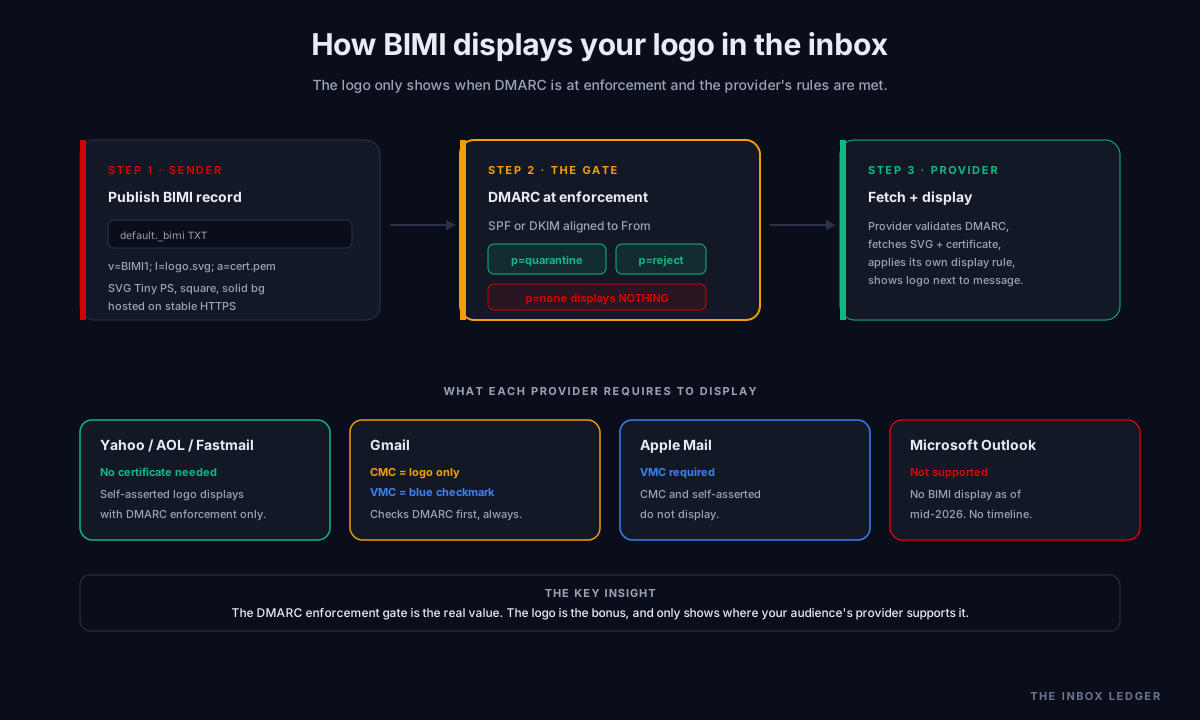
BIMI (Brand Indicators for Message Identification) is a DNS-based open standard, specified in RFC 9495, that lets your verified brand logo appear next to your emails in supported inboxes. Instead of a generic initials avatar, recipients see your company logo, and in some inboxes a verified checkmark. It is maintained by the AuthIndicators Working Group.
The mechanism is straightforward. You publish a BIMI TXT record at default._bimi.yourdomain.com that points to your logo (an SVG file) and optionally to a mark certificate proving you have rights to that logo. When your email authenticates and aligns with DMARC, a supporting mailbox provider may fetch and display the logo next to the message.
Three things have to be true for the logo to show:
- Authentication: SPF or DKIM aligned to the visible From domain, with DMARC at enforcement (p=quarantine or p=reject)
- A compliant logo: an SVG in the specific SVG Tiny PS format, hosted on a stable public HTTPS server
- Provider policy met: each mailbox provider has its own rules for whether and when to display, including whether a certificate is required
The first requirement is the one most teams underestimate, and it is also the one with value independent of BIMI itself. A BIMI email record on a domain that is not at DMARC enforcement does nothing; no provider will display the logo. This is why BIMI is best understood as the visible reward for completing your authentication stack, not as a standalone feature.
The three paths to a BIMI logo
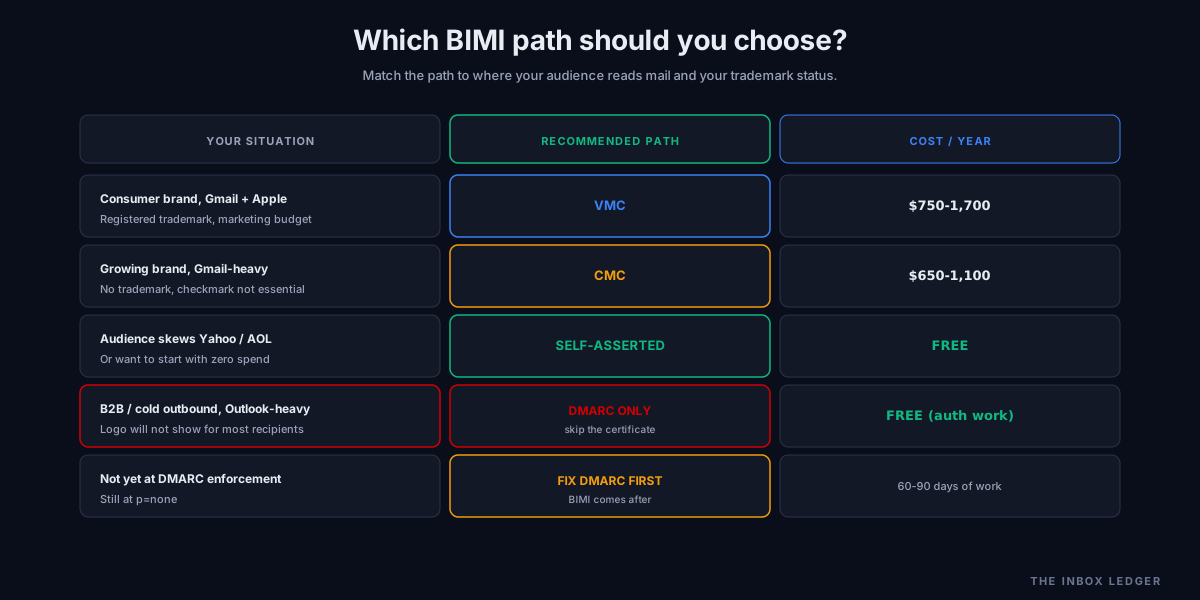
There are three ways to set up BIMI email and get a logo into the inbox, and they differ in cost, eligibility, and which inboxes display the logo. The right path depends entirely on where your audience reads mail and whether you hold a registered trademark.
Path 1: Self-asserted (free)
A self-asserted BIMI record points to your SVG logo with no certificate at all. You publish the DNS record and host the SVG; no third-party verification, no annual fee.
- Cost: free (just DNS and SVG hosting)
- Displays on: Yahoo Mail, Fastmail, AOL
- Does not display on: Gmail, Apple Mail (both ignore self-asserted logos)
- Best for: teams whose audience is heavily Yahoo, AOL, or Fastmail, or teams that want to start the BIMI journey with zero spend
Path 2: Common Mark Certificate / CMC (~$650 to $1,100 per year)
The CMC arrived in late 2024 as Gmail’s more accessible option. It does not require a registered trademark; instead it verifies that your logo has been publicly displayed on your domain for a sustained period (commonly 12 months) via archive verification.
- Cost: roughly $650 to $1,100 per year
- Displays on: Gmail (logo only, no blue checkmark), Yahoo, Apple Mail support varies, plus the free-tier providers
- Eligibility: proof of public logo use, no trademark required
- Best for: teams that want their logo in Gmail but do not hold a registered trademark, or do not want to wait the months trademark registration takes
Path 3: Verified Mark Certificate / VMC (~$750 to $1,700 per year)
The VMC is the high-assurance certificate. It requires a registered trademark and unlocks the most visible trust signals, including Gmail’s blue verified checkmark and Apple Mail logo display.
- Cost: roughly $750 to $1,700 per year
- Displays on: Gmail (with the blue verified checkmark), Apple Mail, Yahoo, plus the free-tier providers
- Eligibility: a registered trademark with one of the recognized intellectual property offices
- Best for: established brands with a registered trademark where the Gmail blue checkmark and Apple Mail display justify the cost and the trademark barrier
The single most important distinction: only a VMC triggers Gmail’s blue checkmark and only a VMC displays in Apple Mail. A CMC gets your logo into Gmail without the checkmark. Self-asserted gets you nothing in Gmail or Apple Mail. The path you need is determined by which of those inboxes your audience actually uses.
Which mailbox providers display BIMI in 2026
Provider support is uneven, and choosing a BIMI path without knowing where your audience reads mail is the most common waste of money we see.
Gmail requires at minimum a CMC to display the logo, and a VMC to display the blue verified checkmark. Gmail checks the DMARC record before it even looks for the BIMI record; a p=none policy disqualifies you regardless of everything else.
Apple Mail requires a VMC. A CMC or self-asserted record does not display in Apple Mail. DigiCert is notably the certificate authority whose VMCs Apple accepts.
Yahoo Mail, AOL, Fastmail display the BIMI logo with no certificate required, as long as DMARC is at enforcement and alignment is correct. This is the free tier of BIMI display.
Microsoft Outlook does not support BIMI as of mid-2026. This includes Outlook.com, Hotmail, and Microsoft 365 webmail, with no public timeline for adding it. For B2B senders whose audience is heavily Microsoft, this is the decisive fact: the logo will not show for most of your recipients regardless of which path you pay for.
The practical implication: a B2B SaaS company selling into enterprise (heavily Microsoft) gets far less from a VMC than a consumer brand emailing a Gmail and Apple audience. Know your audience’s inbox distribution before you choose a path. The sender reputation guide covers how to check where your mail actually goes via the provider-direct tools.
The DMARC prerequisite: the part that actually matters
Every BIMI path requires DMARC at enforcement. This is not a formality; it is the gate, and it is the part of BIMI with value independent of the logo.
To qualify for BIMI email, your domain needs:
- SPF or DKIM properly configured and aligned to the visible From domain
- DMARC at p=quarantine or p=reject (p=none does not qualify, on any provider; see RFC 7489 for the DMARC spec)
- Enforcement on both the organizational domain and any sending subdomain used for the From address
A domain at p=none with a BIMI record published displays no logo anywhere. Gmail specifically checks DMARC enforcement before looking at the BIMI record at all. This means the BIMI project forces you to complete the DMARC escalation covered in the DMARC policy guide: moving from p=none through p=quarantine to p=reject, watching aggregate reports, remediating misaligned senders.
For cold email and outbound teams, this reframes BIMI entirely. The logo may never show (especially on Outlook-heavy B2B audiences), but the DMARC enforcement the BIMI setup forces is exactly the authentication discipline that protects sender reputation and deliverability. The BIMI prerequisite delivers the real value whether or not you ever buy a certificate.
The BIMI logo: SVG Tiny PS format
The logo file has strict requirements that catch teams. BIMI requires the logo in SVG Tiny PS (Portable/Secure) format, a constrained profile of SVG, not a standard SVG export from a design tool.
The requirements:
- Format: SVG Tiny PS specifically (most standard SVG exports need conversion)
- Shape: square aspect ratio, centered, with the logo filling the frame
- Background: a solid color, not transparent
- Size: kept small (typically under 32KB)
- Hosting: a stable public HTTPS URL that does not require authentication and serves the correct MIME type
A logo that fails any of these requirements means the BIMI record resolves but the logo does not display, which looks identical to a DMARC problem and sends teams debugging the wrong thing. Most VMC and CMC issuers provide a conversion and validation tool as part of the certificate process; the self-asserted path requires doing this yourself.
How to set up BIMI email, in order
The sequence matters because the prerequisites gate each step:
- Get to DMARC enforcement first. SPF and DKIM aligned, DMARC at p=quarantine or p=reject on the organizational domain and sending subdomains. This is the DMARC policy guide work and takes 60 to 90 days done properly
- Confirm DMARC reports are clean. Authentication passing above 99% in aggregate reports, no unaddressed misaligned senders
- Decide the path. Self-asserted, CMC, or VMC, based on your audience’s inbox distribution and trademark status (use the decision matrix above)
- Prepare the logo. Convert to SVG Tiny PS, square, solid background, hosted on stable HTTPS
- Obtain the certificate if needed. For CMC, archive verification of public logo use. For VMC, the registered trademark and certificate authority process (DigiCert if targeting Apple Mail)
- Publish the BIMI record. TXT record at
default._bimi.yourdomain.comwithv=BIMI1; l=(logo URL) anda=(certificate URL) if using one - Verify the full chain. DNS resolves, HTTPS serves the SVG with correct MIME type, certificate validates, DMARC aligns
- Test across providers. Send to Gmail, Apple Mail, and Yahoo addresses you control; confirm display matches the path you chose
- Set a renewal reminder. VMCs have a maximum validity of 397 days; a lapsed certificate stops the logo displaying in Gmail and Apple Mail
The work that takes time is step 1, not steps 4 through 8. Teams that already run DMARC at enforcement can complete the BIMI-specific work in days. Teams starting from p=none are really doing a DMARC project with a logo at the end.
Common BIMI email mistakes
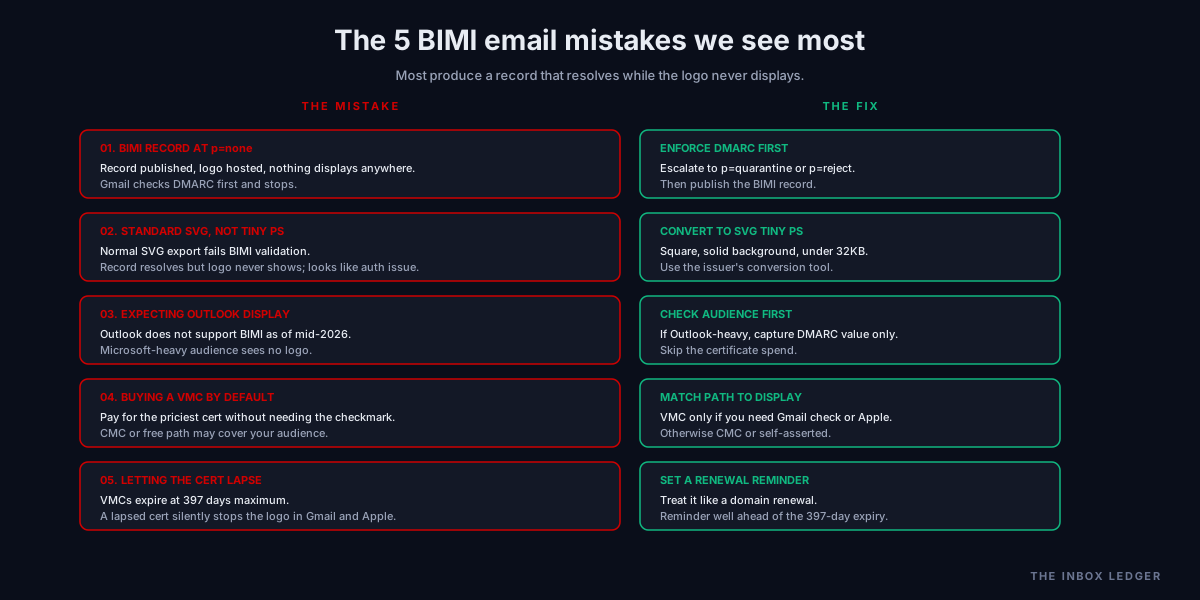
Five patterns we see most often:
1. Publishing a BIMI record at DMARC p=none
The most common mistake. The record is published, the logo is hosted, and nothing displays anywhere because DMARC is not at enforcement. Gmail checks DMARC first and stops. The fix is completing the DMARC escalation to p=quarantine or p=reject before publishing the BIMI record.
2. Using a standard SVG instead of SVG Tiny PS
A normal SVG export from a design tool fails BIMI validation. The record resolves but the logo never shows, which looks like an authentication problem. The fix is converting to the SVG Tiny PS profile, square with a solid background.
3. Expecting the logo to show in Outlook
Microsoft Outlook does not support BIMI as of mid-2026. Teams with Microsoft-heavy audiences buy a VMC and see no logo for most recipients. The fix is checking your audience’s inbox distribution first; if it is Outlook-heavy, the logo investment is largely wasted and only the DMARC value remains.
4. Buying a VMC when a CMC or free path would do
Teams buy the most expensive certificate by default. If you do not need Gmail’s blue checkmark or Apple Mail display, a CMC (no trademark required, cheaper) or the free self-asserted path may cover your audience. The fix is matching the path to the actual display you need.
5. Letting the certificate lapse
VMCs expire at 397 days maximum. A lapsed certificate silently stops the logo in Gmail and Apple Mail. The fix is a renewal reminder set well ahead of the expiry, treated like a domain renewal.
Is BIMI email worth it? The honest answer
Whether BIMI email is worth it splits cleanly by who you are.
Worth the full VMC if you are a consumer-facing brand with a registered trademark, a Gmail and Apple Mail audience, and an established marketing operation where a 4 to 10 percent open rate lift and the blue checkmark justify $750 to $1,700 per year. For a brand sending millions of consumer emails, the math is easy.
Worth a CMC if you want your logo in Gmail, do not hold a trademark (or do not want to wait for registration), and your audience is Gmail-heavy but the blue checkmark is not essential. The middle path for growing brands.
Worth only the free self-asserted path if your audience skews Yahoo, AOL, or Fastmail, or if you simply want to start without spend.
Worth doing the DMARC work but skipping the certificate if you are a B2B or cold outbound operation with an Outlook-heavy audience. The logo will not show for most recipients, but the DMARC enforcement the BIMI prerequisite forces is exactly the authentication discipline that protects deliverability. Do the DMARC policy work, skip the certificate, capture the real value.
The pattern we see is that the DMARC enforcement is worth it for nearly everyone, and the certificate is worth it for a narrower set than the vendors selling certificates would suggest. Match the spend to where your audience actually reads mail.
How BIMI connects to the broader authentication stack
BIMI email is the visible top of the email authentication pyramid. It sits on SPF, DKIM, and DMARC, and it displays nothing without all three working at enforcement. This makes BIMI the natural capstone of the authentication cluster rather than a standalone project.
The dependency chain runs downward: BIMI needs DMARC at enforcement (DMARC policy guide), DMARC needs SPF and DKIM aligned (SPF DKIM DMARC setup guide), and all of it sits on the sender reputation and deliverability foundation that determines whether authenticated mail reaches the inbox at all. A logo on mail that lands in spam helps nobody.
For teams running outbound, BIMI itself is rarely the priority, but the authentication work it forces is. See the cold email deliverability checklist for the operational baseline and the how to improve email deliverability walkthrough for the fastest authentication fixes. For the infrastructure underneath, the SMTP relay guide and Office 365 SMTP guide cover how sending architecture affects alignment.
Frequently asked questions
What is BIMI email and how does it work?
Do I need a VMC for BIMI, or is a CMC enough?
Does BIMI work in Outlook?
What does a BIMI record look like and where do I publish it?
How much does BIMI cost in 2026?
Is BIMI worth it for cold email and B2B outbound?
What SVG format does BIMI require?
The bottom line on BIMI email
BIMI email is two decisions, and separating them is the whole game. The authentication prerequisite (DMARC at enforcement, SPF and DKIM aligned) is worth doing for nearly every sender, because it blocks spoofing, improves deliverability, and protects sender reputation whether or not a logo ever appears. The certificate that makes the logo display is worth paying for only when your audience reads mail in Gmail or Apple Mail and your brand has the trademark posture to justify a VMC, or the public-use history for a CMC.
The teams we work with that get BIMI right start with the DMARC work, confirm where their audience actually reads mail, and then choose the cheapest path that displays the logo where it will be seen. The teams that get it wrong buy a VMC first, discover their Outlook-heavy audience never sees it, and conclude BIMI was a waste, when the real mistake was buying the certificate before doing the authentication and audience analysis.
For the authentication layers BIMI depends on, see the DMARC policy guide and the SPF DKIM DMARC setup guide. For where it all sits in the trust stack, see the sender reputation guide and the email deliverability pillar.
Subscribe to the weekly briefing for operator-grade deliverability and authentication notes, one short email every week.