Sender reputation: how to build and protect it in 2026
Sender reputation in 2026: what it actually measures, how to check it at each mailbox provider, what damages it, and how to recover from a reputation drop.
Sender reputation in 2026 is not a single number you check on a third-party scoring site. It is a continuously updated set of signals that every major mailbox provider tracks independently for your domain and your IPs, and the score that matters most to you depends entirely on where your mail goes. A 95 on SenderScore.org means nothing if your audience is on Gmail and your Google Postmaster Tools domain reputation is “Low.” The teams that mistake the third-party score for the real thing spend months optimizing the wrong signal while their inbox placement quietly erodes at the mailbox provider that actually delivers their mail.
On the audits we run, sender reputation is the single most predictive signal of long-term deliverability outcomes. SPF, DKIM, and DMARC are necessary but not sufficient. Warmup gets you a starting position. Content matters. But the cumulative measure of how mailbox providers perceive your sending behavior over weeks and months is what determines whether your campaigns work at scale. This guide covers what sender reputation actually measures in 2026, how to check it at each major mailbox provider (the only checks that matter), what damages it fastest, and the practical recovery process when you have already taken a hit.
For the broader context, the email deliverability pillar covers how sender reputation fits into inbox placement. For the authentication foundation, see the SPF DKIM DMARC setup guide and the DMARC policy guide. For the operational practices that build reputation over time, the cold email deliverability checklist is the baseline.
What sender reputation actually measures
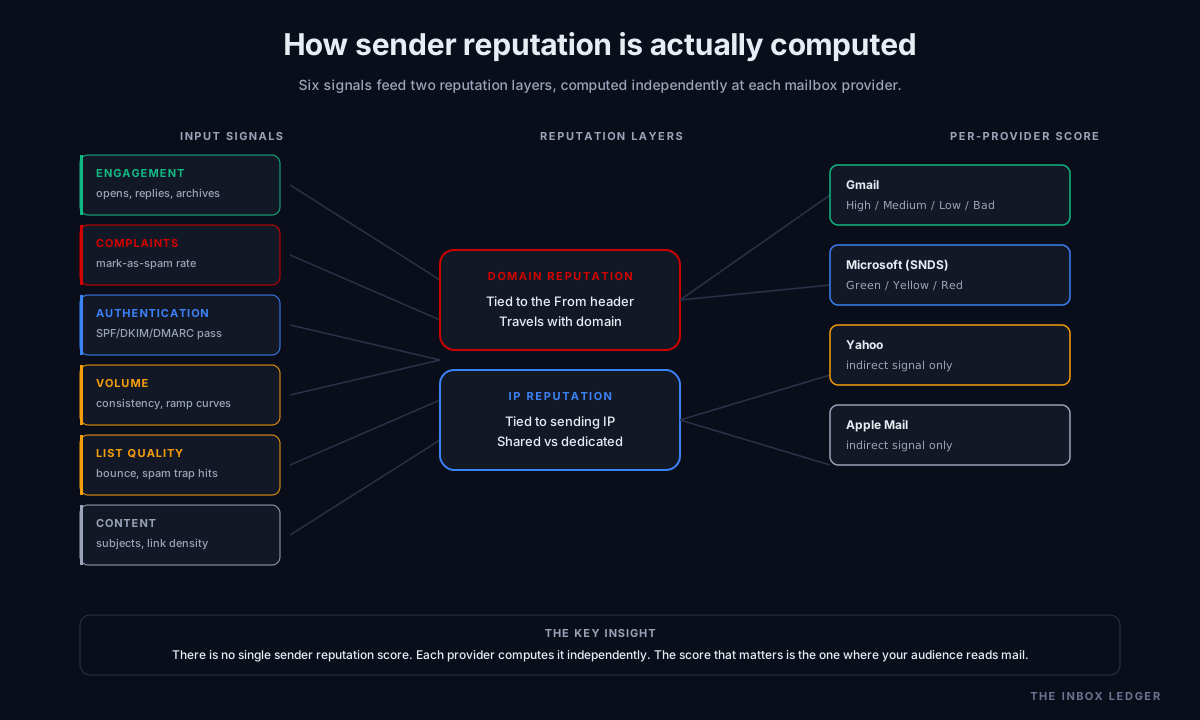
Sender reputation is the cumulative assessment a receiving mail server makes about whether to trust mail from your domain and your IPs. Every major mailbox provider (Gmail, Outlook, Yahoo, Apple, Fastmail) computes it independently using their own algorithms. There is no universal score. The third-party tools (SenderScore.org, Talos, MXToolbox) provide useful signals but do not see what Google or Microsoft see internally.
Sender reputation has two distinct layers:
Domain reputation is tied to the domain in the From header (and to a lesser extent the DKIM signing domain and SPF return-path). It travels with the domain regardless of which IP sends the mail. If you migrate from one ESP to another, your domain reputation follows you. This is the primary signal in 2026 because most modern senders use shared ESP IPs where IP reputation is less informative.
IP reputation is tied to the sending IP address. It matters most for self-hosted SMTP and dedicated IP setups. On shared ESP infrastructure (most Google Workspace, Microsoft 365, SendGrid, Mailgun shared pools), IP reputation reflects the aggregate behavior of everyone on that IP, which is why dedicated IPs become important at higher sending volumes.
Both layers feed into the per-mailbox-provider reputation score that ultimately decides whether your mail reaches the inbox, the spam folder, or gets rejected. The signals mailbox providers track:
- Engagement signals: opens, replies, archives, marks-as-important
- Negative signals: spam complaints, deletions without opening, marks-as-spam
- Authentication signals: SPF/DKIM/DMARC pass/fail rates, alignment
- Volume signals: send volume consistency, ramp curves, spike patterns
- List quality signals: bounce rates, spam trap hits, dormant address ratio
- Content signals: subject line patterns, link density, image-to-text ratio
The single most damaging signal is the spam complaint rate. Google’s bulk sender requirements cap complaint rates at 0.3% for senders pushing 5,000+ daily messages to Gmail; cross that threshold and your inbox placement degrades within days. Best-in-class senders target 0.1% or lower. The other signals matter, but complaint rate is the one that produces the fastest reputation collapse.
How to check sender reputation at each major mailbox provider
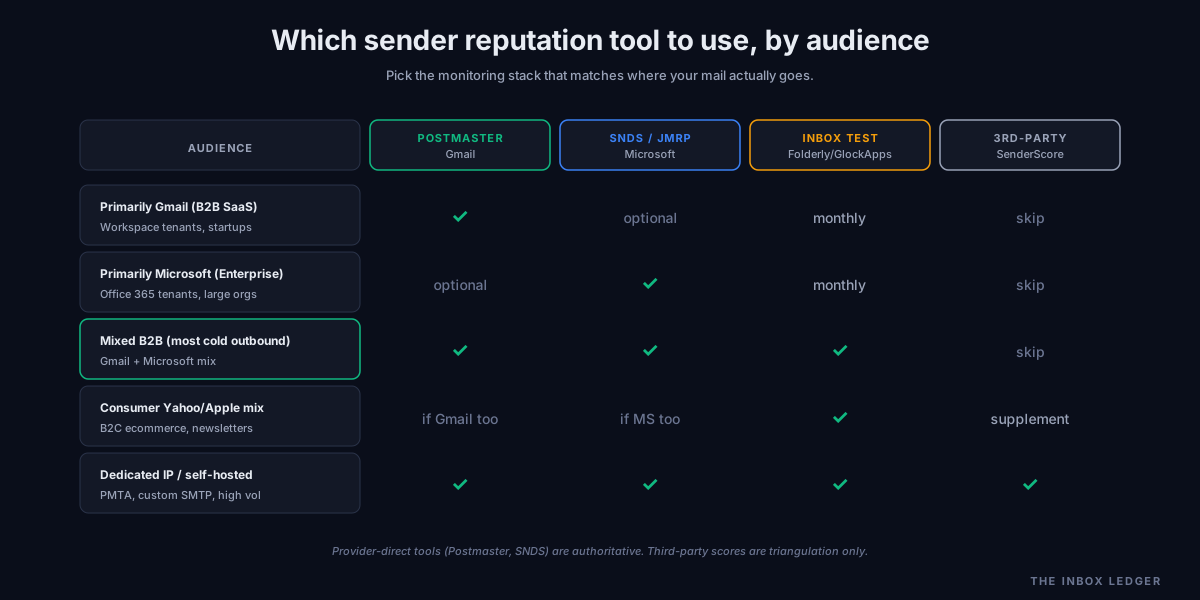
The only sender reputation checks that matter are the ones at the providers your audience actually uses. Set these up before you measure anything else.
Gmail: Google Postmaster Tools
Google Postmaster Tools is the authoritative source for Gmail reputation data. Free, requires DNS-based domain ownership verification, takes 24 hours after setup to start populating. The signals you get:
- Domain reputation: High, Medium, Low, Bad
- IP reputation: same scale, per IP
- Spam rate: percentage of mail marked as spam by Gmail users
- Authentication results: SPF/DKIM/DMARC pass rates
- Delivery errors: per-IP error breakdowns
- Encryption: TLS connection rates
Domain reputation of “High” means Gmail trusts your mail; “Medium” means it inbox-places conditionally based on individual user signals; “Low” means most mail goes to spam regardless of user behavior; “Bad” means filtering or outright rejection. The progression from High to Low can happen in 48 hours after a complaint rate spike.
Postmaster Tools requires at least 100 messages per day to a specific domain over a 7-day window to show data. Below that threshold the dashboard shows “no data,” which itself is useful information.
Microsoft (Outlook.com, Hotmail, Office 365): SNDS and JMRP
Microsoft’s Smart Network Data Services (SNDS) shows your IP reputation against Outlook’s filters: Green (good), Yellow (some issues), Red (bad). Requires IP ownership verification and is most useful for senders with dedicated IPs.
Microsoft’s Junk Mail Reporting Program (JMRP) is the complement: it sends you a copy of every message Outlook users mark as spam from your IPs, in near-real-time. Free to enroll. The reports are noisy but extremely valuable for identifying which mail is generating complaints.
For Office 365 specifically, the Microsoft tech community deliverability documentation covers tenant-specific reputation diagnostics that the May 2025 enforcement expansion added.
Yahoo and Apple: indirect signals only
Yahoo and Apple do not publish reputation dashboards. The only signals you get are deliverability test results from inbox placement tools (Mailtrap, GlockApps, Folderly) and the SPF/DKIM/DMARC pass rates you see in DMARC aggregate reports. Yahoo aligned with Google’s bulk sender rules in February 2024 so most of what you learn about Gmail behavior applies to Yahoo as well.
Third-party scoring tools
- SenderScore.org (free): the original sender score, IP-based, rated 0-100 by Return Path/Validity. Useful for IP-level signal across providers, less useful if your sending is on shared ESP infrastructure
- Talos Intelligence (free, from Cisco): IP and domain reputation rated Good/Neutral/Poor
- MXToolbox (free): blacklist status across 100+ DNSBLs, plus basic reputation lookups
- Mail-tester.com (free): per-message reputation score with detailed breakdown of why mail scored where it did
These tools provide useful triangulation but should never replace the provider-direct checks above. A Postmaster Tools “Low” with a SenderScore of 90 means your audience is on Gmail and you have a real problem; the SenderScore is misleading.
What damages sender reputation fastest
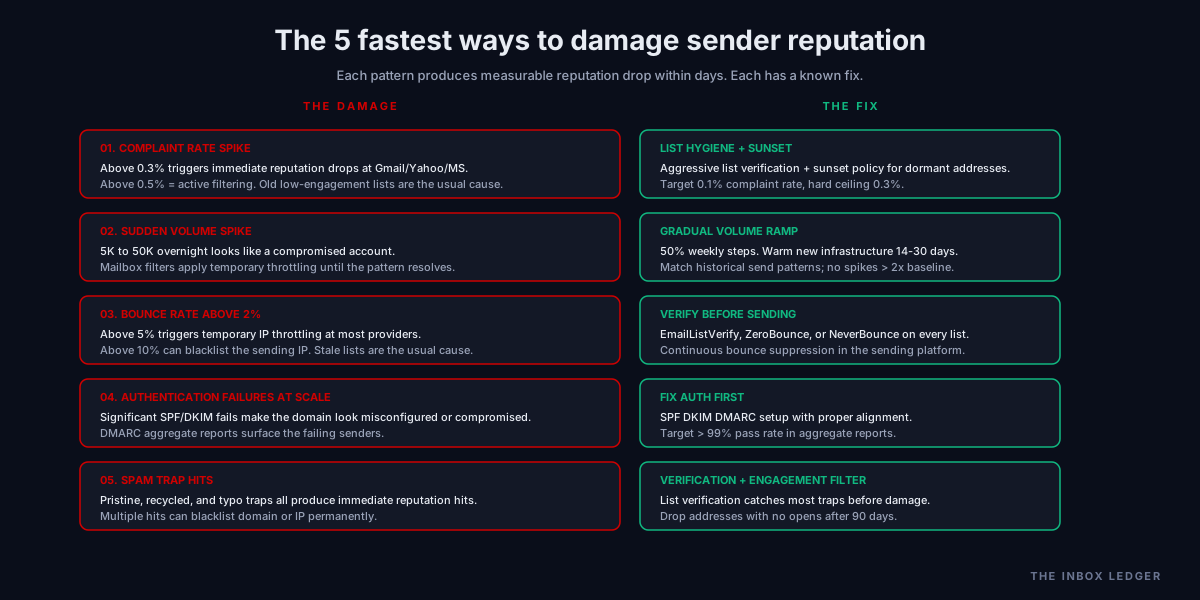
Five patterns we see most often on audits:
1. Spam complaint rate spikes
A complaint rate above 0.3% triggers immediate reputation drops at Gmail, Yahoo, and Microsoft. Above 0.5% and you are in active filtering territory. The most common cause is sending to old, low-engagement lists where recipients no longer remember opting in. The fix is aggressive list hygiene (see email hygiene playbook) plus a sunset policy for dormant addresses.
2. Sudden send volume spikes
Mailbox providers track your sending velocity. A domain that historically sends 5,000 messages per day and suddenly sends 50,000 looks like a compromised account. The volume itself is not the problem; the unexplained spike is. Mailbox provider filters apply temporary throttling or filtering until the spike pattern resolves. The fix is ramping volume gradually and warming new sending infrastructure properly (see email warmup tools).
3. Bounce rate above 2%
Bounce rates above 2% on a single send are a strong negative signal. Bounces above 5% trigger temporary IP throttling at most providers; above 10% can blacklist the sending IP. The fix is list verification before sending (see email hygiene) and continuous bounce suppression in your sending platform.
4. Authentication failures at scale
If a meaningful percentage of your mail fails SPF or DKIM, mailbox providers treat the domain as either misconfigured or compromised. Either way, sender reputation degrades. The fix is the proper authentication setup covered in the SPF DKIM DMARC setup guide and the policy escalation in the DMARC policy guide.
5. Hitting spam traps
Spam traps are addresses operated by anti-spam organizations specifically to catch senders who scrape lists, send to old data, or never clean their list. There are three types: pristine traps (never used by a real person, only on harvested lists), recycled traps (formerly real addresses repurposed by ESPs), and typo traps (common misspellings of real domains). Hitting any of them produces an immediate reputation hit; hitting multiple in a short window can blacklist your IP or domain permanently. List verification catches most of these before they damage you.
How to build sender reputation from scratch
A new sending domain and new sending infrastructure start with neutral sender reputation. The first 30 to 60 days of activity determine the trajectory. The pattern that works:
Days 1 to 14: warmup phase
Start at 5 to 10 messages per day. Send to known-good engaged recipients (your team, friendly contacts, anyone who will actually open and reply). Use a warmup tool to generate engagement signals if you do not have enough organic recipients (see email warmup tools). Keep complaint rates at zero. Authentication must be perfect on day one; reputation damage from misconfigured SPF on a new domain takes weeks to recover from.
Days 14 to 30: ramp phase
Increase to 50 to 100 messages per day. Begin sending to real prospects (if cold outreach) or real customers (if transactional/marketing). Watch Postmaster Tools daily. Stop and diagnose if domain reputation drops to “Medium.” Resume ramp only when stable at “High.”
Days 30 to 60: scale phase
Increase to target send volume in 50% weekly steps. Bounce rate must stay under 2%; complaint rate under 0.3%. Domain reputation should be stable at “High” at Gmail (and Green at Microsoft SNDS if you have dedicated IP). Authentication pass rates above 99% in DMARC aggregate reports.
Days 60+: maintenance
Reputation is steady state but not stable. New ESP integrations, list growth, content changes can all shift it. Monthly reputation review minimum. Daily Postmaster Tools monitoring during any campaign sends above 10K messages.
How to recover from a sender reputation hit
The recovery process depends on how badly the reputation has degraded. Three scenarios:
Mild degradation: Postmaster Tools “Medium” or SenderScore drop of 5-15 points
The fix is operational: identify what changed in the last 14 days, stop the bad behavior, ramp back down to safer volume, watch reputation trend for 7 to 14 days. Most domains recover from this in 2 to 4 weeks of disciplined sending. No infrastructure change required.
Moderate degradation: Postmaster Tools “Low” or SenderScore below 70
The reputation is actively hurting deliverability. Stop sending entirely for 48 to 72 hours. Audit the recent send history for the cause (bounce spike, complaint spike, authentication failure). Fix the root cause. Resume at reduced volume (20% of previous peak) and run reputation monitoring daily. Recovery takes 4 to 8 weeks. During this period, mail to engaged recipients only; sending to cold prospects accelerates the damage.
Severe degradation: Postmaster Tools “Bad” or domain blacklisted
The sending domain is unrecoverable in the short term. Options:
- Replace the sending domain. Move outbound to a new domain (often a fresh subdomain like
outbound.yourdomain.comor a separate domain entirely), warm it from scratch, transition gradually over 60 days. The damaged primary domain may rehabilitate over 6 to 12 months of low-volume, high-engagement sending but should not carry primary outbound during recovery. - Migrate to dedicated IP. If reputation damage is IP-based on a shared ESP pool, moving to dedicated IP (and warming it properly) isolates you from the shared pool damage. Available on Smartlead, Instantly, SendGrid, Mailgun, and most modern ESPs at higher tiers.
This is the case where consulting help is worth the spend; see email deliverability consultant for when external help is justified. A sender reputation collapse is the single most expensive deliverability failure a B2B program can experience because the recovery time is measured in months, not weeks.
The practical sender reputation checklist
A disciplined sender reputation program looks like this:
- Set up Google Postmaster Tools with DNS verification on every sending domain
- Enroll in Microsoft SNDS for IP-based reputation visibility at Outlook
- Configure DMARC aggregate reporting to a parsing tool (EasyDMARC, dmarcian, Postmark) for ongoing authentication monitoring
- Establish baseline complaint rate target of 0.1% or lower, hard ceiling at 0.3%
- Establish baseline bounce rate target under 2%, hard ceiling at 5%
- Set up inbox placement testing for monthly checks across major providers (Folderly, GlockApps, Mailtrap)
- Monitor domain reputation daily during any campaign above 10K messages
- Review reputation trends weekly at steady state
- Document any infrastructure or list changes so you can correlate them with reputation movement
- Build a reputation recovery playbook in advance: know what you will do at the first sign of degradation, before you need it
The discipline most often missing is step 9 and step 10. Teams notice reputation dropped, scramble to figure out why, and lose two weeks on the diagnostic. The operator-grade approach is to document changes preemptively and rehearse the recovery process before the first incident.
How sender reputation connects to broader deliverability work
Sender reputation is the cumulative effect of every other deliverability practice. Authentication (SPF DKIM DMARC setup, DMARC policy) feeds the authentication signal. List hygiene (email hygiene) feeds the bounce and complaint signals. Warmup (email warmup tools) feeds the engagement signal during ramp. Volume discipline and content quality feed the behavior signals.
The teams we work with that maintain consistent inbox placement do not chase sender reputation directly. They run disciplined operations across all the underlying practices, and sender reputation follows. The teams that try to “improve sender reputation” without fixing the underlying practices end up running expensive remediation campaigns that produce short-term gains followed by predictable collapses.
For the broader operational baseline, see the cold email deliverability checklist. For the fastest improvements when reputation is already eroding, see the how to improve email deliverability walkthrough. For the infrastructure layer that supports good reputation, see the SMTP relay guide and best email deliverability services.
Frequently asked questions
What is a good sender reputation score?
How long does it take to build sender reputation?
What's the difference between domain reputation and IP reputation?
How do I check my sender reputation for free?
Can sender reputation recover from a hit?
Does cold email always damage sender reputation?
How often should I check sender reputation?
The bottom line on sender reputation
Sender reputation is the trailing indicator that summarizes every other deliverability decision you have made. It is not a knob you turn directly. It moves in response to authentication, list quality, volume discipline, engagement signals, and complaint rates. The teams we work with that maintain consistent inbox placement do not optimize for sender reputation; they optimize for the underlying practices and watch reputation as the scorecard.
The single most important operational change you can make: actually look at Google Postmaster Tools and Microsoft SNDS for your domains, every day during active campaigns and weekly at steady state. The third-party scoring sites are useful triangulation but the provider-direct tools are the ones that matter. Most articles on this topic miss this distinction entirely and treat SenderScore as the canonical signal; it is not.
For the connected pieces of the cluster, start with the email deliverability pillar for the broader sender reputation context, the SPF DKIM DMARC setup guide and DMARC policy guide for the authentication layer, the email hygiene playbook for the bounce and complaint controls, and the email warmup tools guide for the engagement signal during ramp.
Subscribe to the weekly briefing for operator-grade deliverability and sender reputation notes, one short email every week.
More on Deliverability
Email blacklist removal 2026: the operator playbook
Email blacklist removal in 2026: diagnose the root cause first, identify the tier, delist in the right order, prevent re-listing. The full playbook.
Email deliverability monitoring vs warmup: 2026 guide
Email deliverability monitoring vs warmup in 2026: what each does, when you need both, and why monitoring is non-negotiable post-enforcement.
Spam complaint rate 2026: the 0.3% operator playbook
Spam complaint rate in 2026: the 0.3% threshold explained, why ESP dashboards underreport, the five drivers of complaints, and the recovery playbook.