DMARC policy: when to move from p=none to quarantine
DMARC policy in 2026: when to move from p=none to quarantine to reject, how to read dmarc reports, and what to avoid breaking on the way there.
Your dmarc policy is the single line of DNS that decides whether spoofed mail in your name lands in inboxes, gets quarantined, or bounces entirely. In 2026, after two years of Google and Yahoo bulk sender enforcement and Microsoft’s May 2025 expansion of those same rules, the value of p=none as a final destination for your dmarc policy has collapsed. Mailbox providers still require a published record at minimum, but they increasingly read p=none as “this sender is not serious about authentication” and discount reputation accordingly.
The teams we work with that move their dmarc policy cleanly from p=none to p=quarantine to p=reject over 60 to 90 days end up with stronger inbox placement, fewer spoofing incidents, and far less time spent firefighting deliverability. The teams that publish p=reject on day one (because a vendor told them it was “best practice”) spend the next three weeks unbreaking legitimate mail flows: payroll vendors, CRM notifications, transactional providers nobody documented. Both outcomes are common, and the difference is process, not knowledge.
This guide is the operator-grade walk-through we use on audits: what each dmarc policy state actually does, how to read the XML reports without losing your weekend, the alignment problems that block 80% of teams from moving past p=none, and the specific signals that tell you it’s safe to escalate. If you want the broader cluster context first, the email deliverability pillar covers how authentication fits into sender reputation and inbox placement, and the cold email deliverability checklist covers the prerequisite operational work.
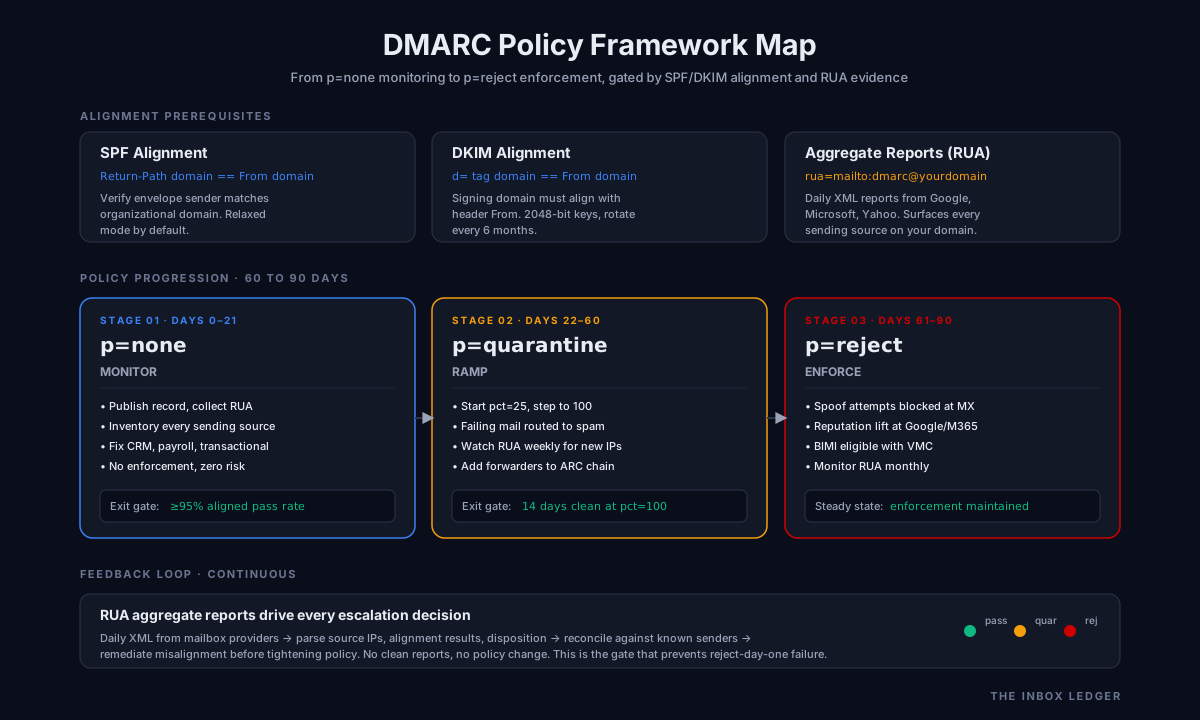
What a dmarc policy actually is (and what it is not)
DMARC (Domain-based Message Authentication, Reporting and Conformance, defined in RFC 7489) is a policy layer that sits on top of SPF and DKIM. Your dmarc policy tells receiving mail servers two things: how to handle messages that fail authentication in your name, and where to send reports about those failures.
The policy itself lives in a single DNS TXT record at _dmarc.yourdomain.com. A typical dmarc record looks like this:
v=DMARC1; p=none; rua=mailto:reports@yourdomain.com; ruf=mailto:forensics@yourdomain.com; fo=1; adkim=r; aspf=r; pct=100
The p= tag is the enforcement instruction. It has three valid values:
p=none: monitor only. Receivers do not act on the policy. They still send aggregate reports ifrua=is set. This is the diagnostic state, not a destination.p=quarantine: receivers should treat failing mail as suspicious. In practice this means spam folder, sometimes greylisting, sometimes additional scrutiny on inbound filters.p=reject: receivers should refuse failing mail at the SMTP layer. The sending server gets a bounce. The message never reaches the user.
What a dmarc policy is not: it is not anti-spam (legitimate mail you send to cold prospects passes DMARC easily), it is not anti-phishing on its own (it stops exact-domain spoofing, not lookalike domains), and it is not a substitute for sender reputation. A domain with perfect DMARC and a 4% complaint rate still goes to spam. Authentication is the floor, not the ceiling.
Why p=none is no longer a safe parking spot
For years, p=none was the default dmarc policy recommendation: publish a record, collect reports, never escalate. That advice broke in February 2024 when Google’s bulk sender requirements made a published DMARC record mandatory for senders pushing more than 5,000 messages per day to Gmail. Yahoo announced equivalent rules the same week. Microsoft’s enforcement expansion in May 2025 brought Outlook.com and Hotmail into the same standard.
The text of those requirements says “DMARC policy of at least p=none.” The practical effect is different. On the audits we run in 2026, domains stuck at p=none for more than six months consistently show 8 to 15 percent worse inbox placement at Gmail compared to peer domains at p=quarantine or p=reject. The mailbox providers are not punishing p=none directly. They are using time-at-policy as one signal in a much larger reputation model, and a domain that never escalates reads as either abandoned or compromised.
What we see most often is teams who set up DMARC in early 2024 to satisfy the enforcement deadline, never built reporting infrastructure, never moved off p=none, and now wonder why their inbox rates are eroding even with clean SPF and DKIM. The dmarc record exists. It is doing nothing.
The three states explained: p=none, p=quarantine, p=reject
p=none (monitoring)
You publish the record, you collect aggregate reports (the rua= mailto), you build a picture of who sends mail in your name. The goal of this dmarc policy state is inventory: every legitimate sender (your ESP, your CRM, your invoicing tool, your help desk, your HR system, your three different transactional providers that nobody documented) needs to be identified, authenticated correctly with SPF or DKIM, and pass dmarc alignment.
Time at p=none: typically 14 to 45 days for a small organization, 60 to 90 days for an enterprise with many shadow senders. Beyond that, you are not gathering more data; you are stalling.
p=quarantine (soft enforcement)
Failing mail goes to spam (or equivalent). The risk profile is meaningful but bounded: a misconfigured sender does not bounce, it just lands in the user’s spam folder where someone might still find it. This is the right intermediate state because it surfaces problems quickly (people complain when their CRM notifications hit spam) without dropping messages entirely.
A common refinement here is the pct= tag, which lets you apply the dmarc policy to a percentage of failing mail. Start with p=quarantine; pct=25, monitor reports for two weeks, move to pct=50, then pct=100. The slow ramp gives you time to catch broken senders without taking down legitimate mail in one move.
p=reject (full enforcement)
Failing mail bounces. This is the destination state, and on a correctly configured domain it is uneventful. Once you reach p=reject, spoofing in your exact domain becomes operationally impossible. The phishing attack vector against your customers and employees that uses your literal domain in the From header is closed.
Mail you intentionally send through any vendor that passes SPF or DKIM and meets alignment continues to flow. Mail spoofed in your name bounces at the receiving server. This is the outcome the whole exercise points at.
DMARC alignment: the thing that actually blocks most teams
The reason teams cannot move from p=none is almost always alignment, not setup. SPF alignment requires the domain in the SMTP MAIL FROM (the “envelope from”) to match the domain in the From header. DKIM alignment requires the d= tag in the DKIM signature to match the From header domain. DMARC passes if either SPF or DKIM aligns; it fails if neither does.
In practice, most third-party senders sign mail with their own DKIM key (d=sendgrid.net, d=mailchimp.com) and use their own bounce domain in MAIL FROM. Both fail alignment when the From header says yourdomain.com. The fix is either:
- Custom DKIM: have the vendor sign mail with
d=yourdomain.comusing a key you publish in DNS (this is what Postmark, SendGrid, Mailchimp, Klaviyo, and most modern ESPs offer; sometimes it requires the paid tier). - Custom return-path: configure the vendor to use a bounce subdomain on your domain (like
bounce.yourdomain.com) that SPF-aligns to the From header.
Both alignment modes can be set to strict (adkim=s, aspf=s) or relaxed (adkim=r, aspf=r). Relaxed mode allows organizational domain match (bounce.yourdomain.com aligns with mail.yourdomain.com). Strict mode requires exact match. Default and recommended starting point is relaxed for both.
On the audits we run, the typical breakdown when teams first publish p=none looks like this: 60 to 75 percent of legitimate mail aligns on at least one mechanism, 15 to 25 percent fails both (the high-priority remediation list), and 5 to 10 percent is genuine spoofing or unauthorized mail. The middle bucket is the work.
Reading dmarc reports without losing your weekend
DMARC defines two report types. Aggregate reports (XML, sent daily by mailbox providers to your rua= address) summarize pass/fail counts by sending IP. Forensic reports (a copy of failing messages, sent to your ruf= address if fo=1 is set) give per-message detail. Aggregate reports are the workhorse; forensic reports are noisy and many providers no longer generate them due to privacy concerns.
Raw aggregate XML is unreadable. A typical mid-size organization receives 30 to 80 XML reports per day from 15 to 40 different providers. Parsing them by hand is not a job; it’s a multi-month engagement that no team should ever attempt. Use a dmarc reporting tool. The four we see most often on client audits:
- EasyDMARC: strong UI, fast parsing, reasonable pricing for SMB, includes hosted SPF and DKIM management.
- Dmarcian: the operator favorite for mid-market and enterprise; deep forensic analysis, mature alignment diagnostics, strong support.
- Postmark DMARC monitoring: free tier for monitoring only; clean weekly digest emails, ideal for smaller domains that just need a pulse check.
- Valimail: enterprise-grade, automated sender discovery and authentication, common in regulated industries.
What you are looking for in the reports, in order of priority:
- Unknown sending IPs that pass authentication: this is either a vendor you forgot or a compromise. Investigate every one.
- Known sending IPs that fail alignment: these are your remediation queue. Either fix the vendor’s DKIM/SPF config or accept that mail from that source will quarantine.
- Volume of failing mail trending up: this is usually a forwarding or mailing list issue (especially with mailing lists that rewrite the From header).
- Sources you do not recognize at all: spoofing attempts, useful for security signal but lowest priority for delivery.
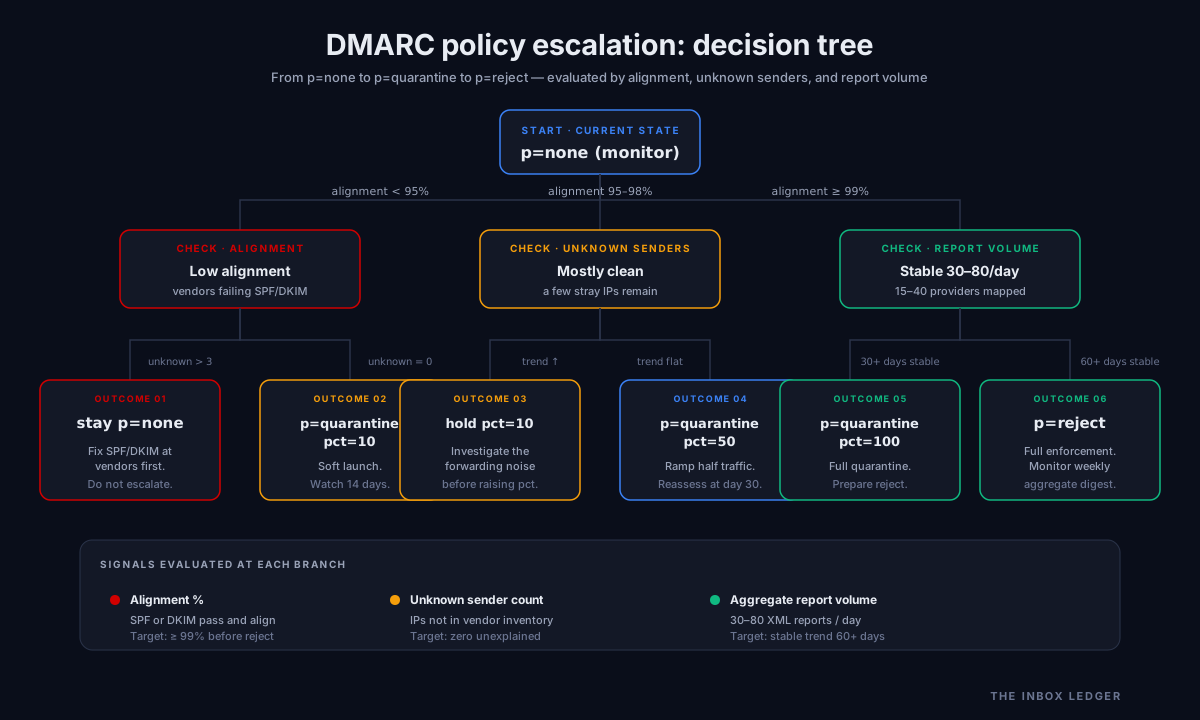
The 60 to 90 day escalation framework
The dmarc policy escalation framework we use on engagements has five gates. You do not move forward until the prior gate is closed.
Gate 1: publish p=none with reporting (day 0)
Publish the record with rua=mailto:reports@yourdomain.com, point that address at a dmarc reporting tool, and confirm reports start arriving within 48 hours from at least Gmail, Yahoo, and Microsoft. If you do not see reports from all three within a week, your DNS or the report inbox is misconfigured.
Gate 2: complete sender inventory (days 14 to 30)
Every IP and authentication source in your reports is classified: legitimate (and aligned), legitimate (and broken), unauthorized. The legitimate-and-broken bucket gets a remediation owner. The unauthorized bucket gets a security ticket.
The signal to advance: 90% or more of your mail volume passes alignment on at least one mechanism, AND you have written down what the remaining 10% is.
Gate 3: move to p=quarantine; pct=25 (days 30 to 45)
A quarter of failing mail starts going to spam. Watch reports for two weeks. The signal to advance: no internal complaints about missing mail, no spike in support tickets from customers about quarantined notifications.
Gate 4: ramp pct=50, then pct=100 (days 45 to 75)
Move pct up in two steps, 7 to 14 days apart. By the end of this window, all failing mail is quarantining and you have a complete picture of what fails and why.
Gate 5: move to p=reject (day 75 to 90)
Drop the pct= tag (reject does not respect pct at most providers anyway) and set p=reject. The cutover should be a non-event. If it is not, you skipped a gate.
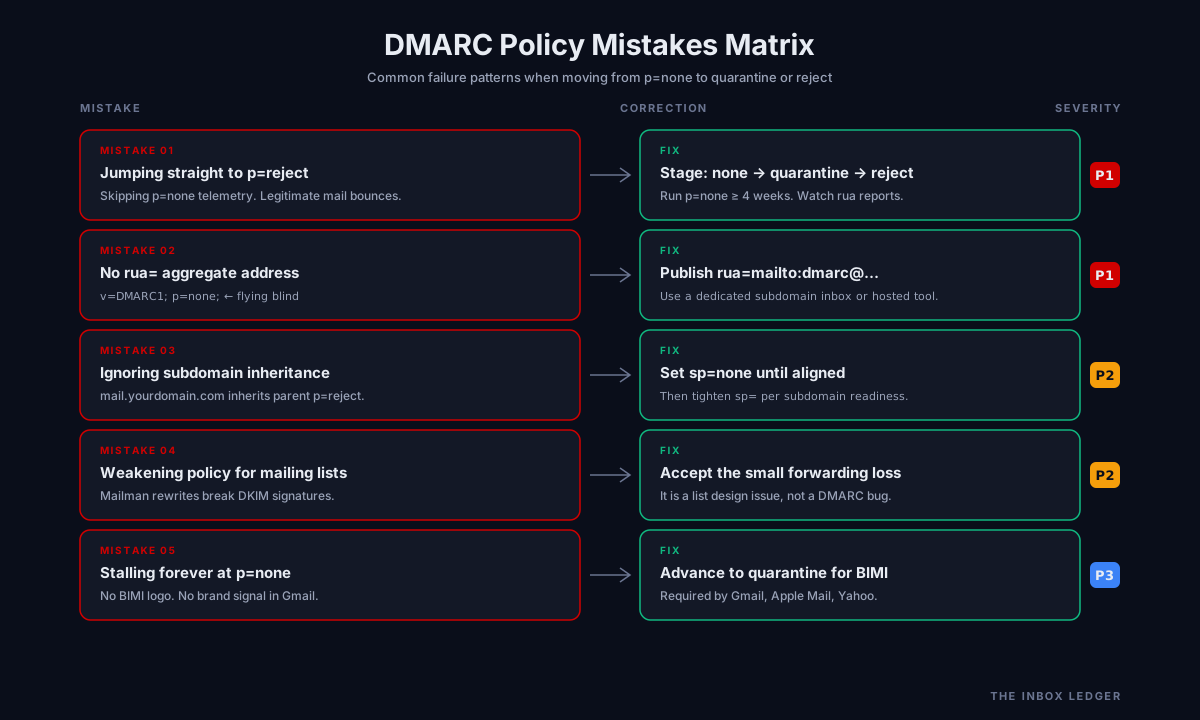
Common mistakes and how they break things
Setting p=reject on day one
The single most common dmarc policy failure mode. The compliance team reads “best practice is p=reject” in a vendor whitepaper, the IT team publishes it, and three weeks later someone notices that none of the automated invoice reminders are being delivered. Mail from the legacy on-prem mail server, the third-party calendar invitation service, and the marketing automation tool that nobody migrated all started bouncing the moment the record went live. The fix is to roll back to p=none, do the inventory work, then escalate properly. Most articles on this topic miss how often this happens; on our audits, it’s the modal pattern.
Publishing without a working rua= address
If you publish rua=mailto:reports@yourdomain.com and that mailbox does not exist (or is full, or rejects mail from unknown senders), you get no reports. You get no visibility. You stay at p=none forever because you have no data to justify moving. Verify that the report address accepts mail from anyone, ideally from a dedicated subdomain or via the reporting tool’s hosted inbox.
Forgetting about subdomains
The sp= tag controls the dmarc policy for subdomains. If you publish p=reject on yourdomain.com but you also send transactional mail from mail.yourdomain.com that you have not yet aligned, the parent policy still applies (subdomains inherit unless sp= is set explicitly). Either set sp=none while you fix subdomain authentication, or align the subdomain senders first.
Treating mailing list forwarding as a problem to solve at DMARC
Traditional mailing lists (Mailman, listservs, some Google Groups configurations) rewrite the From header or break DKIM signatures by modifying message bodies. The result is failing DMARC on mail that is legitimately forwarded. This is not a DMARC bug, it is a mailing list design issue, and the right answer is usually to accept the loss for that small slice of traffic, not to weaken your policy.
Ignoring BIMI eligibility
BIMI (Brand Indicators for Message Identification) requires p=quarantine or p=reject to display your verified logo next to your messages in supported clients (Gmail, Apple Mail, Yahoo). Teams that stall at p=none lose this brand visibility. Not a deliverability factor per se, but a real revenue signal for consumer-facing senders.
The practical checklist
A working dmarc policy escalation looks like this in order. Each step assumes the prior one is closed.
- Confirm SPF is published and authoritative. SPF record exists at the apex, all sending sources are listed via include or ip4/ip6 mechanisms, the record has fewer than 10 DNS lookups (RFC 7208).
- Confirm DKIM is signing all major mail streams. Every ESP and vendor that sends mail in your name has a working DKIM selector and key published in DNS (RFC 6376).
- Publish DMARC record at p=none with
rua=pointing at a reporting tool inbox. - Verify reports arriving from Gmail, Yahoo, Microsoft, and at least one other provider within 7 days.
- Inventory all sending sources from aggregate reports. Classify each as aligned, misaligned-legitimate, or unauthorized.
- Remediate misaligned-legitimate senders. Either set up custom DKIM, configure custom return-path, or migrate to a vendor that supports alignment.
- Move to p=quarantine; pct=25. Monitor reports and internal escalations for 10 to 14 days.
- Ramp to pct=50, then pct=100 in two steps, 7 to 14 days apart.
- Move to p=reject. Drop the pct tag.
- Set sp= explicitly if subdomain dmarc policy differs from organizational policy.
- Review reports monthly at steady state. New vendors, new IPs, new spoofing attempts will surface continuously.
- Enable BIMI once
p=quarantineorp=rejectis stable for 30+ days, if brand display matters for your audience.
A clean run through this list takes 60 to 90 days at a small organization and 4 to 6 months at an enterprise. The work is in step 5 and step 6: every shadow sender, every vendor with a buried DKIM setting, every legacy system that someone configured in 2017 and forgot.
How dmarc policy connects to broader deliverability work
Authentication is necessary but not sufficient. A perfectly authenticated domain with poor list hygiene, high complaint rates, or aggressive cold outreach to unverified lists still ends up in spam. A strong dmarc policy closes the spoofing vector and proves you are a legitimate sender; the rest of your sender reputation is built through volume discipline, engagement, and list quality. The email hygiene playbook covers the cleanup side, and the cold email deliverability checklist covers the operational practices that move inbox rates over time.
If you run cold outbound, the relationship between your dmarc policy and reply rates is indirect but real: domains at p=reject consistently see better inbox placement at Gmail (per Google Postmaster Tools data) than peers at p=none with otherwise identical infrastructure. The cold email outreach guide and the email warmup tools guide cover the operational practices that compound with strong authentication. For teams running on managed infrastructure, the SMTP relay guide explains how relay choice affects alignment options.
Frequently asked questions
Can I start at p=quarantine instead of p=none?
What does pct=25 actually do at p=reject?
Do I need both rua and ruf reporting addresses?
How long should I stay at p=quarantine before moving to p=reject?
What happens to my mail if a recipient's server does not check DMARC?
Can I use a single dmarc record for multiple sending domains?
Does p=reject affect my deliverability to recipients of legitimate mail?
The bottom line on dmarc policy
A dmarc policy is not a checkbox; it is a 60 to 90 day process that ends with p=reject published and every legitimate mail stream aligned. The teams we work with that follow the gates above (publish at none, inventory senders, remediate alignment, ramp through quarantine with pct, then reject) end up with stronger inbox placement, no spoofing in their name, and BIMI eligibility if they want it. The teams that publish reject on day one or stall forever at none get the worst of both: broken mail flows or eroding reputation, sometimes both.
The work that matters is not the DNS record. It is the sender inventory, the alignment remediation, and the discipline of reading aggregate reports every week until the picture is stable. Use EasyDMARC, Dmarcian, or Valimail to parse the XML; do the operator work yourself, because nobody else knows which vendors your team uses.
For the connected pieces of the cluster, start with the email deliverability pillar for the broader sender reputation context, the email hygiene playbook for what compounds with strong DMARC over time, the cold email deliverability checklist for the operational baseline, and the how to improve email deliverability walk-through for the fastest fixes at any policy state.
Subscribe to the weekly briefing for operator-grade deliverability and authentication notes, one short email every week.
More on Deliverability
Email blacklist removal 2026: the operator playbook
Email blacklist removal in 2026: diagnose the root cause first, identify the tier, delist in the right order, prevent re-listing. The full playbook.
Email deliverability monitoring vs warmup: 2026 guide
Email deliverability monitoring vs warmup in 2026: what each does, when you need both, and why monitoring is non-negotiable post-enforcement.
Spam complaint rate 2026: the 0.3% operator playbook
Spam complaint rate in 2026: the 0.3% threshold explained, why ESP dashboards underreport, the five drivers of complaints, and the recovery playbook.