Email finder tools 2026: 8 picks by job to be done
Email finder tools in 2026 categorized by job: single lookups, bulk prospecting, coverage maximization, CRM enrichment, or sequencing-included workflow.
The market for email finder tools in 2026 looks like a parade of identical 10-tool listicles ranking Hunter, Apollo, Snov.io, Saleshandy, RocketReach, Lusha, and a few others in roughly the same order. The framing misses what actually decides whether the tool works for you. The right email finder depends entirely on the job you are hiring it for, and the jobs produce genuinely different recommendations. A founder doing 20 highly targeted lookups a month needs a different tool than an SDR team running 10,000-contact bulk pulls every quarter. A RevOps team enriching a CRM at scale needs different infrastructure than a small agency stitching finder and sequencer together. The generic listicle treats email lookup as one product to compare; in practice it is at least five distinct jobs, and the best tool for each job is different.
This guide is the decision framework we use when teams ask which email finder tools to pick from the dozens on the market. It covers the five jobs teams actually hire email finder tools for, the specific picks that solve each job with honest tradeoffs, the vendor accuracy benchmark games that make published numbers useless, why single-source finders are losing ground to waterfall enrichment, and the data discipline that keeps your sender reputation intact regardless of which tool you pick. Written for sales teams, founders, and agencies who need their finder to produce sendable contacts rather than a higher number on a marketing page.
For the broader prospecting context, see the Apollo alternatives guide for the data layer and the cold email infrastructure guide for what sits underneath. For the deliverability foundation that determines whether your found emails actually land, see the email deliverability pillar and the email hygiene guide.
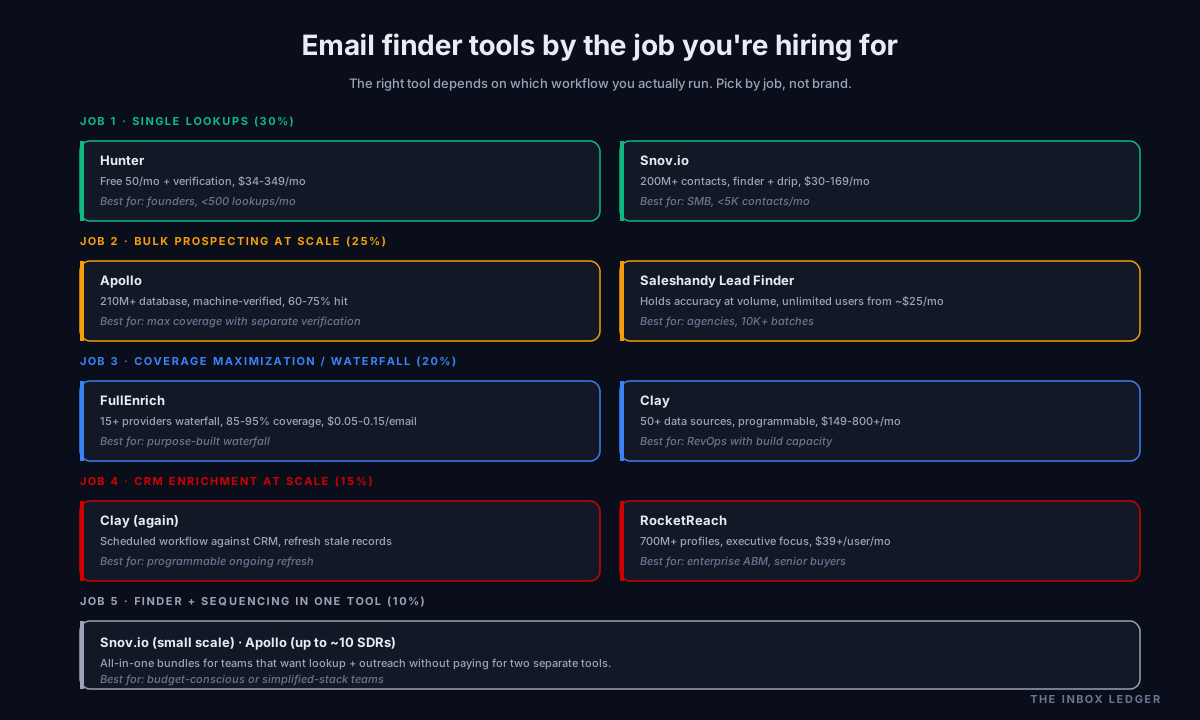
The five jobs teams hire email finder tools for
What we see most often on the audits we run is teams picking from the available lead generation tools by feature count or marketing benchmark, then six months later realizing the tool was wrong for their actual workflow. The picks below fall into five distinct categories based on the job to be done.
Single lookups and small-team prospecting (about 30% of teams we see). Founders, solo SDRs, and small teams using a b2b email finder to find email address contacts for targeted research. Volume is low, accuracy on each lookup matters more than database breadth, and a usable free tier is often the deciding factor.
Bulk B2B prospecting at scale (about 25%). Sales teams running large list pulls for outbound campaigns. Volume runs into thousands per month, the cost per email matters, and the tool needs to keep accuracy steady at scale rather than degrading as list sizes grow.
Maximum coverage and waterfall enrichment (about 20%). Teams where every missed contact is a wasted SDR hour and the single-source finder model is leaving emails on the table. The job is hitting 85 to 95 percent coverage across diverse B2B lists, which only a multi-source waterfall reliably delivers.
CRM enrichment at scale (about 15%). RevOps teams running ongoing enrichment of existing CRM records, where data freshness and native CRM integration matter more than ad-hoc lookups.
Finder plus sequencing in one tool (about 10%). Smaller teams or budget-constrained operations that want lookup and outreach in the same subscription rather than paying for two tools.
The email finder tools picks for each category are different, the cost structures are different, and getting the category wrong is the single most expensive email finder mistake we see. Pick by the job, not by the brand name on the marketing page.
The 8 email finder tools, categorized by job
These are the 8 email finder tools we see actually used in production by B2B teams in 2026. Grouped by the job they best solve.
For single lookups and small-team prospecting: Hunter, Snov.io
Hunter is the most common starting point for solo founders and small teams. Domain-based lookup, a free tier of 50 to 75 credits per month with verification included, simple Chrome extension, no credit card required for the free tier. Paid tiers start around $34 per month. Best fit for teams doing fewer than 500 lookups per month who value accuracy and simplicity over database scale. Hit rates land in the 85 to 92 percent range on standard B2B lists.
Snov.io doubles as a single-lookup tool and a low-end sequencer, which is why it appears in two categories. The lookup side covers 200M+ contacts via domain search, LinkedIn extension, and bulk CSV. Free tier with 50 credits per month; paid from around $30 per month. Best fit when you need light prospecting plus drip campaigns in one subscription and your volume stays under 5,000 contacts monthly.
For bulk B2B prospecting at scale: Apollo, Saleshandy
Apollo carries one of the largest databases in the category, with 210M+ contacts, and is the default for high-volume bulk pulls. The accuracy tradeoff is real: Apollo is machine-verified rather than human-verified, which means higher coverage at moderate hit rates (often 60 to 75 percent on standard B2B lists). Best fit when raw volume matters and you have list verification in your stack to handle the bounce risk. The full picture is in the Apollo alternatives guide when Apollo itself is the wrong fit.
Saleshandy Lead Finder has gained ground for bulk B2B prospecting where accuracy needs to hold at scale. Reports of pulling 10,000-email batches without hit-rate degradation, plus an unlimited-users pricing model that suits teams. Best fit for agencies and teams doing high-volume bulk prospecting where Apollo’s machine-verified data produces too many bounces.
For maximum coverage and waterfall enrichment: FullEnrich, Clay
The single-source finder model (one provider, one database) is genuinely losing ground in 2026 for serious outbound. Waterfall enrichment (querying multiple providers in sequence and returning the first verified hit) consistently hits 85 to 95 percent coverage on diverse lists where single-source tools cap at 60 to 80 percent.
FullEnrich is the purpose-built waterfall tool. Queries 15+ data providers in sequence (Apollo, Hunter, Dropcontact, Kaspr, and others) and returns the first verified result. Higher cost per email than single-source, but the coverage difference on hard-to-find contacts is significant.
Clay is the programmable alternative. Rather than a fixed waterfall, Clay lets you build your own enrichment workflow combining 50+ data sources (the finder tools above plus LinkedIn, BuiltWith, news APIs, custom scrapers). Best fit for RevOps teams that want full control over the waterfall logic and have someone who can build the workflow.
For CRM enrichment at scale: Clay, RocketReach
Clay appears again because the programmable model also fits ongoing CRM enrichment. Set up the workflow once, run it on schedule against your CRM, refresh stale records.
RocketReach specializes in executive and senior leadership contact data with a 700M+ profile database. Better suited to enrichment of specific named accounts and senior buyers than to broad list building. Best fit for enterprise account-based teams enriching CRM records on specific high-value contacts.
For finder plus sequencing in one tool: Snov.io, Apollo
Snov.io appears again because the bundle of finder plus drip campaigns is its strongest positioning at small scale. The drip builder is basic compared to dedicated sequencers like Smartlead or Instantly, but for teams under $200 per month total tool spend, the bundle is the right tradeoff.
Apollo also covers this use case at slightly larger team sizes, bundling the data finder with sequencing, a dialer, and LinkedIn tasks. The per-user pricing rises faster than Snov.io’s flat fee, but the all-in-one workflow reduces tooling overhead for teams up to about 10 SDRs. Above 10 SDRs the Apollo alternatives guide covers the typical migration path.
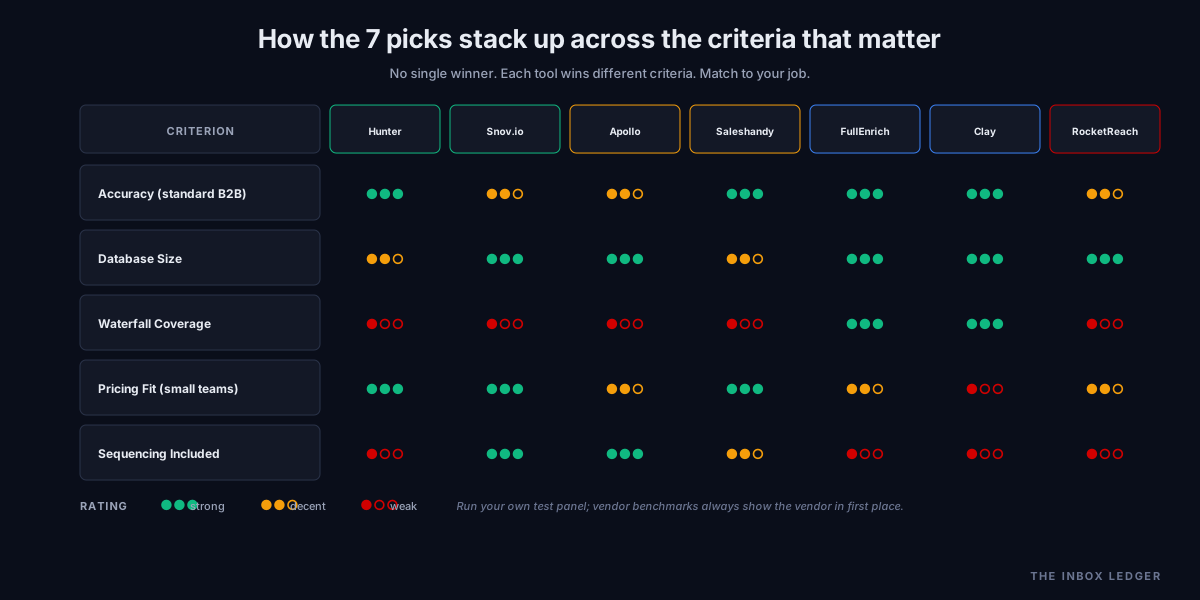
Pricing comparison: what each pick actually costs
The pricing models across email finder tools vary in ways the marketing pages obscure. Real cost at common team sizes:
Hunter: $34 to $349 per month flat fee, credit-based. A small team using 1,000 credits per month runs $34 to $104. Effective cost per email lookup roughly $0.03 to $0.07 depending on tier. Free tier of 50 credits.
Snov.io: $30 to $169 per month flat fee, credit-based. A small team using 1,000 credits per month stays in the $30 to $79 range. Free tier of 50 credits. Includes basic sequencing in every tier.
Apollo: per-user pricing around $49 to $99 per user per month, plus separate credit costs for data exports. A 5-person team runs $245 to $495 per month plus credits. The data is bundled; you pay for users, not lookups.
Saleshandy Lead Finder: from around $25 per month with unlimited users on the entry plan. A 5-person team typically stays at the plan price. Effective cost per email drops at higher volume tiers.
FullEnrich: usage-based, roughly $0.05 to $0.15 per verified email depending on the waterfall depth used. A team needing 5,000 verified emails per month runs $250 to $750. The premium for waterfall coverage is real.
Clay: $149 to $800+ per month flat-fee at tier, plus usage credits within tier. A RevOps team running heavy enrichment often lands in the $400 to $1,500 monthly range. Most flexible, also most operationally complex.
RocketReach: starts around $39 per user per month for the entry tier, scaling to enterprise pricing. Best value at small team sizes for executive enrichment specifically.
The cost pattern: flat-fee tools (Hunter, Snov.io, Saleshandy) suit predictable monthly volume. Usage-based tools (FullEnrich, Clay) suit teams where volume varies and the coverage premium is worth the unpredictability. Per-user tools (Apollo, RocketReach) suit teams where users equal sales reps with consistent workflows.
Why vendor accuracy benchmarks are noise
Every email finder vendor publishes an accuracy number, and the numbers tell you almost nothing useful. The pattern is consistent: the vendor’s own benchmark always shows the vendor in first place. Saleshandy’s 15-tool test ranked Saleshandy first. UpLead’s accuracy guarantee shows UpLead at 95 percent. Apollo’s own benchmark shows Apollo on top.
The benchmarks fail for predictable reasons:
- Test panels are selected to favor the vendor. A panel of mostly enterprise US contacts favors vendors with strong US enterprise data; a panel weighted toward European mid-market favors GDPR-compliant providers. There is no neutral panel
- Verification methodologies differ. What one vendor counts as “verified” another counts as “risky” or “guessed.” Direct comparison of percentages assumes a common definition
- Sample sizes are small enough to be statistically meaningless at the percentage-point differences that show in marketing
- The 25 percent annual data decay in B2B contacts means a tool that tested at 95 percent six months ago is delivering 71 percent today on the same panel, but the marketing page still says 95 percent
The fix is running your own panel. Assemble 100 to 500 contacts representative of your actual ICP, submit them to two or three candidate tools the same week, verify deliverability with a second-source verifier (EmailListVerify, ZeroBounce, NeverBounce), and compare hit rates on your data. Your panel is the only benchmark that predicts your real outcomes.
The 2026 deliverability context that changes the email finder tools math
The 2025 mailbox provider tightening changes how email finder tools accuracy translates into outcomes. Office365 inbox placement dropped from 77.4 percent to 50.7 percent year-over-year through 2025, and Outlook and Hotmail tightened further after Microsoft’s high-volume sender enforcement. Microsoft now filters cold outbound aggressively, alongside Google’s bulk sender requirements at Gmail. Every bounce on your sending domain costs more than it did a year ago because the sender reputation hit damages inbox placement on subsequent sends, not just the bounced one.
The practical implication for email finder tools choice: bounce rates above 2 percent are now actively dangerous, not just suboptimal. Top-performing programs target hard bounces under 1 percent. This pushes the right choice toward tools that hold accuracy at your actual volume, not tools that win benchmarks on someone else’s panel.
For high-volume programs, this also pushes toward waterfall enrichment over single-source. The 5 to 15 percent coverage gap between single-source and waterfall finders matters less than the bounce-rate consistency, and waterfall tools that route to verified-only results from multiple sources tend to produce cleaner lists than single-source tools that fall back to guessed addresses.
For the full bounce-rate discipline and how to keep lists clean before any send, see the email hygiene guide. For the broader sender reputation context that determines whether your found emails actually reach the inbox, see the sender reputation guide and the cold email deliverability checklist.
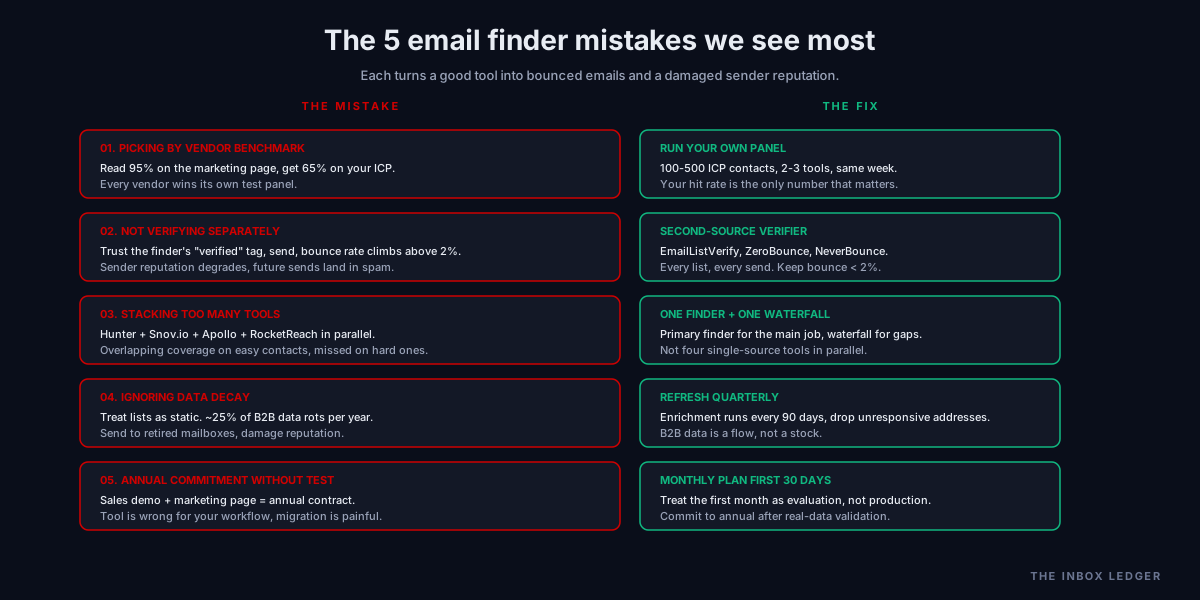
Common email finder tools mistakes
Five patterns we see most often on audits:
1. Picking the tool by published accuracy number
The most common mistake. A team reads the marketing page, sees “95 percent accuracy,” signs up, and discovers their hit rate is 65 percent because their ICP is different from the vendor’s benchmark panel. The fix is the test-panel discipline above: 100 to 500 contacts on your actual ICP, two or three candidates the same week, your hit rate is the only number that matters.
2. Not verifying separately
Treating the finder’s “verified” tag as final and sending without a second-source verification step. Bounce rates climb above 2 percent and sender reputation degrades. The fix is running every list through an independent verifier (EmailListVerify, ZeroBounce, NeverBounce) before any send, regardless of how confident the finder claims to be. The sender reputation guide covers how to verify the impact via Google Postmaster Tools.
3. Stacking too many overlapping tools
Teams subscribe to Hunter and Snov.io and Apollo and RocketReach simultaneously because each marketing page makes a different case. The result is overlapping coverage on common contacts, missed coverage on hard ones, and a tool bill three times what it should be. The fix is picking one finder for the primary job, plus one waterfall or verification tool for coverage gaps, not running four single-source tools in parallel.
4. Ignoring data decay
The B2B database you bought clean in January is roughly 25 percent wrong by December. People change jobs, titles shift, companies rebrand, mailboxes get retired. Teams that treat lists as static assets send to addresses that no longer exist and damage sender reputation. The fix is refreshing lists quarterly through enrichment runs, dropping unresponsive addresses after 90 days, and accepting that B2B data is a flow, not a stock.
5. Skipping the test panel
Teams commit to an email finder tool based on a sales demo and a marketing page rather than testing on their own data. The tool produces different results than expected, the team has already paid annual, and migration becomes painful. The fix is running the test panel on a monthly plan before committing to annual, and treating the first 30 days as evaluation rather than production.
The practical decision framework
The decision process we use when teams ask which email finder tools to evaluate:
- Name the primary job. Single lookups, bulk prospecting, coverage maximization, CRM enrichment, or sequencing-included. If you cannot name one clearly, spend a week documenting which workflow you actually run before picking
- Map job to category. Single lookups lead to Hunter or Snov.io. Bulk prospecting leads to Apollo or Saleshandy. Coverage maximization leads to FullEnrich or Clay. CRM enrichment leads to Clay or RocketReach. Sequencing-included leads to Snov.io or Apollo
- Run your own test panel. 100 to 500 contacts on your real ICP, submitted to two or three candidates the same week, hit rates compared on your data
- Verify the candidates’ results with a second-source verifier. Use EmailListVerify, ZeroBounce, or NeverBounce to confirm what each tool returned actually delivers
- Compare effective cost per verified email, not headline pricing. A tool with lower price per credit but a 65 percent hit rate costs more per verified email than a higher-price tool at 92 percent
- Start on monthly plan. Avoid annual commitment until you have 30 days of real data on your workflow
- Plan for one finder plus verification, not a stack of four
- Schedule quarterly list refresh through enrichment runs to handle data decay
The discipline that matters most: the tool you pick matters less than the data discipline around it. Bad data through a great finder still produces bounces. Good data through a mediocre finder still works.
How email finder tools fit your broader outbound stack in 2026
The email finder is one decision in a stack that determines outbound outcomes:
- Data source (the email finder tools covered here, plus the Apollo alternatives guide for the broader landscape)
- List verification (the email hygiene guide and the bounce-rate discipline)
- Sending infrastructure (the cold email infrastructure guide, the best cold email software guide, and the instantly vs smartlead comparison)
- Authentication (the SPF DKIM DMARC setup guide and DMARC policy guide)
- Sequencing and messaging (the cold email outreach guide, cold email templates guide, and cold email follow-up guide)
The finder choice is upstream of everything. Bad data through a great sender produces bounces; good data through a mediocre sender at least reaches some inboxes. But neither produces results without the broader stack, which is why teams obsessing over finder choice while ignoring infrastructure end up with the same outbound outcomes regardless of which finder they paid for.
For the operational baseline that turns good data into booked meetings, see the cold email deliverability checklist and the sender reputation guide. For when the team grows past what any one finder can handle, the Apollo alternatives guide and Lemlist alternatives guide cover the broader tool landscape.
Frequently asked questions
What are the best email finder tools in 2026?
What is the most accurate email finder tool?
What is a waterfall email finder and is it worth the cost?
Can email finder tools cause deliverability problems?
What is the cheapest email finder tool?
Should I use multiple email finder tools at once?
How fast does B2B email data decay?
The bottom line on email finder tools
Picking the right email finder tools in 2026 is a job-matching exercise, not a feature comparison. The teams we work with that pick well start by naming the specific job (single lookups, bulk prospecting, coverage, CRM enrichment, or sequencing-included), map the job to the right tool category, run their own test panel of 100 to 500 contacts on their actual ICP, and pick based on hit rate on their data rather than the vendor’s marketing benchmark. The teams that pick poorly trust the published accuracy number, commit annually, and discover six months later that the tool was wrong for their workflow.
The discipline that matters most: the tool you pick matters less than the data discipline around it. Bad data through a great email finder still produces bounces that damage sender reputation and deliverability. Good data through a mediocre finder, run through proper verification and used on a clean sending infrastructure, still produces results. Pick the finder for the job, verify everything separately, and treat the data as a flow that needs ongoing refresh.
For the operational baseline that turns good data into booked meetings, see the cold email deliverability checklist and the cold email outreach guide. For the broader prospecting and outbound stack, see the Apollo alternatives guide and the best cold email software guide.
Subscribe to the weekly briefing for operator-grade prospecting and outbound notes, one short email every week.
More on Outbound Sales
B2B lead generation tools 2026: 10 picks by funnel stage
B2B lead generation tools in 2026 mapped to the funnel stage they actually solve: visitor capture, prospecting, enrichment, activation, and routing.
Email enrichment 2026: 8 tools by what you're enriching
Email enrichment in 2026: waterfall vs single-source, the 8 tools by job, the data decay reality, and the verification step vendor benchmarks obscure.